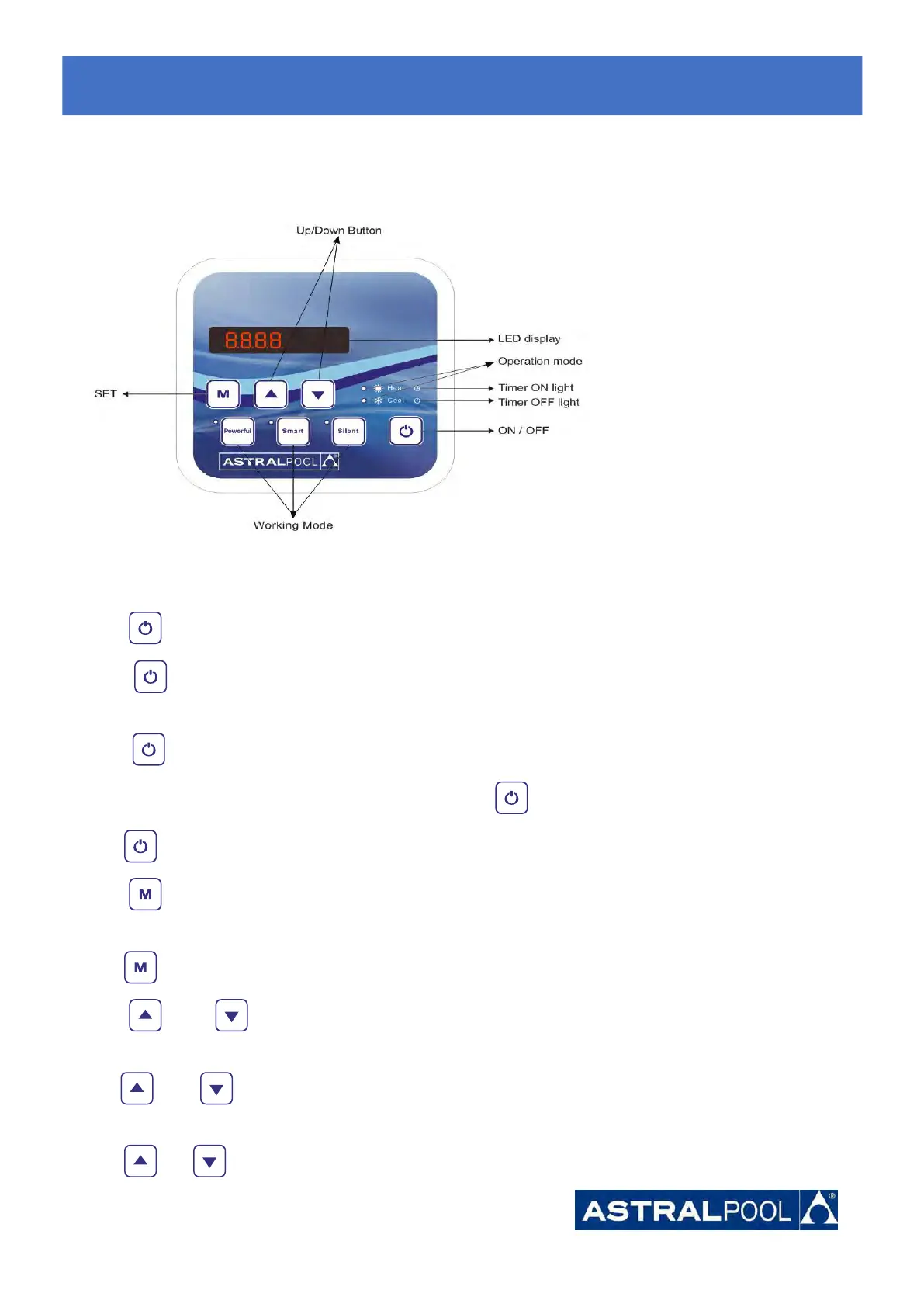
7. Display Controller Operation
7.1. Guide for operation
When the heat pump connects to the power, the LED display shows a code for 3 seconds which indicates the heat
pump model.
7.2 The keys and their operations
7.2.1 button
Press to start the heat pump unit, the LED display shows the desired water temperature for 5 seconds,
then shows the inlet water temperature and the operation mode.
Press to stop the heat pump unit and show “OFF”
Notice : During the parameter checking and setting, press the to quick-exit and save the current setting .
Press again to turn on/off the machine.
7.2.2 button
Press for 5 seconds to switch the heating mode and auto mode.
7.2.3 and button
Lock/unlock the display:
Hold and for 5 seconds to lock/Unlock the display.
Water temperature setting:
Press or to set the water temperature directly.
7.
7.7.
Start-up
Start-upStart-up
of
ofof
the
thethe
Heat
HeatHeat
Pump
PumpPump





 To Next Page