Page | 34 Revision Date April 30, 2020 || Document Number UM-E71-314 || Rev B
astronics.com
Step 4
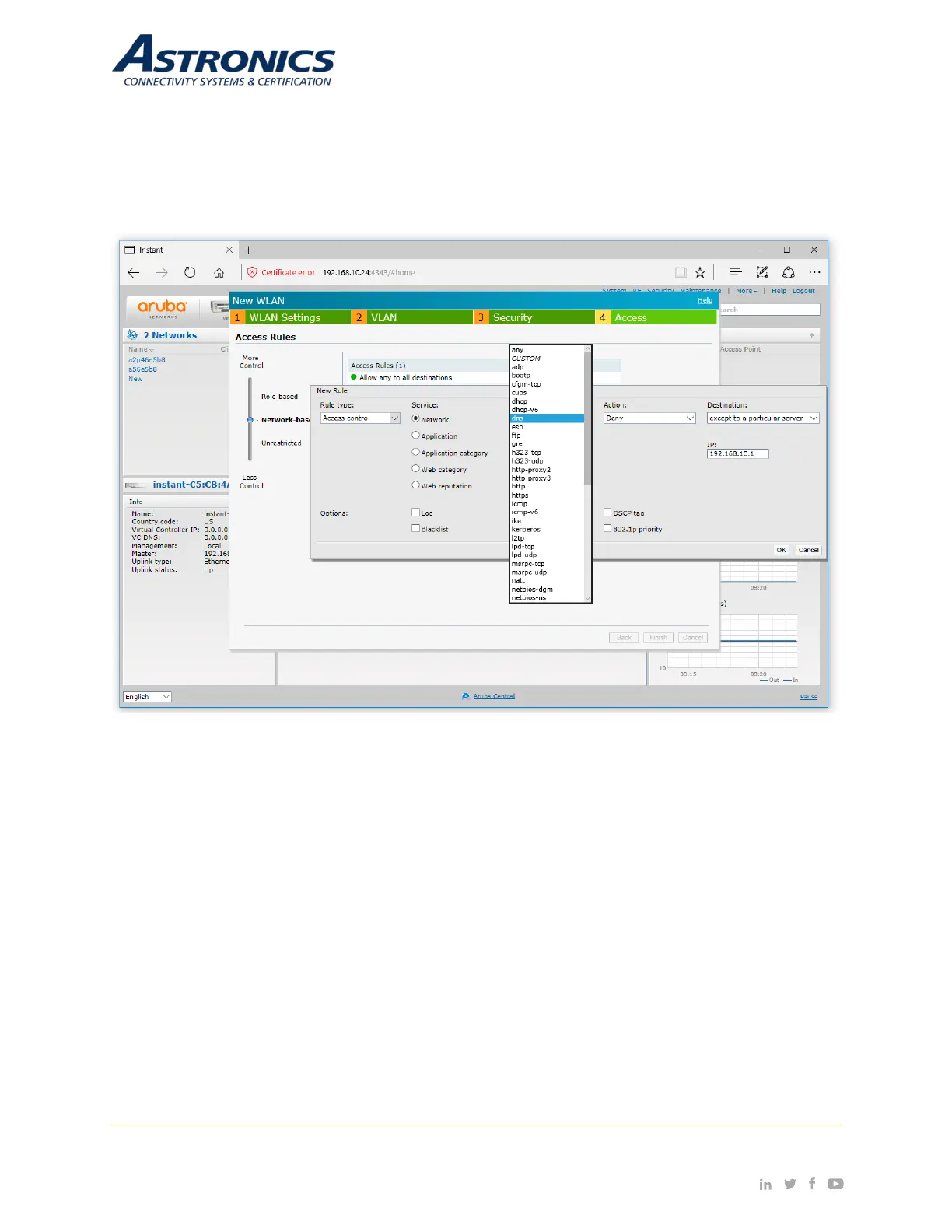
The Access tab is where you configure the firewall rules and user rights. The Access tab allows you to
create Network-Based rules and Role-Based rules. You also have the option to leave the SSID Unrestricted.
Figure 7-5 shows an example of creating a rule that denies all DNS traffic except to the DNS server with
the IP address of 192.168.10.1.
Figure 7-5: Configuring Firewall Rules
Refer to the Aruba Instant Users Guide for additional information on the IAP GUI.
Captive Portal SSID
The following is to create a Captive Portal SSID for your guests:
• In the WLAN Settings tab, select the Guest option.
• In the VLAN tab, select Network Assigned for Client IP Assignment and Default for Client VLAN
Assignment.
• In the Security tab, select External for Splash Page Type, and then select the Edit button to edit
the default Captive Portal Profile as shown below in Figure 7-6.


 To Next Page