1-19
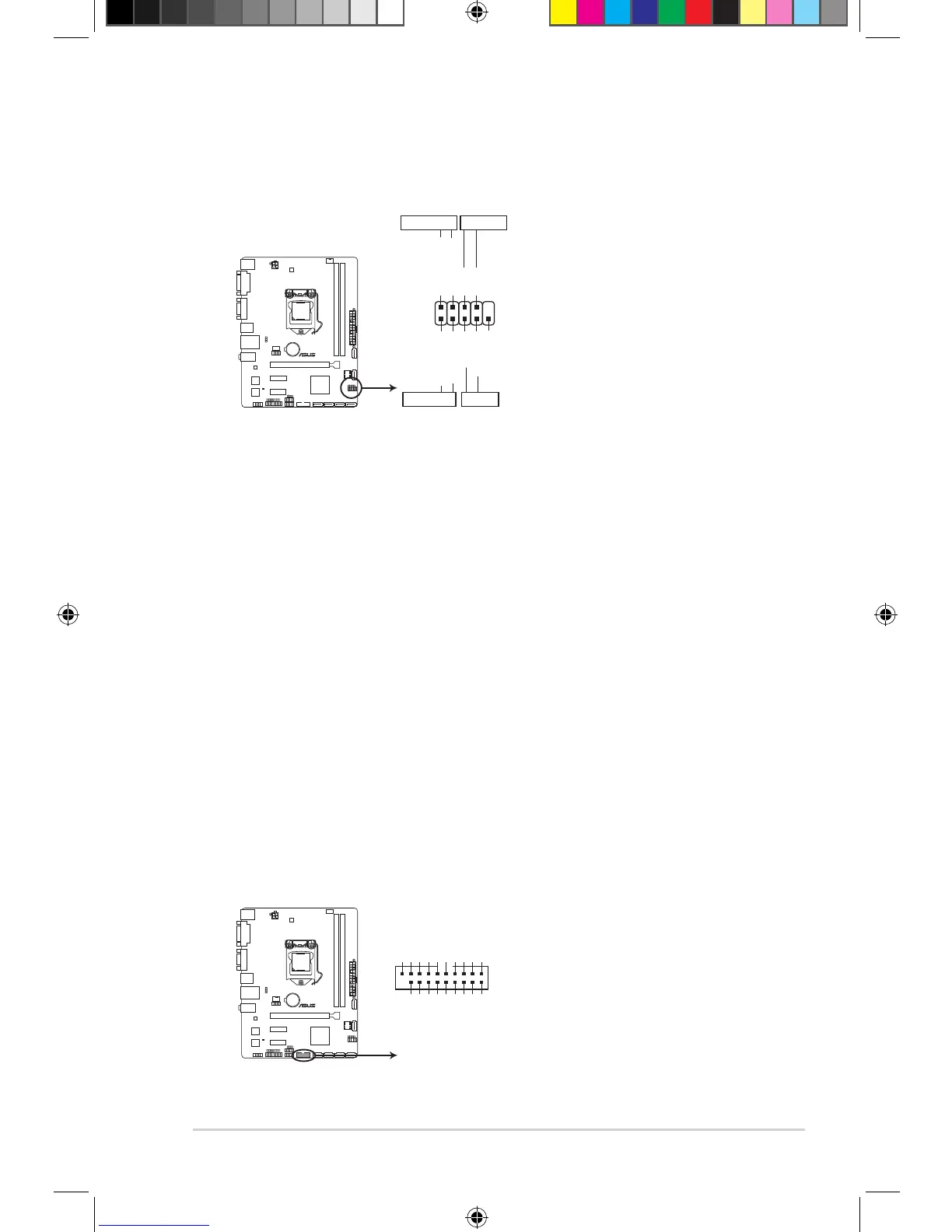
9. System panel connector (10-1 pin F_PANEL)
Thisconnectorsupportsseveralchassis-mountedfunctions.
• SystempowerLED(2-pinPWR_LED)
This2-pinconnectorisforthesystempowerLED.ConnectthechassispowerLED
cable to this connector. The system power LED lights up when you turn on the system
power,andblinkswhenthesystemisinsleepmode.
• HarddiskdriveactivityLED(2-pinHDD_LED)
This2-pinconnectorisfortheHDDActivityLED.ConnecttheHDDActivityLEDcable
tothisconnector.TheHDDLEDlightsuporasheswhendataisreadfromorwritten
totheHDD.
• ATXpowerbutton/soft-offbutton(2-pinPWR_BTN)
This connector is for the system power button.
• Resetbutton(2-pinRESET)
This 2-pin connector is for the chassis-mounted reset button for system reboot without
turning off the system power.
10. USB 3.0 connector (20-1 pin USB3_910)
ThisconnectorallowsyoutoconnectaUSB3.0moduleforadditionalUSB3.0front
orrearpanelports.WithaninstalledUSB3.0module,youcanenjoyallthebenetsof
USB3.0includingfasterdatatransferspeedsofupto5Gbps,fasterchargingtimefor
USB-chargeabledevices,optimizedpowerefciencyandbackwardcompatibilitywith
USB2.0.
B85M-K PLUS
B85M-K PLUS System panel connector
PIN 1
PWR_BTN
PWR_LED+
PWR_LED-
PWR
GND
HDD_LED+
HDD_LED-
Ground
HWRST#
(NC)
F_PANEL
+PWR_LED-
+HDD_LED- RESET
B85M-K PLUS
B85M-K PLUS USB3.0 Front panel connector
USB3_910
PIN 1
USB3+5V
IntA_P1_SSRX-
IntA_P1_SSRX+
GND
IntA_P1_SSTX-
IntA_P1_SSTX+
GND
IntA_P1_D-
IntA_P1_D+
GND
USB3+5V
IntA_P2_SSRX-
IntA_P2_SSRX+
GND
IntA_P2_SSTX-
IntA_P2_SSTX+
GND
IntA_P2_D-
IntA_P2_D+
E10185_B85M-K_PLUS_Guide.indb 19 2015/2/13 14:25:15



 To Next Page