36 ASUS CUSL2-C User’s Manual
Connectors
3. H/W SETUP
3. HARDWARE SETUP
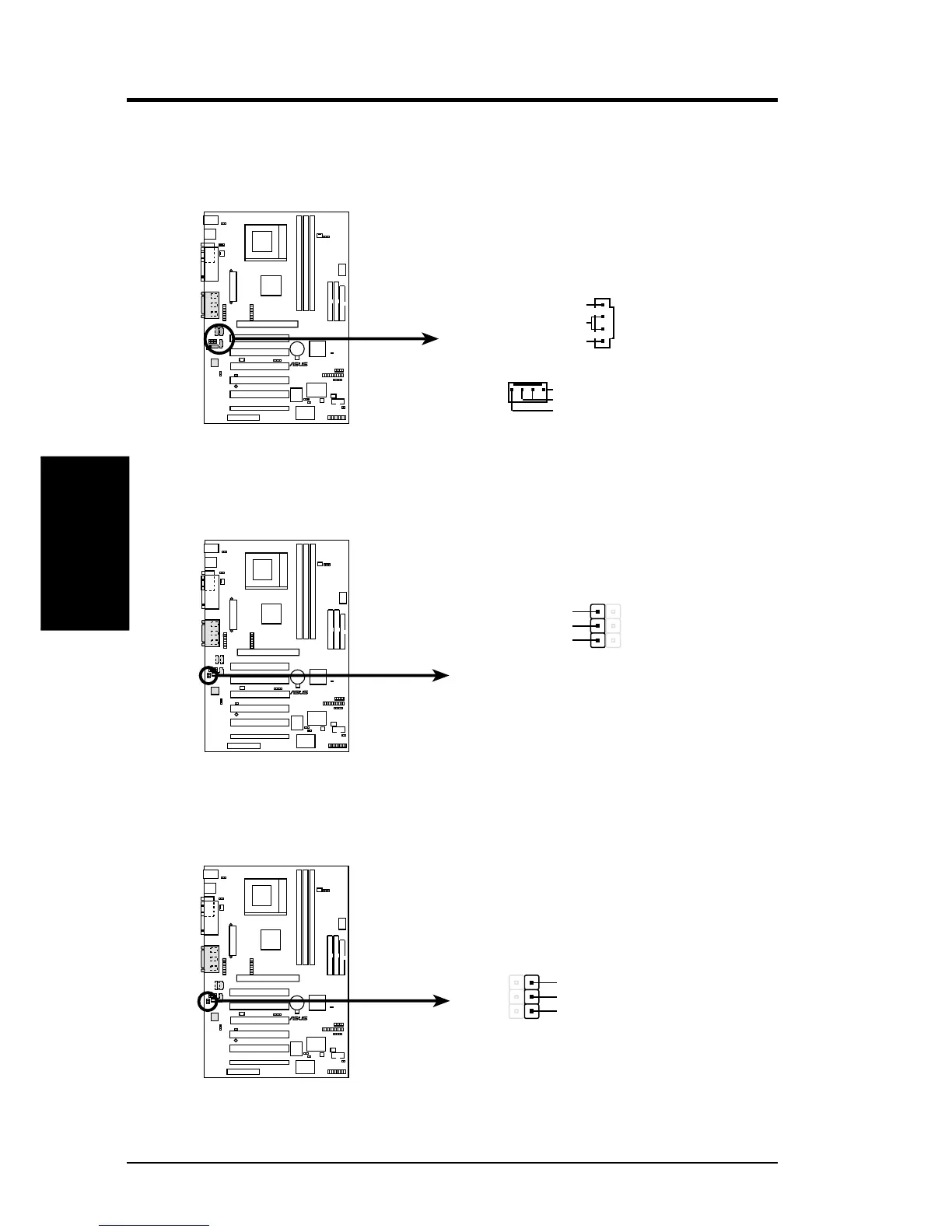
12) Internal Audio Connectors (4-pin CD1, AUX, VIDEO, MODEM)
These connectors allow you to receive stereo audio input from such sound sources
as a CD-ROM, TV tuner, or MPEG card. The MODEM connector allows the
onboard audio to interface with a voice modem card with a similar connector.
CUSL2-C
®
CUSL2-C Internal Audio Connectors
VIDEO (Green)
MODEM
CD1 (Black)
AUX (White)
Modem-Out
Ground
Modem-In
Right Audio Channel
Left Audio Channel
Ground
13) Headphone True-Level Line Out Header (3-pin EARPHONE)
This connector allows you to connect chassis mounted headphone to the mother-
board instead of having to attach an external headphone onto the ATX connectors.
CUSL2-C
®
1
EARPHONE
CUSL2-C True-Level Line Out Header
Earphone Left
GND
Earphone Right
14) Internal Microphone Connector (3-pin MIC2)
This connector allows you to connect chassis mounted microphone to the mother-
board instead of having to attach an external microphone onto the ATX connectors.
CUSL2-C
®
CUSL2-C Internal Microphone Connector
MIC2
MIC Power
1
3
MIC Input
Ground


 To Next Page