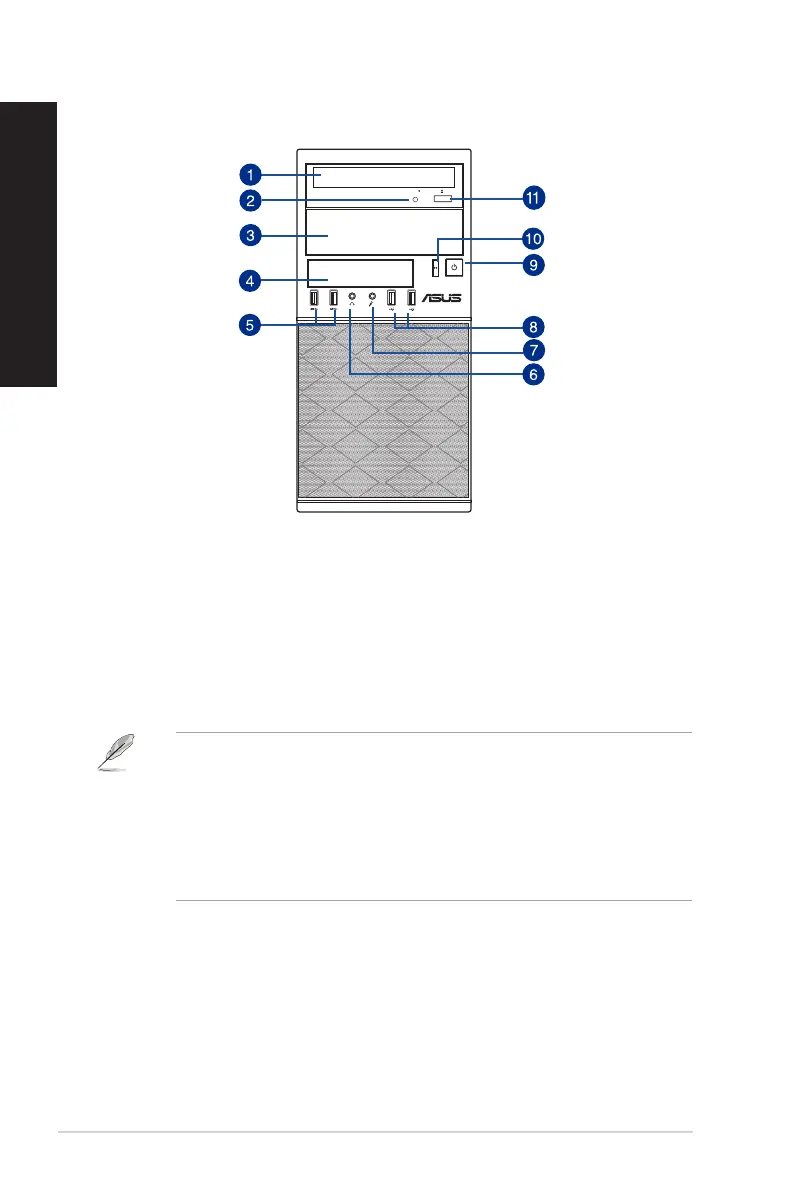
D831MT/MD800 / D631MT/MD590 Front Panel
1. 5.25 inch optical disk drive. There is a 5.25 inch optical disk drive in the bay.
2. Optical disk drive LED. This LED lights up when the optical disk drive operates.
3. 5.25 inch optical disk drive bay. The 5.25 inch optical disk drive bay is for 5.25 inch
DVD-ROM / CD-RW / DVD-RW devices.
4. 3.5 inch drive bays. The 3.5 inch drive bays are for 3.5 inch hard disk drives / memory
card readers.
5. USB 3.0 ports. These Universal Serial Bus 3.0 (USB 3.0) ports connect to USB 3.0
devices such as a mouse, printer, scanner, camera, PDA, and others.
• DO NOT connect a keyboard / mouse to any USB 3.0 port when installing Windows
®
operating system.
• Due to USB 3.0 controller limitation, USB 3.0 devices can only be used under Windows
®
OS environment and after the USB 3.0 driver installation.
• USB 3.0 devices can only be used as data storage only.
• We strongly recommend that you connect USB 3.0 devices to USB 3.0 ports for faster
and better performance for your USB 3.0 devices.
6. Headphone port. This port connects to a headphone or speaker.
7. Microphone. This port connects to a microphone.
8. USB 2.0 ports. These Universal Serial Bus 2.0 (USB 2.0) ports connect to USB 2.0
devices such as a mouse, printer, scanner, camera, PDA, and others.
9. Power button. Press this button to turn on your computer.
10. Reset button. Press this button to reset your computer.
11. Optical disk drive eject button. Press this button to eject the optical disk drive tray.
16 Chapter 1: Getting started
ENGLISH
ENGLISH



 To Next Page