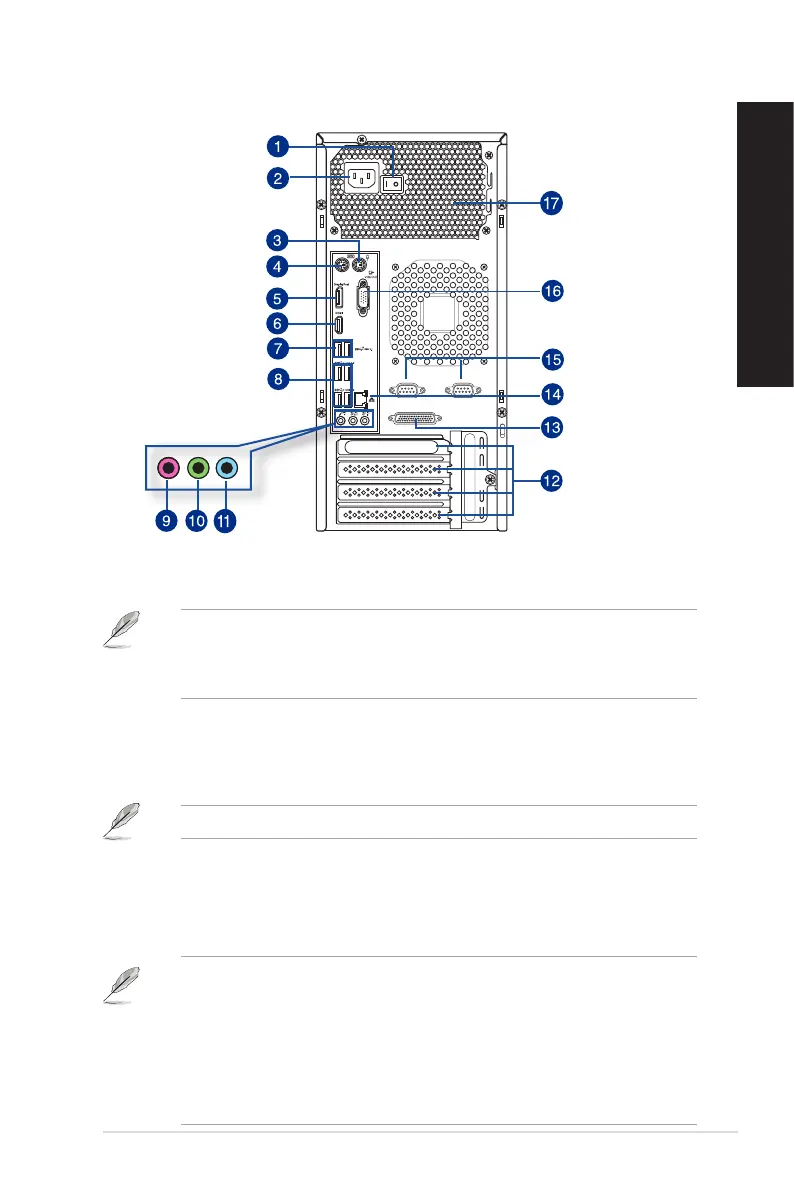
D831MT/MD800 / D631MT/MD590 Rear Panel
1. Power switch. Switch to turn ON/OFF the power supply to your computer.
2. Power connector. Plug the power cord to this connector.
RATING: 100-120Vac, 50-60Hz, 8A (WW)
115Vac, 50-60Hz, 6A (TW)
220-230Vac, 50Hz, 3A (China)
3. PS/2 mouse port (green). This port is for a PS/2 mouse.
4. PS/2 keyboard port (purple). This port is for a PS/2 keyboard.
5. DisplayPort. This port connects a display monitor or home-theater system.
DisplayPort cannot be converted to DVI and HDMI.
6. HDMI port. This port is for a High-Denition Multimedia Interface (HDMI) connector,
and is HDCP compliant allowing playback of HD DVD, Blu-ray, and other protected
content.
7. USB 3.1 ports. These Universal Serial Bus (USB) ports are for USB 3.1 devices.
• DO NOT connect a keyboard / mouse to any USB 3.1 port when installing Windows
®
operating system.
• Due to USB 3.1 controller limitation, USB 3.1 devices can only be used under Windows
®
OS environment and after the USB 3.1 driver installation.
• USB 3.1 devices can only be used as data storage only.
• We strongly recommend that you connect USB 3.1 devices to USB 3.1 ports for faster
and better performance for your USB 3.1 devices.
ASUS Desktop PC
17
ENGLISH
ENGLISH



 To Next Page