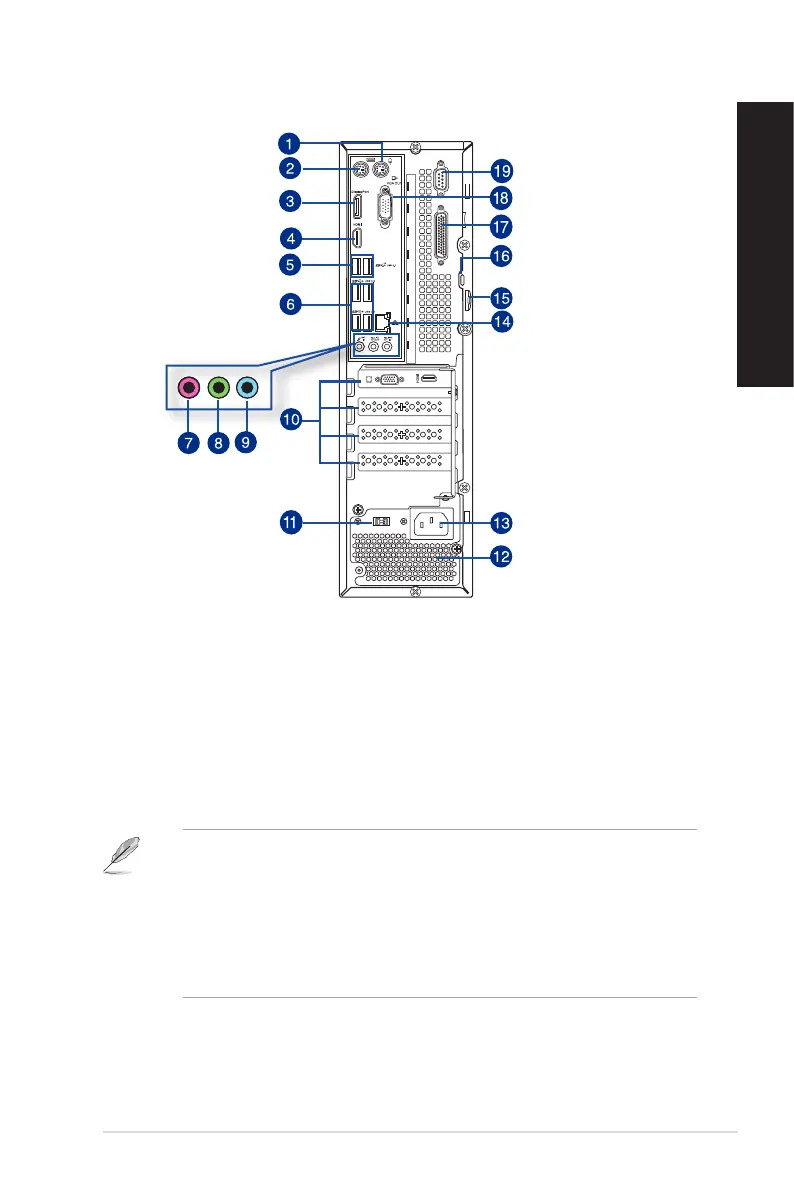
D830SF/SD800 / D630SF/SD590 Rear panel
1. PS/2 mouse port (green). This port is for a PS/2 mouse.
2. PS/2 keyboard port (purple). This port is for a PS/2 keyboard.
3. DisplayPort. This port is for a DisplayPort-compatible devices.
4. HDMI port. This port is for a High-Denition Multimedia Interface (HDMI) connector,
and is HDCP compliant allowing playback of HD DVD, Blu-ray, and other protected
content.
5. USB 3.1 ports. These 9-pin Universal Serial Bus (USB) ports are for USB 3.1 devices.
• DO NOT connect a keyboard / mouse to any USB 3.1 port when installing Windows
®
operating system.
• Due to USB 3.1 controller limitation, USB 3.1 devices can only be used under Windows
®
OS environment and after the USB 3.1 driver installation.
• USB 3.1 devices can only be used as data storage only.
• We strongly recommend that you connect USB 3.1devices to USB 3.1 ports for faster
and better performance for your USB 3.1 devices.
ASUS Desktop PC
21
ENGLISH
ENGLISH



 To Next Page