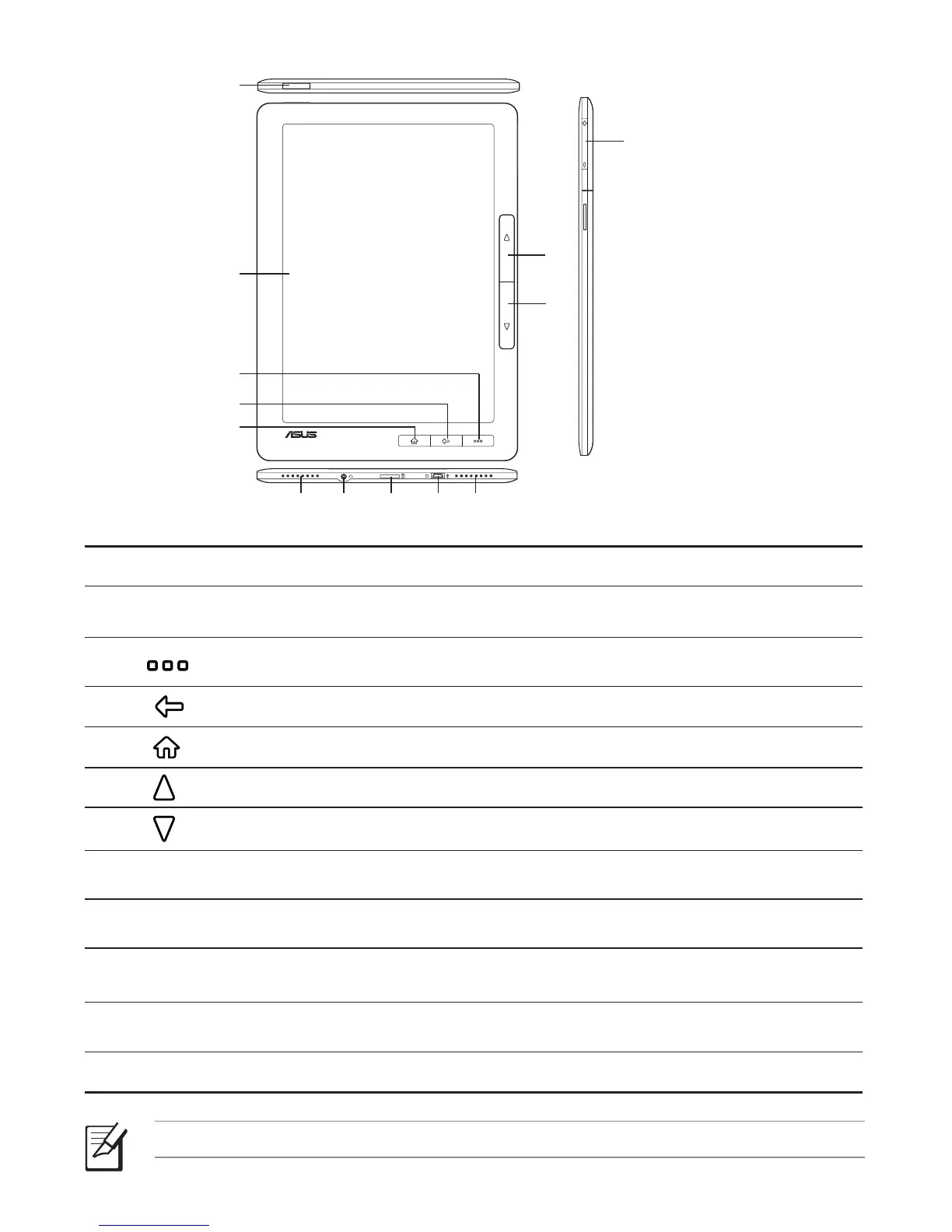
Your Eee Reader
1
Power key: Turns your device on/off.
2
Touch panel: Lightly touch the screen to navigate through the features and
functions of your device.
3
Function key: Press to display the function bar. You may also move
your finger in an upward motion to show the function bar.
4
Back key: Press to go back to the previous screen.
5
Home key: Press to go to the Home screen.
6
Page up key: Press to go back to the previous page.
7
Page down key: Press to go to the next page.
8
Volume key: Press to increase/decrease the volume.
9
Built-in speakers: The device is equipped with two built-in high quality stereo
speakers.
10
3.5mm Earphone jack: Insert your headphone connector into this jack. Using
this jack automatically disables the built-in speakers.
11
microSD card slot: Insert a microSD card into this slot.
12
micro-USB port: Insert the micro-USB cable into this port.
NOTE: Some ASUS Eee Reader models may include a built-in 3G function.
2
9
10
9
11 12
1
3
4
5
6
7
8



 To Next Page