1.7.2 Internal connectors
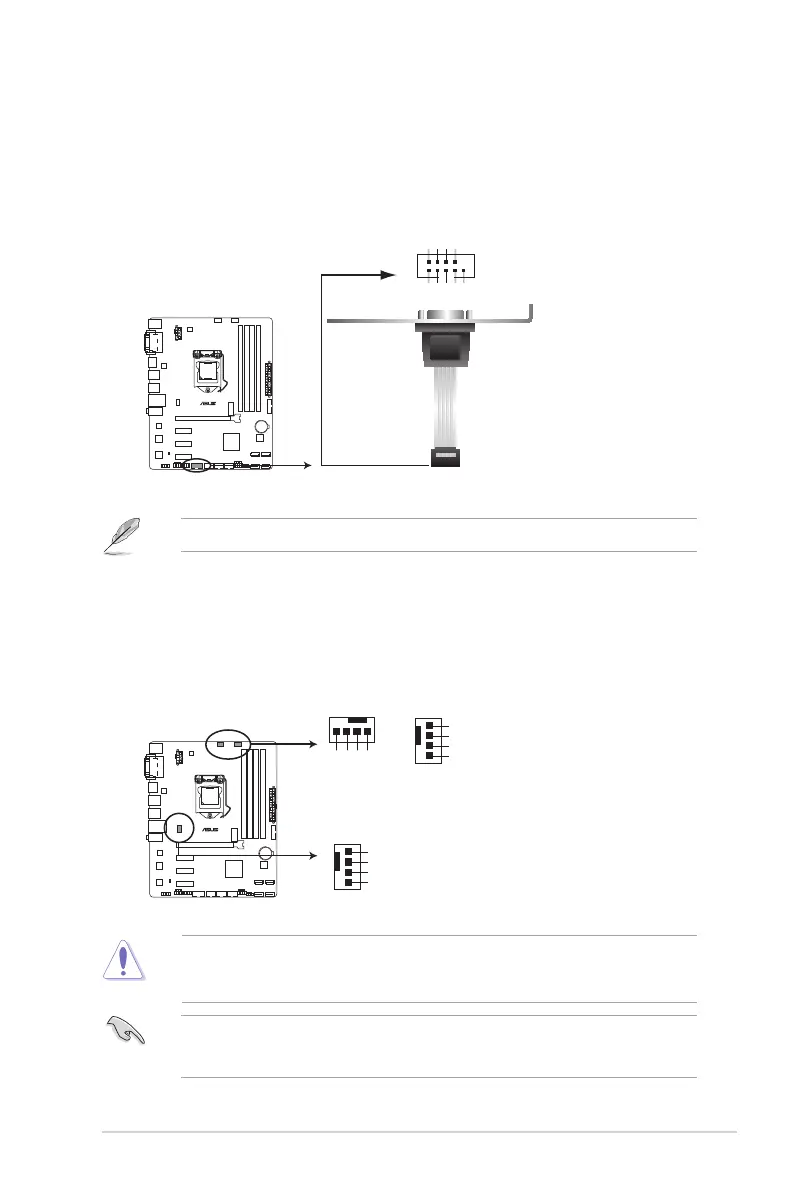
1. Serial port connector (10-1 pin COM)
Thisconnectorisforaserial(COM)port.Connecttheserialportmodulecabletothis
connector,theninstallthemoduletoaslotopeningatthebackofthesystemchassis.
TheCOMmoduleispurchasedseparately.
2. CPU and chassis fan connectors (4-pin CPU_FAN, and 4-pin CHA_FAN1/2)
Connectthefancablestothefanconnectorsonthemotherboard,ensuringthatthe
black wire of each cable matches the ground pin of the connector.
DONOTforgettoconnectthefancablestothefanconnectors.Insufcientairowinside
thesystemmaydamagethemotherboardcomponents.Thesearenotjumpers!DONOT
place jumper caps on the fan connectors.
• TheCPU_FANconnectorsupportstheCPUfanofmaximum1A(12W)fanpower.
• Onlythe4-pinCPUfansupportstheASUSFANXpert2+feature.
H97M-E
H97M-E Serial port (COM) connector
PIN 1
COM
DCD
TXD
GND
RTS
RI
RXD
DTR
DSR
CTS
CHA_FAN1
CPU_FAN
CPU FAN PWM
CPU FAN IN
CPU FAN PWR
GND
GND
CHA FAN PWR
CHA FAN IN
CHA FAN PWM
CHA_FAN2
GND
CHA FAN PWR
CHA FAN IN
CHA FAN PWM
H97M-E
H97M-E Fan connectors
ASUS H97M-E
1-13



 To Next Page