ASUS P5N32-E SLI Plus 4-25
POST Check LAN Cable [Disabled]
POST Check LAN2 Cable [Disabled]
Enables or disables checking of the LAN/LAN2 cable during the Power-On
Self-Test (POST). Conguration options: [Disabled] [Enabled]
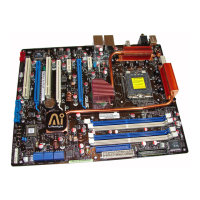
4.5.1 AI NET2
F1:Help ↑↓ : Select Item -/+: Change Value F5: Setup Defaults
ESC: Exit →←: Select Menu Enter: Select Sub-menu F10: Save and Exit
Select Menu
Item Specic Help
Enable or Disable LAN
cable check during POST.
AI NET2
POST Check LAN Cable [Disabled]
POST Check LAN2 Cable [Disabled]
Pair Status Length
LAN1(1-2) Open N/A
LAN1(3-6) Open N/A
LAN1(4-5) Open N/A
LAN1(7-8) Open N/A
LAN2(1-2) Open N/A
LAN2(3-6) Open N/A
LAN2(4-5) Open N/A
LAN2(7-8) Open N/A
Phoenix-Award BIOS CMOS Setup Utility
Advanced
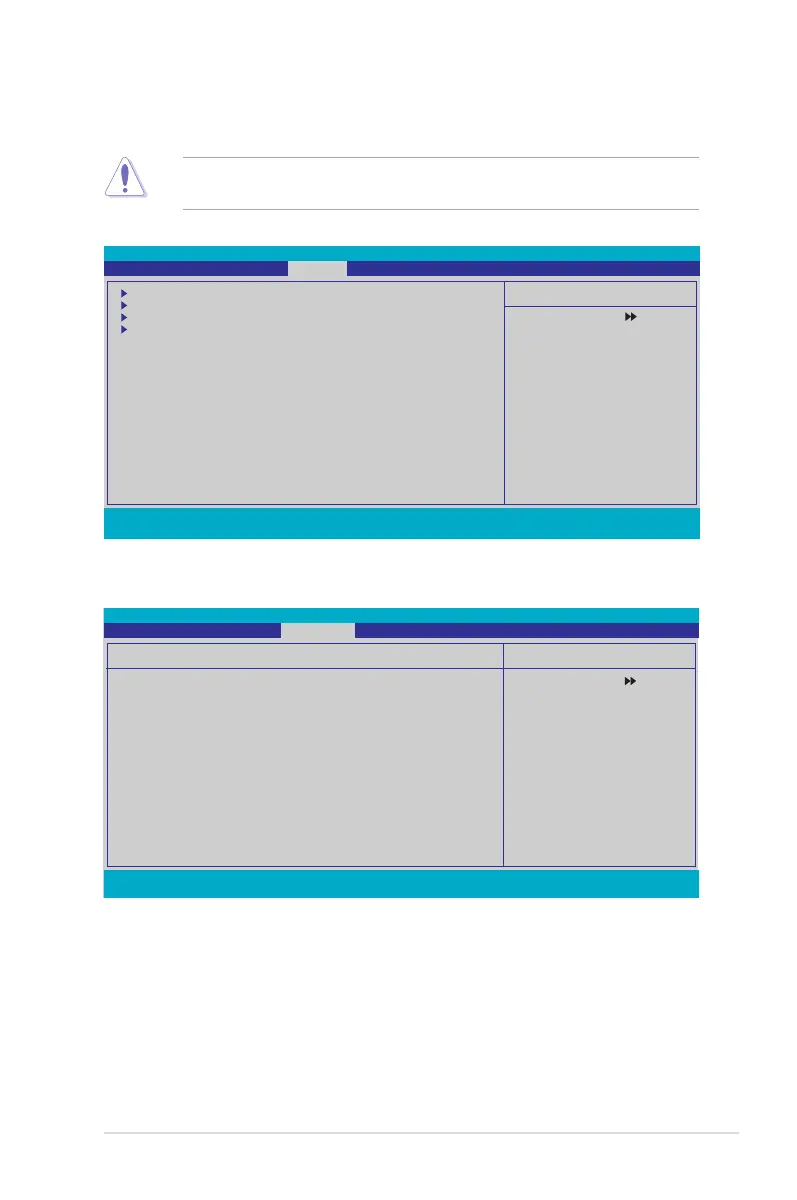
4.5 Advanced menu
The Advanced menu items allow you to change the settings for system devices.
Phoenix-Award BIOS CMOS Setup Utility
Main Extreme Tweaker Advanced Power Boot Tools Exit
Select Menu
Item Specic Help
Press [Enter] to set.
AI NET2
PCIPnP
Onboard Device Conguration
USB Conguration
F1:Help ↑↓ : Select Item -/+: Change Value F5: Setup Defaults
ESC: Exit →←: Select Menu Enter: Select SubMenu F10: Save and Exit
Take caution when changing the settings of the Advanced menu items. Incorrect
eld values can cause the system to malfunction.









 To Next Page