ASUS P6X58-E PRO 3-37
Chapter 3
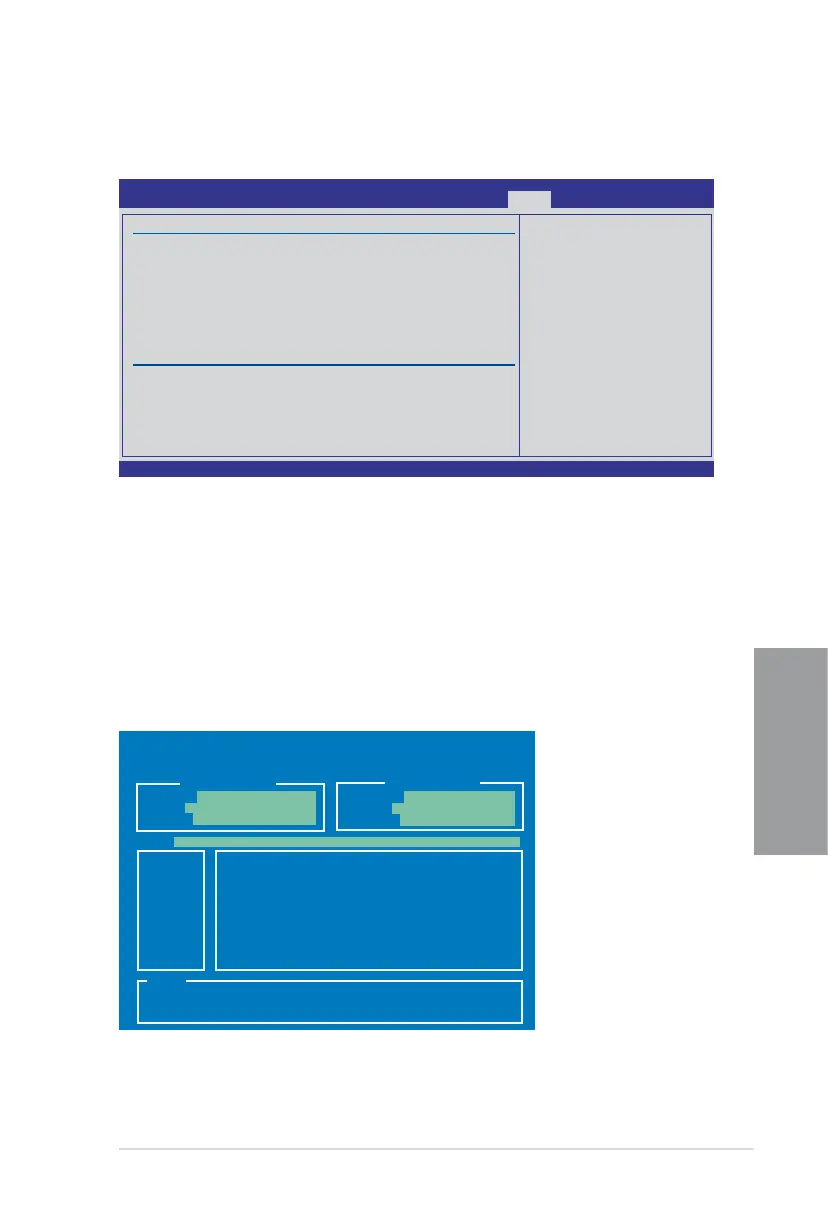
3.9.2 ASUS O.C. Prole
This item allows you to store or load multiple BIOS settings.
Current CMOS
Restore CMOS
A:
Note
[Enter] Select or Load [Tab] Switch [V] Drive Info
[Up/Down/Home/End] Move [B] Backup [Esc] Exit
PATH: A:\
BOARD: P6X58-E-Pro
VER: 0201
DATE: 01/25/2010
BOARD: Unknown
VER: Unknown
DATE: Unknown
ASUSTek O.C. Prole Utility V2.22
Add Your CMOS Prole
Allows you to save the current BIOS le to the BIOS Flash. In the Name sub-item, key in
your prole name and press �Enter, and then choose a prole number to save your CMOS
settings in the Save to sub-item.
Load CMOS Proles.
Allows you to load the previous BIOS settings saved in the BIOS Flash. Press <Enter> to
load the le.
Start O.C. Prole
Allows you to run the utility to save and load CMOS. Press <Enter> to run the utility.
v02.61 (C)Copyright 1985-2010, American Megatrends, Inc.
BIOS SETUP UTILITY
Tools
Typing your prole
name, [0-9][a-z][A-Z]
are acceptable.
←→ Select Screen
↑↓ Select Item
F1 General Help
F10 Save and Exit
ESC Exit
O.C. PROFILE Conguration
O.C. Prole 1 Status : Not Installed
O.C. Prole 2 Status : Not Installed
O.C. Prole 3 Status : Not Installed
O.C. Prole 4 Status : Not Installed
O.C. Prole 5 Status : Not Installed
O.C. Prole 6 Status : Not Installed
O.C. Prole 7 Status : Not Installed
O.C. Prole 8 Status : Not Installed
Status:
Add Your CMOS Prole.
Name: [Default-Prole]
Save To: [Uninstalled]
Load CMOS Proles.
Load From: [Blank]
Start O.C. Prole








 To Next Page