ASUS P6X58D-E 5-5
Chapter 5
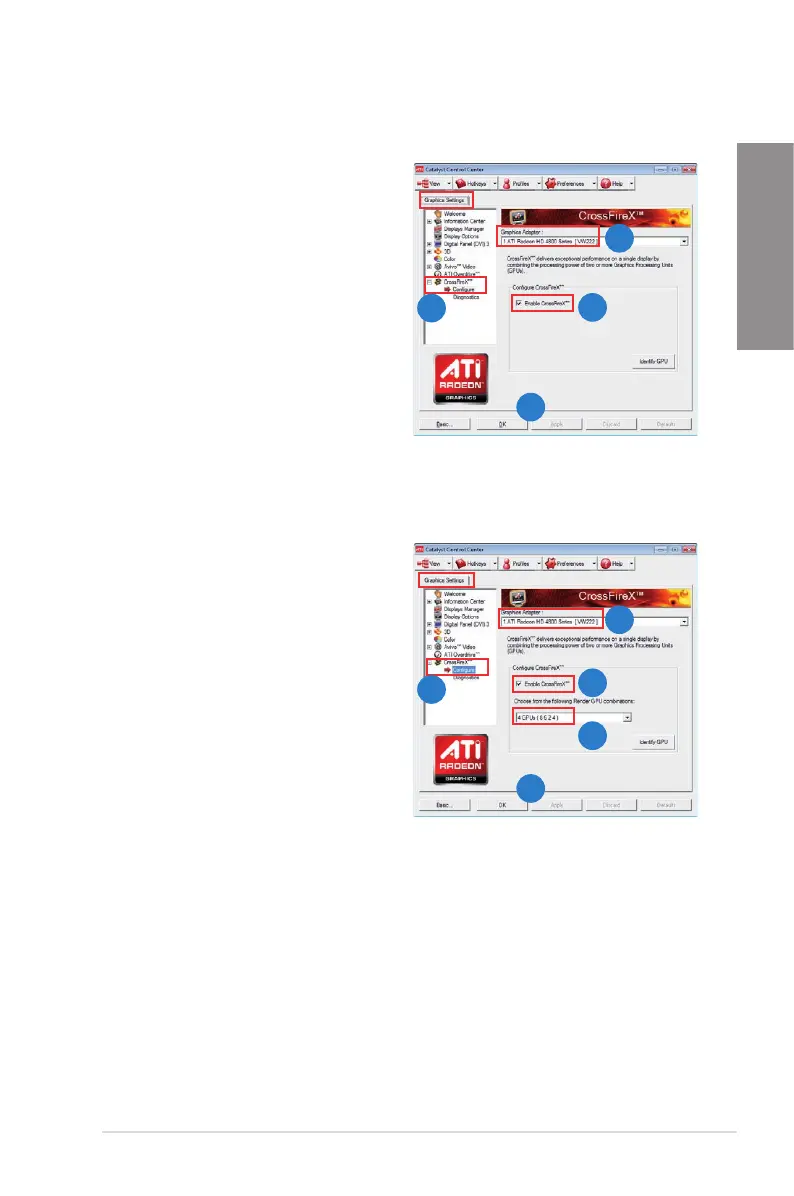
Enabling Dual CrossFireX technology
1. In the Catalyst Control Center window,
click Graphics Settings > CrossFireX >
Congure.
2. From the Graphics Adapter list, select
the graphics card to act as the display
GPU.
3. Select Enable CrossFireX.
4. Click Apply, and then click OK to exit
the window.
Enabling Triple CrossFireX technology
1. In the Catalyst Control Center window,
click Graphics Settings > CrossFireX >
Congure.
2. From the Graphics Adapter list, select
the graphics card to act as the display
GPU.
3. Select Enable CrossFireX.
4. From the list, select the appropriate GPU
combination to apply the CrossFireX
technology.
5. Click Apply, and then click OK to exit
the window.
1
2
3
4
1
2
3
5
4








 To Next Page