ASUS P6X58D-E 5-9
Chapter 5
5.2.4 Installing the device drivers
Refer to the documentation that came with your graphics card package to install the device
drivers.
5.2.5 Enabling the NVIDIA
®
SLI™ technology
After installing your graphics cards and the device drivers, enable the SLI feature in NVIDIA
®
Control Panel under the Windows
®
Vista™ operating system.
Launching the NVIDIA Control Panel
You can launch the NVIDIA Control Panel by the following two methods:
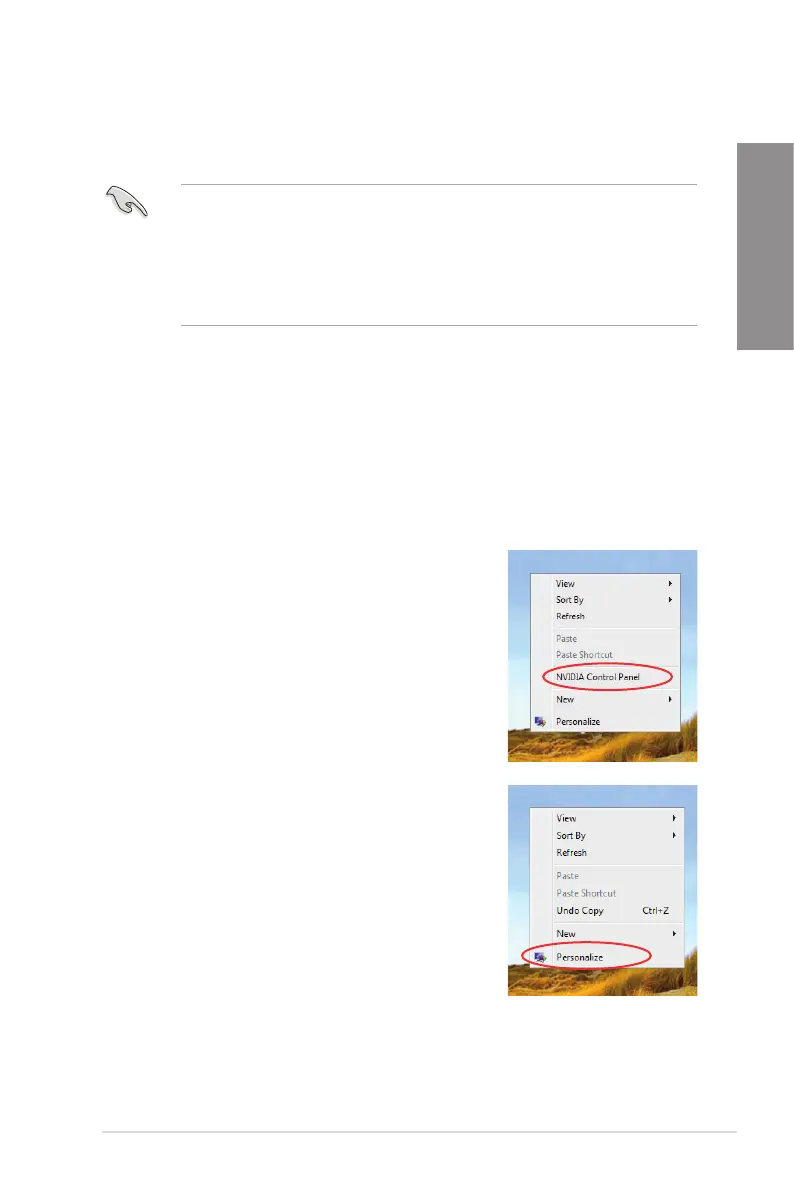
A. Right click on the empty space of the Windows
®
desktop and select NVIDIA Control Panel.
The NVIDIA Control Panel window appears (See Step
B5 on page 5-11).
B1. If you cannot see the NVIDIA Control Panel item in
step (A), select Personalize.
• Ensure that your PCI Express graphics card driver supports the
NVIDIA
®
SLI™ technology. Download the latest driver from the NVIDIA
website (www.nvidia.com).
• If you are using a Triple SLI system, ensure to install the NVIDIA
®
3-way
SLI driver under Windows
®
Vista™. The NVIDIA 3-way SLI technology is
supported by Windows
®
Vista™ only.








 To Next Page