ASUS P6X58D-E 2-21
Chapter 2
• In single VGA card mode, use rst the PCIe 2.0 x16_1 slot (blue) or PCIe 2.0 x16_2
slot (blue) for a PCI Express x16 graphics card to get better performance.
• In CrossFireX™ or SLI™ mode, use the PCIe 2.0 x16_1 (blue) and PCIe 2.0 x16_2
(blue) slots for PCI Express x16 graphics cards to get better performance.
• Use the three PCIe 2.0 x16 slots for 3-Way SLI or CrossFireX™ mode.
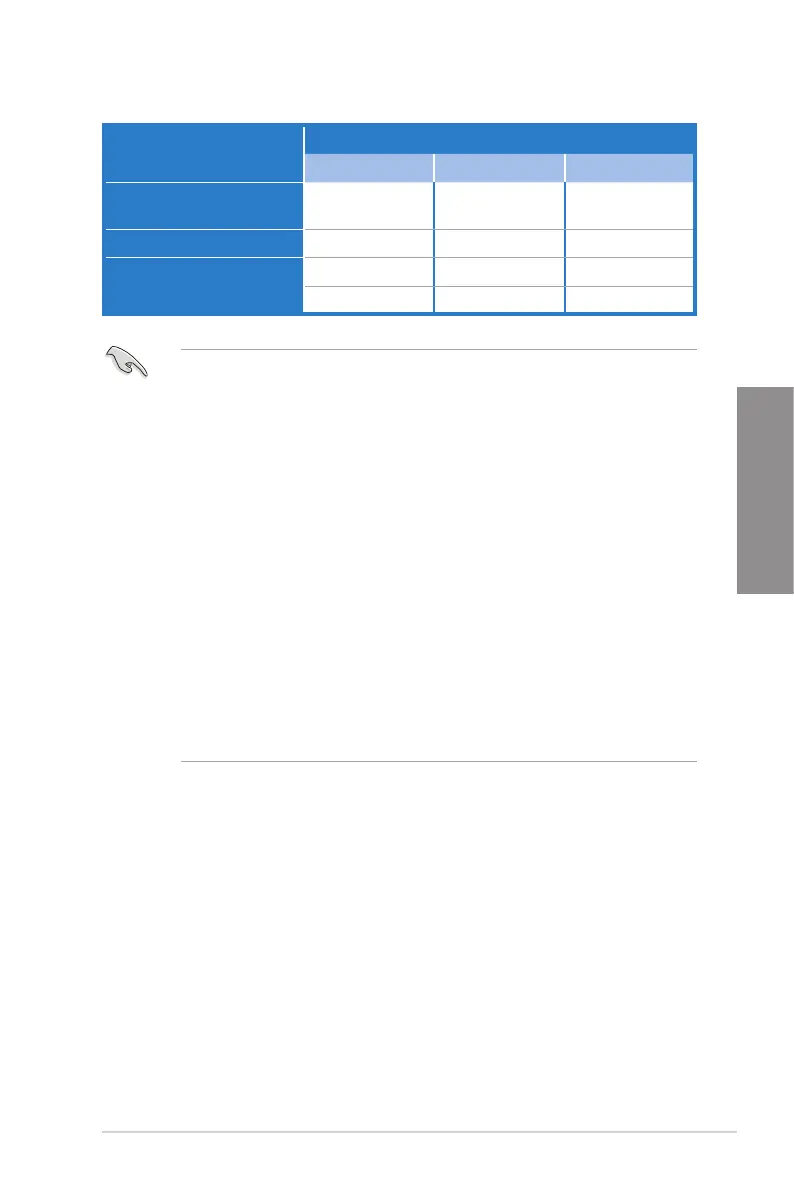
• If you install a PCIe x16 graphics card on to the PCIe x16_1 slot, a PCIe device with
a bandwidth faster than x8 link to the PCIe x16_2 slot, and a PCIe device with a
bandwidth slower than x4 link to the PCIe x16_3 slot, the three PCIe x16 slots will
work at x16, x16, x1 link as the default.
• If you install a PCIe x16 graphics card on to the PCIe x16_1 slot, a PCIe device with
a bandwidth slower than x8 link to the PCIe x16_2 slot, and a PCIe device with a
bandwidth faster than x4 link to the PCIe x16_3 slot, the three PCIe x16 slots will work
at x16, x8, x8 link as the default.
• You may manually reassign the link width of PCIe x16_2 and PCIe x16_3 slots in
BIOS settings. See page 3-22 for details.
• We recommend that you provide sufcient power when running
CrossFireX™ or SLI™ mode. See page 2-35 for details.
• Connect a chassis fan to the motherboard connector labeled CHA_FAN1/2/3 when
using multiple graphics cards for better thermal environment. See page 2-33 for
details.
VGA conguration
PCI Express operating mode
PCIe x16_1 PCIe x16_2 PCIe x16_3
Single VGA/PCIe card
x16 (Recommend for
single VGA)
x16 (Single VGA) N/A
Dual VGA/PCIe card
x16 x16 x1
Triple VGA/PCIe card
x16 x16 x1
x16 x8 x8








 To Next Page