ASUS WLAN Adapter 41
Chapter 3 - Software Reference
Chapter 3
Software Reference
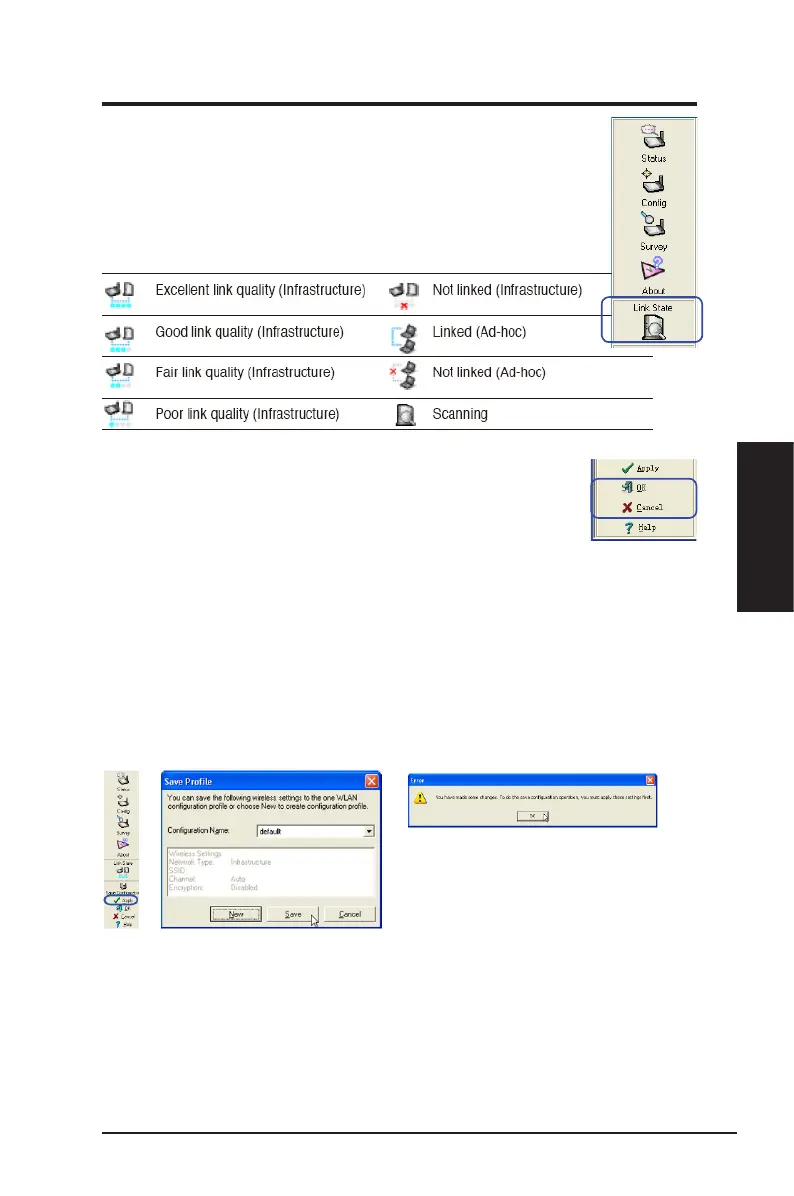
Link State
WLAN Adapter “Link State” icon appears on the left side of
the WLAN Adapter Settings. Use the icon to view the current
signal status.
Exit Wireless Settings
To exit Wireless Settings, you can click
OK
or
Cancel
.
Save Conguration
-
Click to save the current setting as a new prole.
Later, when you make individual settings, you may want to use proles to
save our settings. Proles will help you combine all your settings for work,
home, roaming and other locations so that you do not have to reqeat individual
settings. When you travel from work to home, for example, choose a “home
” prole that contains all your settings for home use. When you travel back to
work, choose an “ofce” prole.
Click Apply to apply the current
settings before saving them as a
prole.
Apply
- Click to apply the changes made on the Wireless Settings utility.
OK
- Click to close the Wireless Setting utility window.
Cancel
- Click to cancel any changes made on the Wireless Settings utility
and close the Wireless Settings utililty window.
Help
- Click to display the help menu.



 To Next Page