56 ASUS WLAN Adapter
Chapter 3 - Software Reference
Chapter 3
Software Reference
Windows
®
Vista wireless options
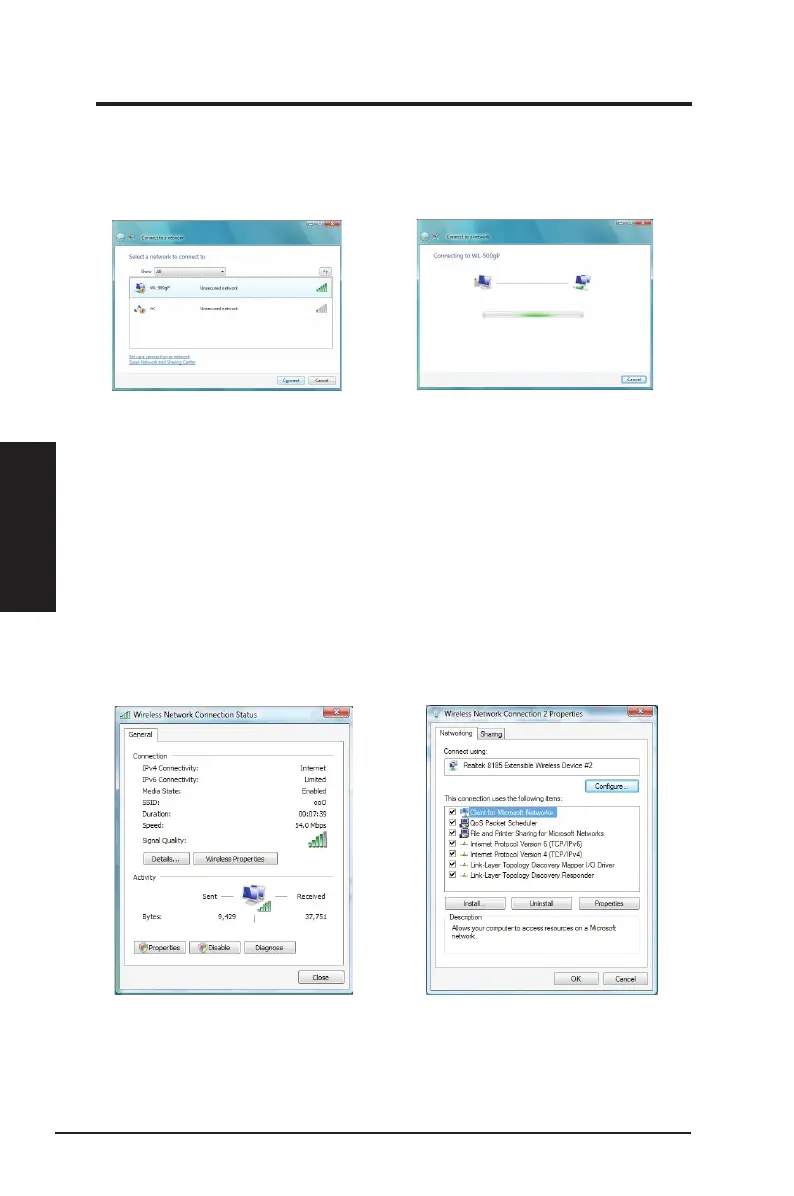
To connect to a wireless network on Windows
®
Vista:
2. If you have set up the encryption key on
your access point, key in the encryption
key and click
Connect
.
1. Right-click the network icon on the
Windows
®
taskbar, then select
Connect
to a network
to view the available
networks. Select the access point and
click
Connect
.
To set up the wireless connection properties:
1. Right-click the network icon on the taskbar and select
Network and sharing Center
.
2. Select
Manage network connections
.
3 Double-click the wireless network connection icon to open the Wireless Network Connection
Status page.
4 Click
Properties
to open the Property page from the Wireless Network Connection Status page.
1. The General page shows status,SSID,
duration, speed, and signal strength. The
green bars represent signal strength, with
ve bars indicating excellent signal and
one bar indicating poor signal.
2. Click
Properties
from the Property page
to set the authentication of the wireless
connection.



 To Next Page