2-5
ASUS RS300-E10 Series
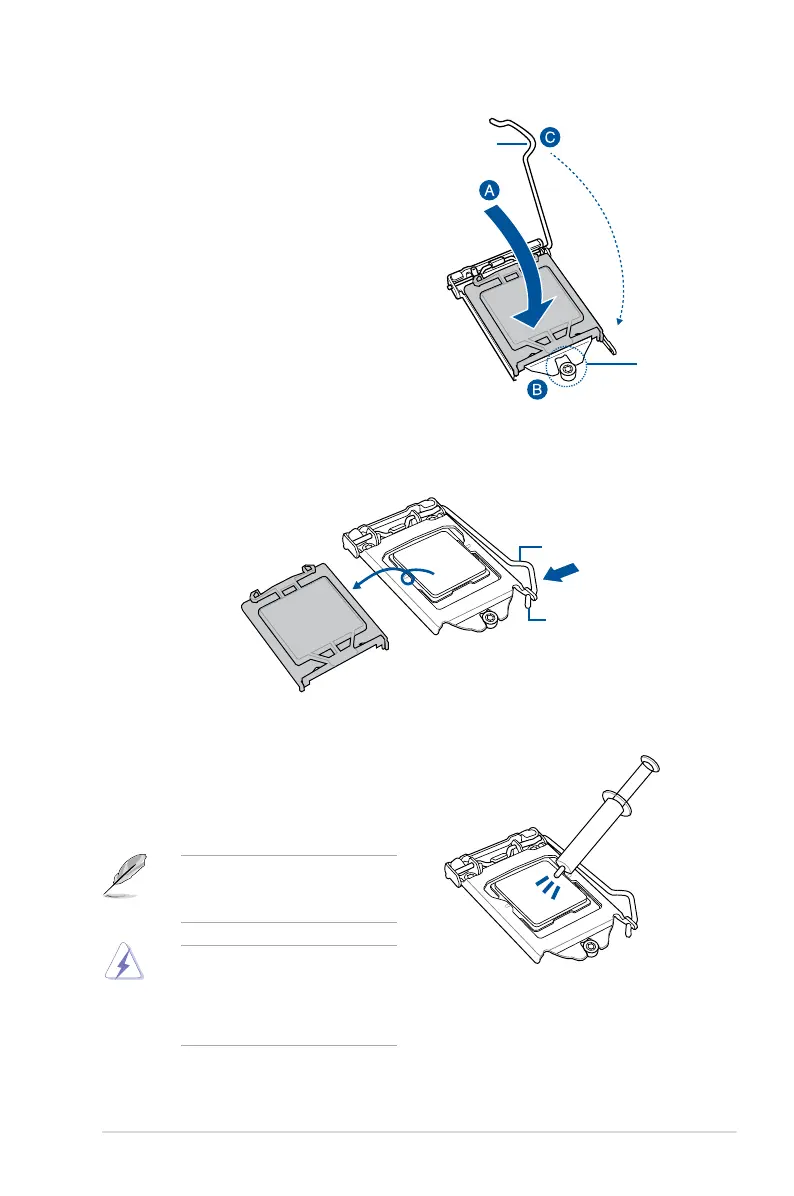
5. Close the load plate (A), ensuring that
the front edge of the load plate slides
under the retention lock (B) then push
down the load lever (C).
Retention
lock
Load lever
6. Insert the load lever under the retention tab to remove the PnP cap from the CPU
socket.
Retention tab
Load lever
7. Apply some Thermal Interface Material
to the exposed area of the CPU that the
heatsink will be in contact with, ensuring
that it is evenly spread in a thin layer.
Some heatsinks come with
pre-applied Thermal Interface
Material. If so, skip this step.
The Thermal Interface Material is
toxic and inedible. DO NOT eat it.
If it gets into your eyes or touches
your skin, wash it off immediately and
seek professional medical help.



 To Next Page