2-17
ASUS RS300-E10 Series
2.5.3 Installing a large GPU card to the PCIE1 slot
For larger GPU cards (such as the NVIDIA Quadro P4000 GPU cards), some internal cables
will need to be removed (some feature disabled) to accommodate the larger GPU card.
2. Install the large GPU card to the PCIE1 slot.
Refer to section
2.5.2 Installing a standard GPU card to the PCIE1 slot
for the steps on
installing a standard GPU card to the PCIE1 slot.
To install a large GPU card to the PCIE1 slot:
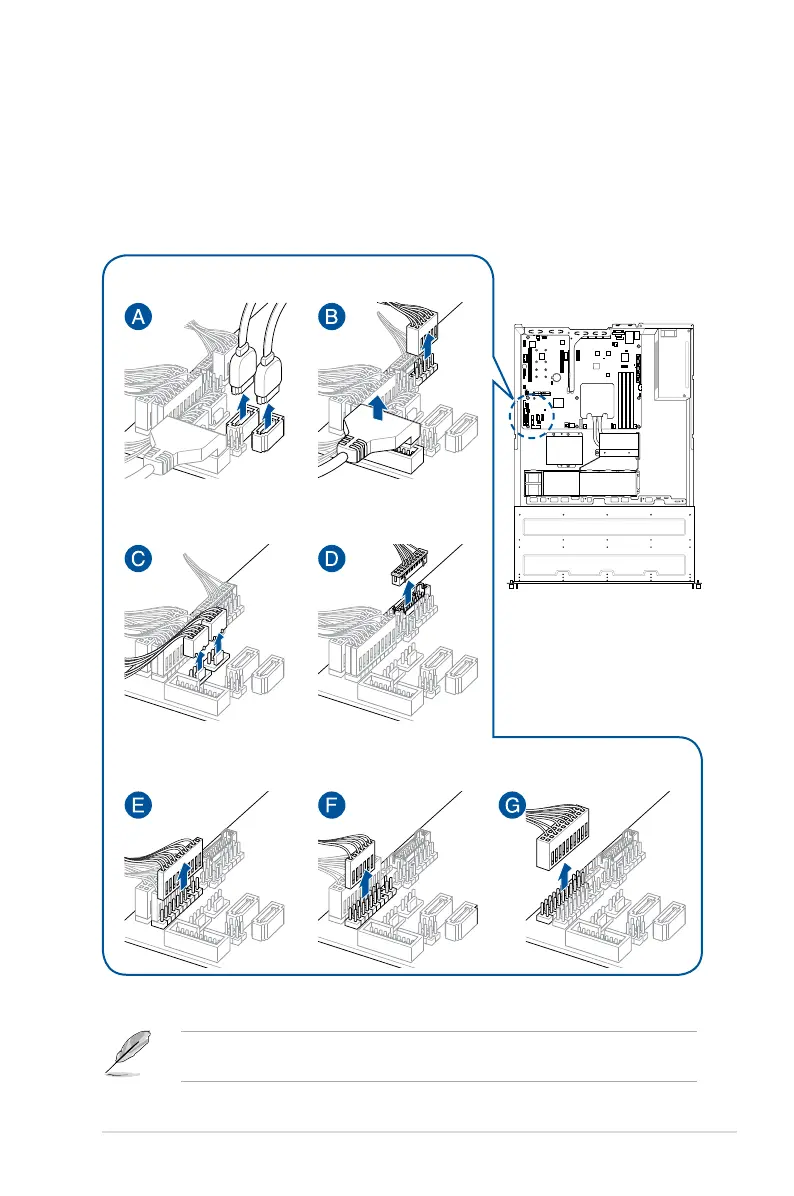
1. Remove the cables from your server system as shown below.
(A) Remove the cables
from SATA5 and SATA6
(B) Remove the cables from
USB3_34 and USB1114
(C) Remove the cables from
FRNT_FAN3 and FRNT_FAN4
(E) Remove the top cable
from AUX_PANEL1
(G) Remove the bottom
cable from PANEL1
(G) Remove the cable
from PANEL1
(D) Remove the cable
from AUX_PANEL2













 To Next Page