Chapter 2: Hardware Information
2-10
2.4 Hard disk drives
The system supports four hot-swap SATA/SAS hard disk drives. The hard disk drive installed
on the drive tray connects to the motherboard SATA/SAS ports via the SATA/SAS backplane.
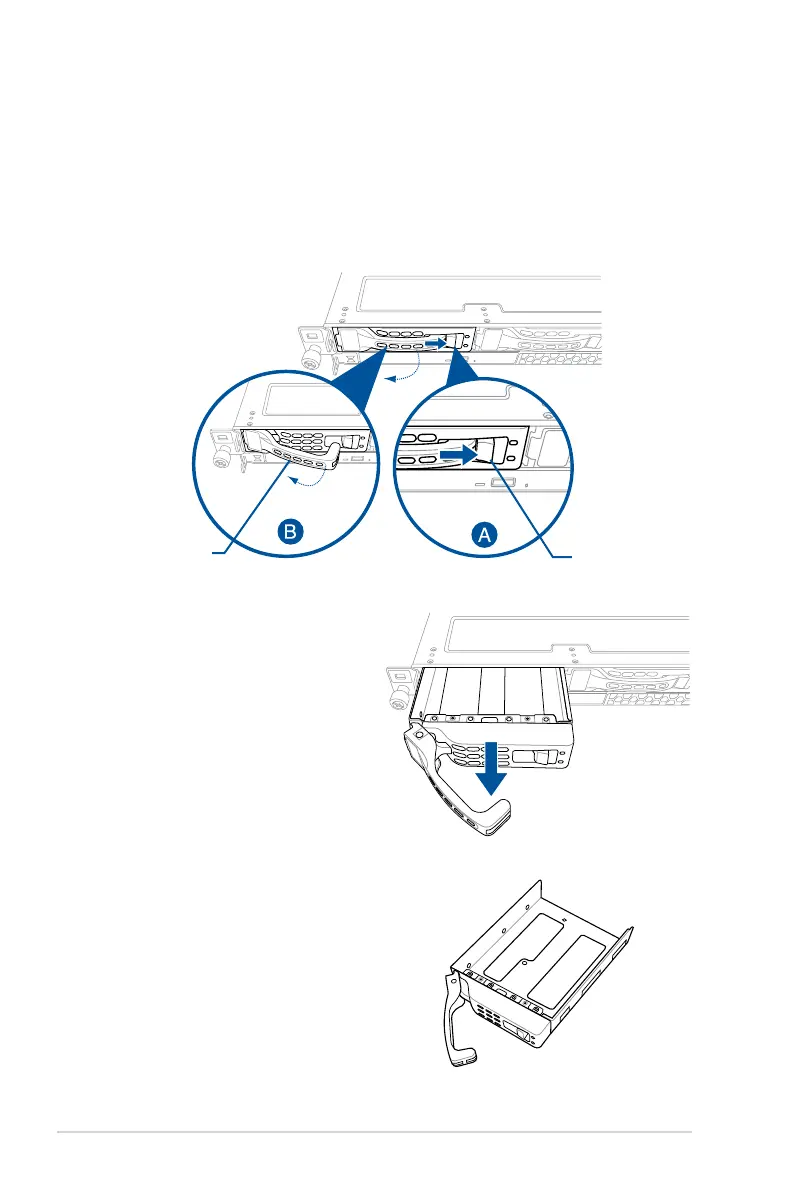
To install a 3.5” hot-swap SATA/SAS HDD:
1. Push the spring lock to the right (A) then pull the tray lever outward (B) to release the
drive tray. The drive tray ejects slightly after you pull out the lever.
2. Firmly hold the tray lever and pull the
drive tray out of the bay.
3. Place the drive tray on a at and
stable surface.
4. Prepare the SATA/SAS HDD and the
bundled set of screws.
spring lock
tray lever













 To Next Page