Chapter 4: Motherboard Information
4-16
• DO NOT forget to connect the fan cables to the fan connectors. Insufcient air ow
inside the system may damage the motherboard components.
• These are not jumpers! DO NOT place jumper caps on the fan connectors!
• All fans feature the ASUS Smart Fan technology.
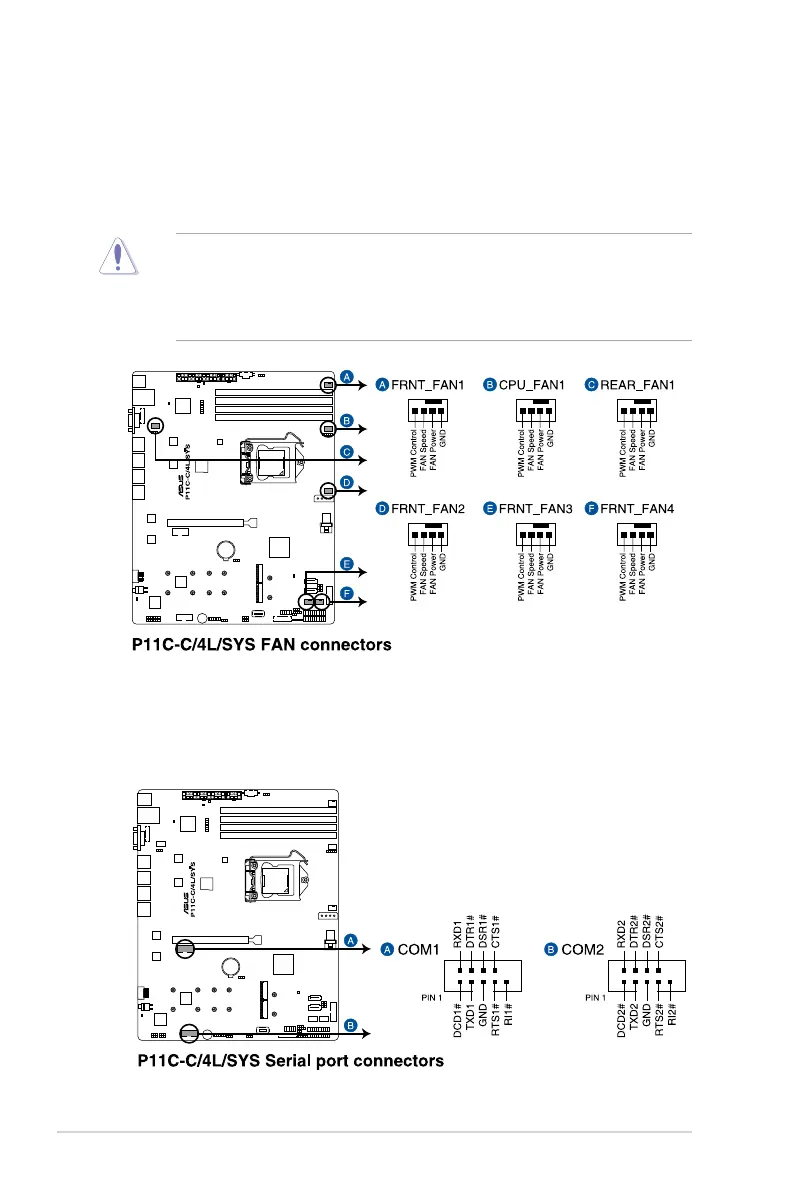
8. CPU, front, and rear fan connectors
(4-pin FRNT_FAN1-4; REAR_FAN1; CPU_FAN1)
The fan connectors support cooling fans. Connect the fan cables to the fan connectors
on the motherboard, ensuring that the black wire of each cable matches the ground pin
of the connector.
9. Serial port connectors (10-1 pin COM1-2)
These connectors are for the serial COM ports. Connect the serial port module cable
to one of these connectors, then install the module to a slot opening at the back of the
system chassis.













 To Next Page