Chapter 2: Hardware setup2-12
• *For the latest update, please refer to ASUS Server AVL on the website.
• Start installing the DIMMs from slot A1 (light blue).
• Always install DIMMs with the same CAS latency. For optimum compatibility,
it is recommended that you obtain memory modules from the same vendor.
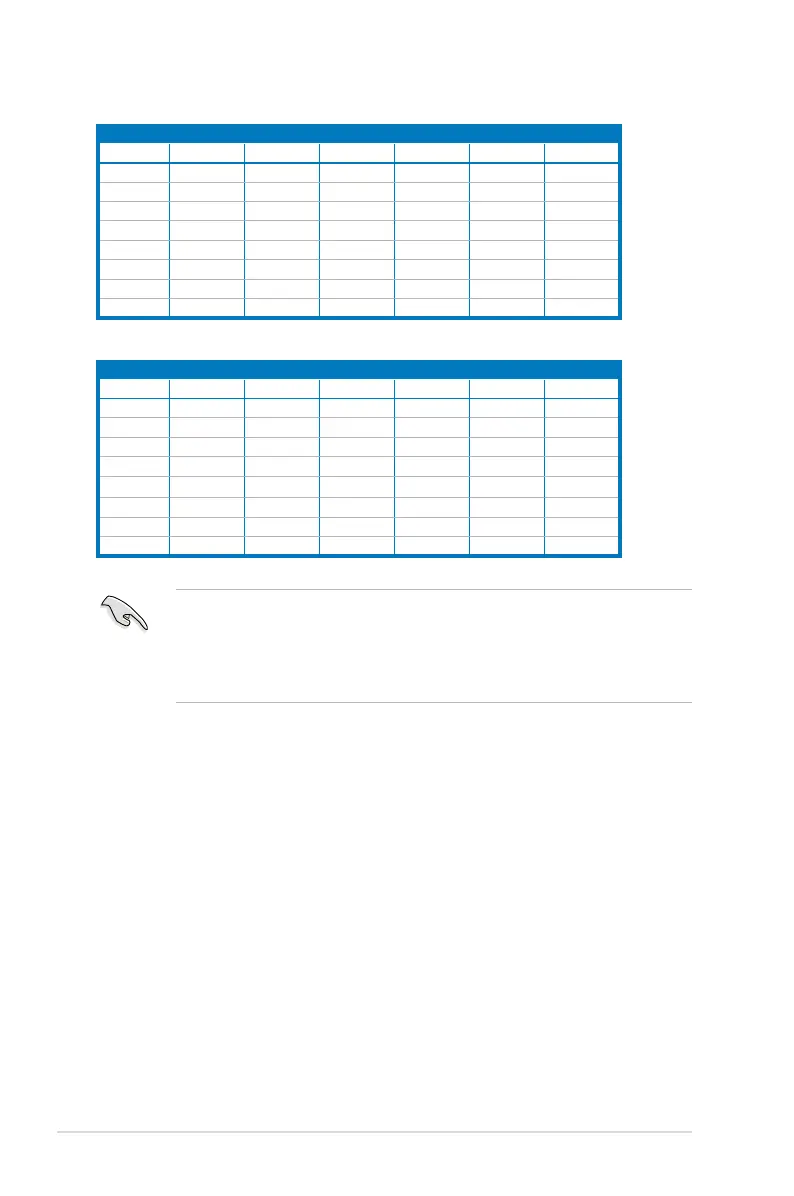
2CPUConguration
DIMM_E3 DIMM_E2 DIMM_E1 DIMM_F3 DIMM_F2 DIMM_F1
1 DIMMs
2 DIMMs
V
4 DIMMs
V V
8 DIMMs
V V
12 DIMMs
V V V V
16 DIMMs
V V V V
20 DIMMs
V V V V V V
24 DIMMs
V V V V V V
2CPUConguration
DIMM_G3 DIMM_G2 DIMM_G1 DIMM_H3 DIMM_H2 DIMM_H1
1 DIMMs
2 DIMMs
4 DIMMs
8 DIMMs
V V
12 DIMMs
V V
16 DIMMs
V V V V
20 DIMMs
V V V V
24 DIMMs
V V V V V V



 To Next Page