9
Chapter 1: Knowing your wireless router RT-N12 C1
Rear panel
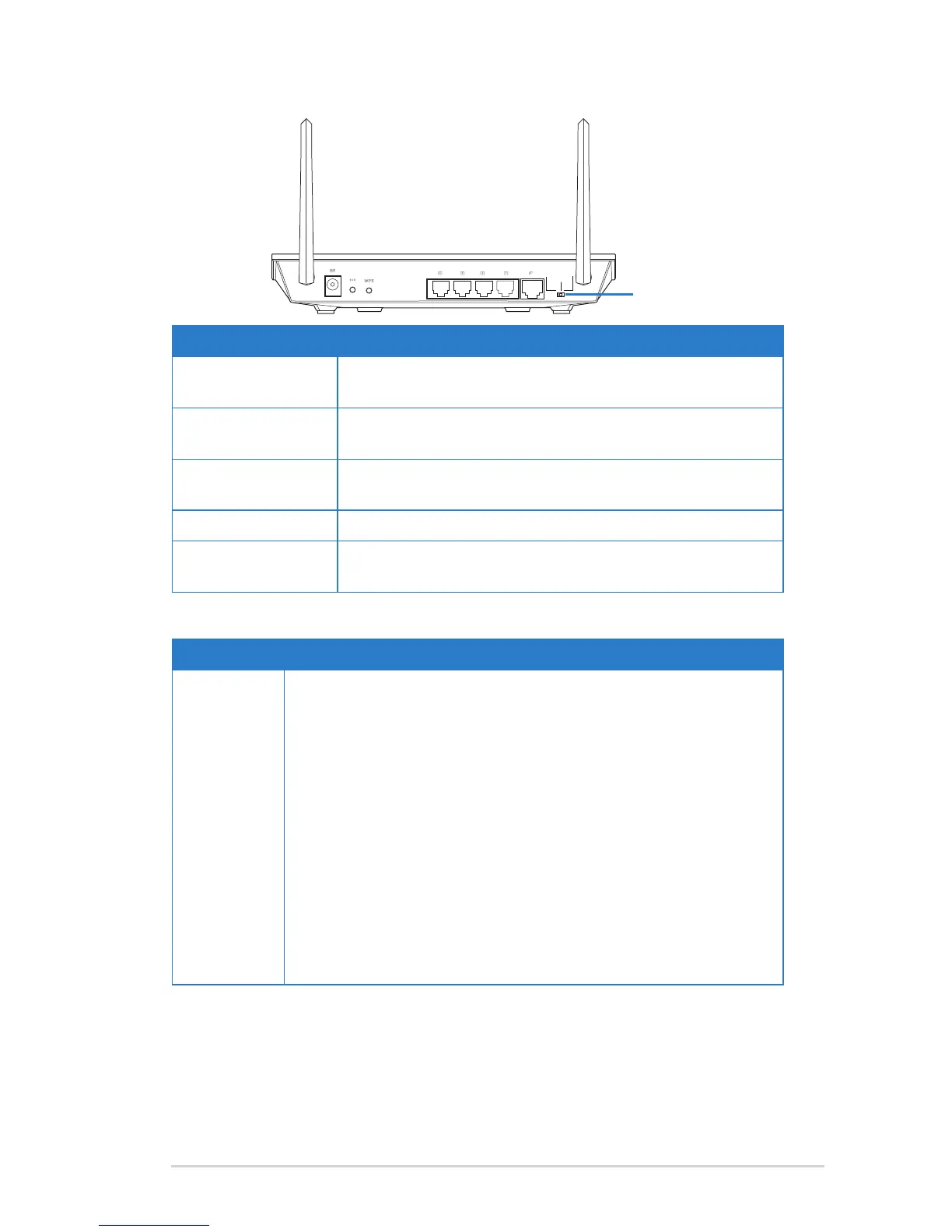
Label Description
WAN Connect an RJ-45 Ethernet cable to this port to establish
WAN connection.
LAN1-LAN4 Connect RJ-45 Ethernet cables to these ports to establish
LAN connection.
DC IN Insert the AC adapter into this port to connect your router
to a power source.
WPS Press this button to establish wireless connection.
Restore Press this button for more than ve seconds to restore the
system to its factory default settings.
Item Description
Operation
mode
selector
Use this selector to choose an operation mode:
Router (IP Sharing mode): In the Router mode, the wireless
router connects to the Internet via PPPoE, Automatic IP, PPTP,
L2TP, or Static IP, and provides you with wireless radio signals.
The NAT, rewall, and IP sharing services for LAN clients are
enabled.
Repeater: In this mode, the wireless router extends your wireless
network coverage and provides you with higher quality wireless
radio signals. The NAT, rewall, and IP sharing services are
disabled.
Access Point (AP): In this mode, the wireless router receives
the WAN IP address from the router connected to the WAN port
and provides you with wireless radio signals. The NAT, rewall,
and IP sharing services are disabled.


 To Next Page