30 ASUS SP97 / SP97-V User’s Manual
III. INSTALLATION
(Connectors)
III. INSTALLATION
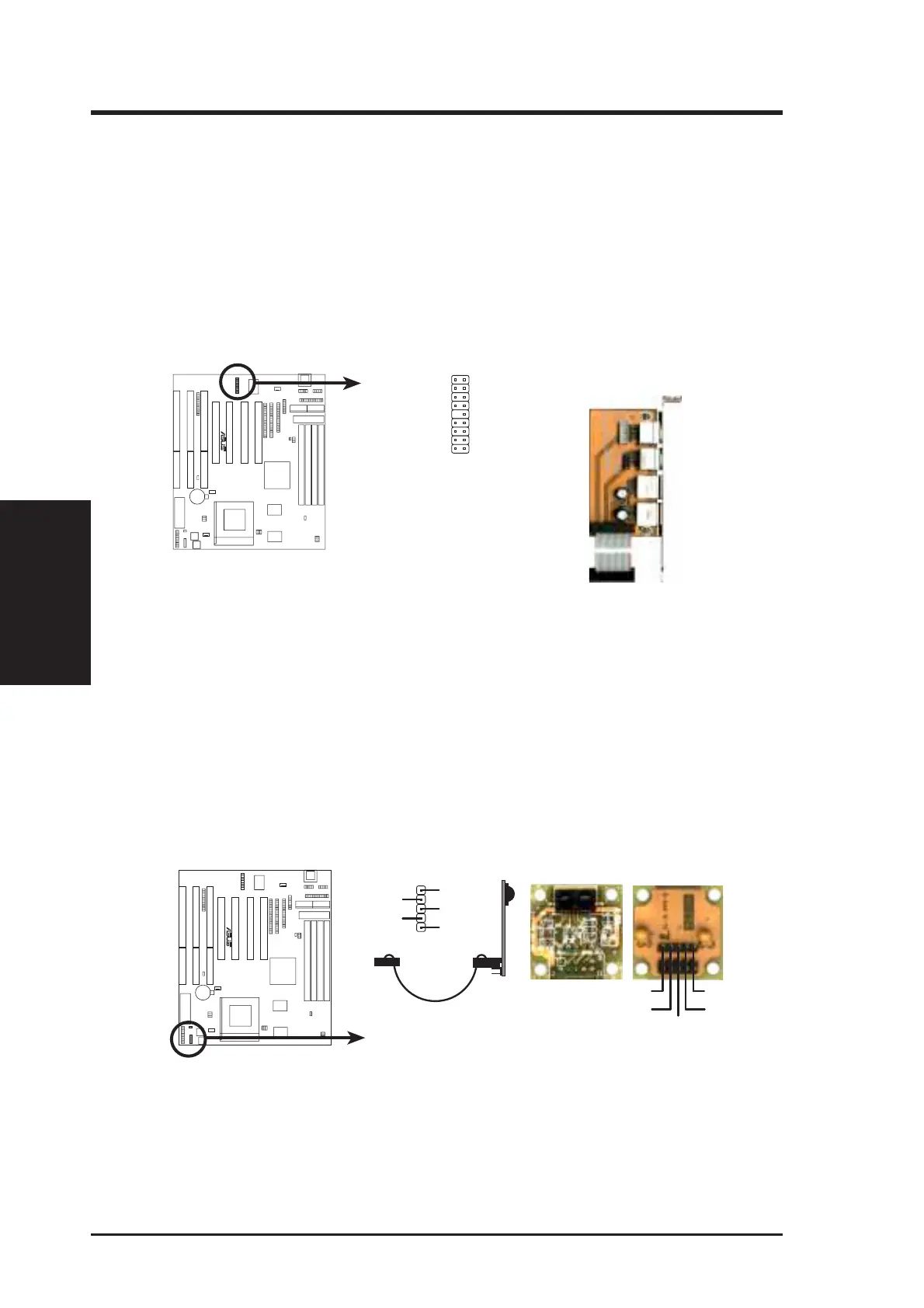
14. USB, Infrared, PS/2 Mouse Module Connector (USB_IR_MOUSE, 18-1 pin block)
If you want to use USB, PS/2 mouse, or infrared (IrDA) devices, you need to
purchase an external connector set. The external connector set connects to the
18-pin block and mounts to an open slot on your computer’s chassis. The system
will direct IRQ12 to the PS/2 mouse if one is detected. If not detected, expan-
sion cards can use IRQ12. See PS/2 Mouse Control in BIOS Features Setup
and USB Function in PnP and PCI Setup of the BIOS SOFTWARE. See Sec-
ond IrDA... connector for details on the infrared connector.
USB, Infrared, PS/2 Mouse Connector
1: USB +5Volt
2: USB Port 0 -
3: USB Port 0 +
4: Ground
5: (no connection)
6: PS/2 Mouse Clock
7: Ground
8: Reserved
9: Reserved
10: USB +5Volt
11: USB Port 1 -
12: USB Port 1 +
13: Ground
14: (no connection)
15: PS/2 Mouse Data
16: Ground
17: Reserved
18: Reserved
1
9
18
10
Infrared
USB 0
USB 1
USB, Infrared,
PS/2 Mouse
Bracket
PS/2 Mouse
(Actual Cable Length ≈ 7.6 cm / 3 in.)
R
15. Second IrDA-Compliant Infrared Connector (IR, 5-pin block)
This connector supports the optional wireless transmitting and receiving infra-
red module. This module mounts to a small opening on system cases that sup-
port this feature. You must also configure the setting through UART2 Use Infra-
red in Chipset Features Setup to select whether UART2 is directed for use
with COM2 or IrDA. Use the five pins as shown below (Back View) and con-
nect a ribbon cable from the module to the motherboard according to the pin
definitions.
Infrared Module Connector
IRRX
+5V
IRTX
FIRRX
GND
For the infrared feature to be available,
you must connect an optional Infrared
module to the motherboard.
+5V
IRTX
IRRX
(NC)
GND
Back View
Front View
R





 To Next Page