1-14
Chapter 1: Product introduction
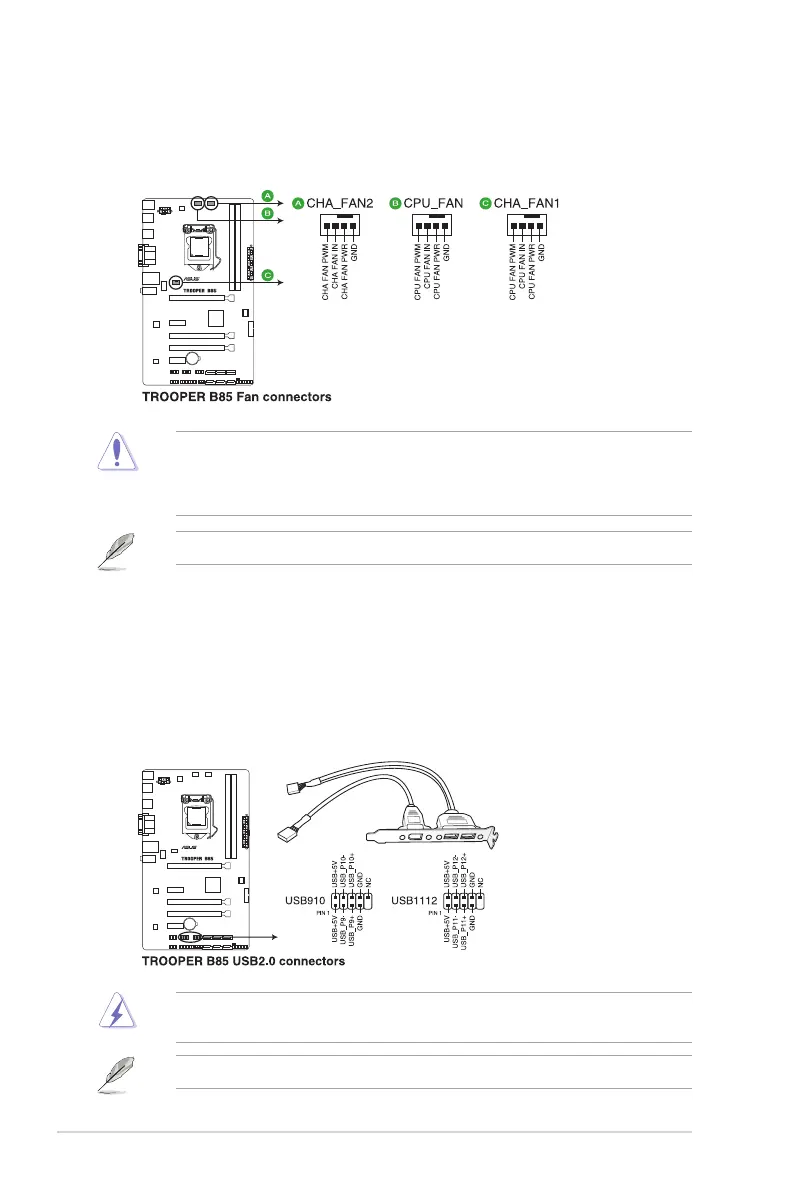
3. CPU and chassis fan connectors (4-pin CPU_FAN, 4-pin CHA_FAN)
Connectthefancablestothefanconnectorsonthemotherboard,ensuringthatthe
black wire of each cable matches the ground pin of the connector.
Donotforgettoconnectthefancablestothefanconnectors.Insufcientairowinside
thesystemmaydamagethemotherboardcomponents.Thesearenotjumpers!Donot
placejumpercapsonthefanconnectors!TheCPU_FANconnectorsupportsaCPUfanof
maximum1A(12W)fanpower.
4. USB 2.0 connectors (10-1 pin USB1112, USB910)
TheseconnectorsareforUSB2.0ports.ConnecttheUSBmodulecabletoanyof
theseconnectors,theninstallthemoduletoaslotopeningatthebackofthesystem
chassis.TheseUSBconnectorscomplywithUSB2.0specicationsandsupportsupto
480Mbpsconnectionspeed.
Neverconnecta1394cabletotheUSBconnectors.Doingsowilldamagethe
motherboard!
TheUSB2.0moduleispurchasedseparately.
Onlythe4-pinCPUfansupportstheASUSFanXpertfeature.




 To Next Page