29
ASUS Xonar U7 User Manual
English
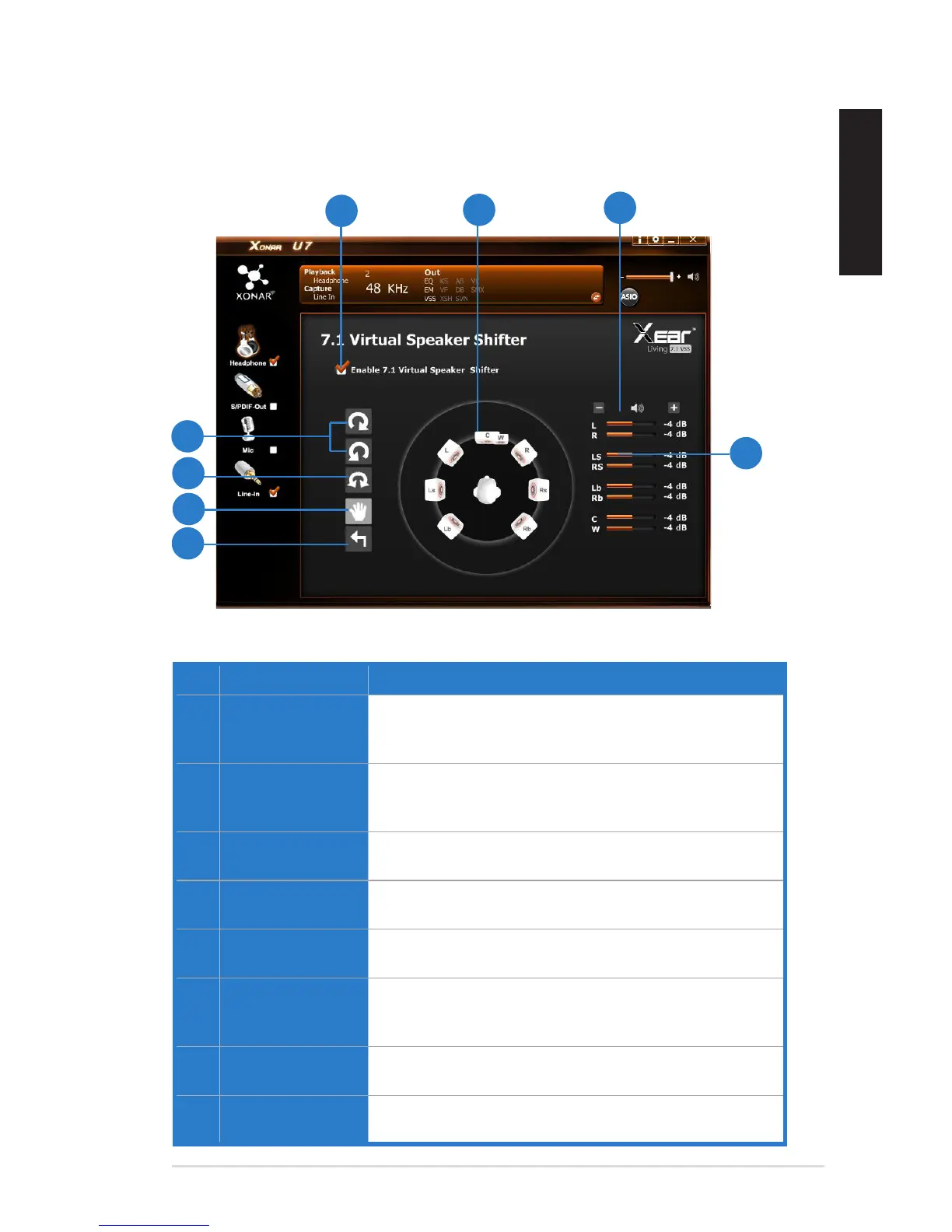
5.2.8 7.1 Virtual Speaker Shifter (Windows
®
XP only)
Function Introduction
No. Items Description
1. 7.1 Virtual speaker
shifter enable/
disable switch
Click on the check box to enable / disable 7.1 Virtual
Speaker to simulate the speaker direction and distance.
2. Virtual Speaker
(L/R/Ls/Rs/Lb/Rb/
C/W)
Each virtual speaker virtualizes one channel of the 7.1
channel speakers in the real world.
3. Volume Control Each virtual speaker virtualizes one channel of the 7.1
channel speakers in the real world.
4. Volume indicator Indicate the volume of each channel.
5. Reset Reset the location of virtual speakers / virtual listener to
default.
6. Manual Shifting
(Free Moving
Mode)
Use the pointer to click and drag to move the location of
individual virtual speakers.
7. Manually Rotation
Mode
Use mouse to rotate the virtual speakers on the screen
manually.
8. Auto Rotation
Mode
The virtual speakers rotate clockwise or counterclockwise
slowly.


 To Next Page