EasyManua.ls Logo

Atag HI3271W - User Manual

Atag HI3271W
86 pages
Go to English
Print Icon
To Next Page IconTo Next Page
Loading...
gebruiksaanwijzing
inductiekookplaat
instructions for use
induction hob
mode d’emploi
plaque de cuisson à induction
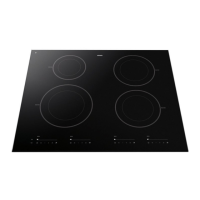
HI3271W
Het toestel-identifi catieplaatje bevindt zich aan de onderkant van het toestel.
The appliance identifi cation card is located on the bottom of the appliance.
La plaque d’identifi cation de l’appareil se trouve sur le dessus de l’appareil.
Plak hier het toestel-identifi catieplaatje.
Stick the appliance identifi cation card here.
Placez ici la plaque d’identifi cation de l’appareil.
Houd, wanneer u contact opneemt met de serviceafdeling, het complete typenummer bij de hand.
When contacting the service department, have the complete type number to hand.
En cas de contact avec le service après-vente, ayez auprès de vous le numéro de type complet.
Adressen en telefoonnummers van de serviceorganisatie vindt u op de garantiekaart.
You will fi nd the addresses and phone numbers of the service organisation on the guarantee card.
Les adresses et les numéros de téléphone du service après-vente se trouvent sur la carte de garantie.
700003436100

Table of Contents

Questions and Answers

  • E
    Elizabeth KelleyAug 6, 2025
    What does the text on the display of my Atag Hob mean when I connect it for the first time?
    • J
      Julie PughAug 6, 2025
      The text appearing on the display of your Atag Hob when connected for the first time indicates the standard set-up routine. This is normal operation.
  • T
    Tiffany StoneAug 10, 2025
    What to do if my Atag Hob is not working and the display is blank?
    • J
      Jennifer SanchezAug 10, 2025
      If your Atag Hob isn't working and the display is blank, it's likely due to a power supply issue. Check the fuses or the electric switch to ensure proper power.
  • P
    Paul JonesAug 15, 2025
    Why does my Atag Hob cooking zone suddenly stop and beep?
    • J
      Joseph JonesAug 15, 2025
      The cooking zone on your Atag Hob may suddenly stop working with a signal because the preset time has ended. Turn off the sound using the + or - button on the timer.
  • J
    Jerry WhiteAug 19, 2025
    Why is my Atag Hob display flashing after switching on the cooking zone?
    • A
      Anthony WrightAug 19, 2025
      If the display flashes after switching on a cooking zone on your Atag Hob, it means the pan isn't suitable for induction cooking or doesn't have the correct shape. Use a suitable pan.
  • O
    osmithAug 23, 2025
    Why do my pans make noise while cooking on the Atag Hob?
    • A
      austinwellsAug 23, 2025
      The noise from your pans while cooking on the Atag Hob is due to energy flowing from the hob to the saucepan. This is normal and not harmful to either the pans or the hob.
  • M
    Mr. Micheal SchneiderAug 27, 2025
    Why does my Atag Hob smell the first few times I use it?
    • W
      wsmithAug 27, 2025
      A slight smell from your Atag Hob during the first few uses is normal, as the new appliance is heating up. This will disappear after a few uses. Make sure to ventilate the kitchen.
  • M
    Michael TurnerSep 1, 2025
    Why does the fan keep running after I turn off my Atag Hob?
    • M
      Michael DurhamSep 1, 2025
      The fan running for several minutes after you switch off your Atag Hob is normal. The hob is simply cooling down.

Summary

Your Induction Hob Introduction

Control Panel Operation

Control Panel Layout and Functions

Detailed identification and explanation of all buttons, indicators, and displays on the control panel.

Safety Instructions

Using Your Induction Hob

Selecting Induction Cookware

Criteria for Induction-Ready Pans

Specifies requirements for pans, including base thickness, sphericity, and material suitability.

Power Level Adjustment

Setting Power Levels and Boost

Step-by-step guide to selecting power levels and using the boost function.

Boost and Switching Off

Safety and Convenience Features

Childproof Lock Activation

Instructions for locking the hob to prevent accidental operation, especially for safety.

Timer Functionality

Hob Maintenance and Cleaning

Daily and Stubborn Stain Cleaning

Guidance on cleaning the hob surface for daily maintenance and tough stains.

Troubleshooting Common Issues

General Troubleshooting Advice

General tips for diagnosing and resolving appliance malfunctions before contacting service.

Troubleshooting Symptom-Cause-Solution Table

A table listing common symptoms, their possible causes, and recommended solutions.

Fault Code Resolution

Specific Fault Code Guidance

Lists fault codes (F00, F7, F8, etc.), their causes, and the appropriate solutions or service contacts.

Installation Instructions Overview

Safety Guidelines for Installation

Crucial safety regulations and precautions to follow during the hob's installation.

Required Installation Clearances

Specifies minimum clearance distances around the hob for proper installation and ventilation.

Hob Mounting and Brackets

Hob Dimensions and Ventilation

Precise Installation Dimensions

Provides exact measurements for the hob's cut-out and recess in the countertop.

Ensuring Adequate Ventilation

Explains the necessity of proper airflow for cooling the appliance's internal components.

Installation Scenarios

Finalizing Hob Installation

Building-In Procedure

Step-by-step instructions for placing the hob into the prepared recess and making the electrical connection.

Technical Specifications

Hob Capacity and Dimensions Data

A table summarizing the hob's type, connection, power, and detailed build-in dimensions.

Atag HI3271W Specifications

General IconGeneral
Power Levels9
Boost FunctionYes
InstallationBuilt-in
TypeInduction
Control TypeTouch
Safety FeaturesChild lock, residual heat indicator, automatic switch-off
MaterialCeramic glass

Related product manuals