EasyManua.ls Logo

Atari WARLORDS - Page 14

Atari WARLORDS
53 pages
Print Icon
To Next Page IconTo Next Page
To Previous Page IconTo Previous Page
Loading...
Warlords
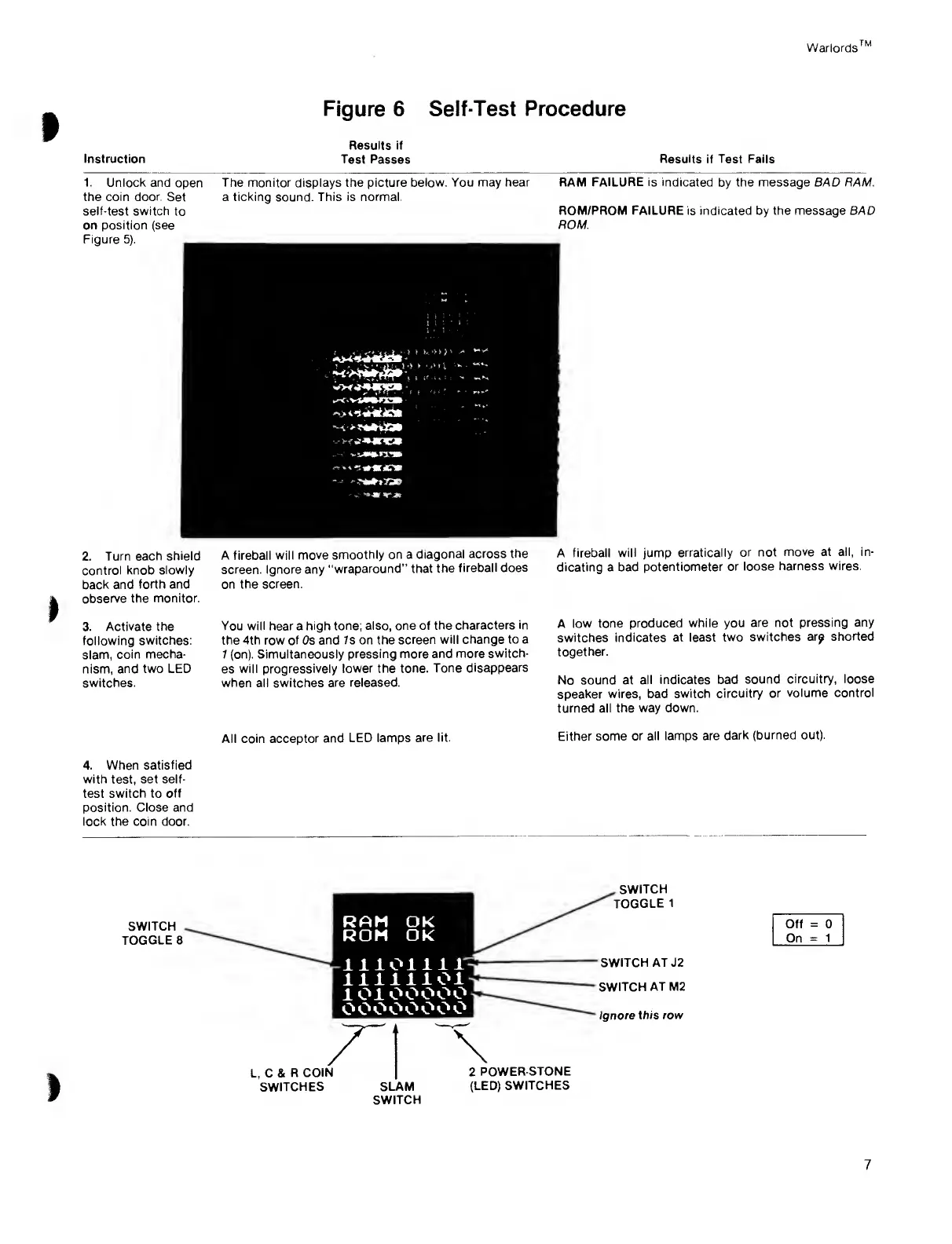
Figure 6 Self-Test
Procedure
Instruction
Results if
Test Passes
Results
if
Test Fails
1. Unlock and
open
the coin
door.
Set
self-test switch
to
on position (see
Figure
5).
The
monitor displays the picture
below. You may hear
a ticking sound. This is
normal.
2.
Turn each
shield
control
knob
slowly
back and
forth and
observe the monitor.
3.
Activate the
following switches:
slam,
coin mecha-
nism,
and two LED
switches.
4.
When
satisfied
with
test,
set self-
test
switch
to
off
position. Close and
lock the coin door.
A fireball will
move
smoothly
on
a
diagonal
across
the
screen.
Ignore any
"wraparound” that
the
fireball
does
on the
screen.
You
will
hear a
high tone; also, one of
the characters
in
the 4th
row
of
Os
and Is on the
screen
will change to a
7
(on). Simultaneously
pressing more and
more switch-
es
will progressively
lower the tone.
Tone
disappears
when all switches
are released.
All
coin
acceptor
and LED
lamps are
lit.
RAM
FAILURE is
indicated
by
the message BAD RAM.
ROM/PROM FAILURE is indicated by the message BAD
ROM.
A
fireball will jump
erratically or not
move at all, in-
dicating a bad
potentiometer or
loose
harness wires.
A low tone
produced
while you
are not pressing any
switches
indicates at
least two
switches
arp shorted
together.
No
sound
at
all indicates bad
sound circuitry, loose
speaker wires,
bad switch
circuitry
or volume control
turned
all the way
down.
Either
some or all
lamps are dark
(burned out).
SWITCH
TOGGLE 8
RAM Ok
ROM Ok
liiomr
illlliOl
10100000
oooooooo
L, C &
R
COIN
SWITCHES
.SWITCH
TOGGLE
1
-SWITCH AT J2
SWITCH
AT M2
Ignore
this row
Off
=
0
On
=
1
SLAM
SWITCH
2
POWER-STONE
(LED)
SWITCHES
7

Related product manuals