EasyManua.ls Logo

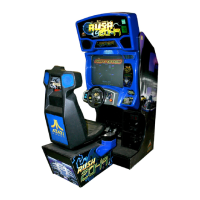
Atari San Francisco Rush 2049 - User Manual

Atari San Francisco Rush 2049
106 pages
Print Icon
To Next Page IconTo Next Page
Loading...
SAN FRANCISCO
RUSH 2049’”
SAFETY, SPECIFICATIONS,
INSPECTION
&
INSTALLATION
NOTICE: This manual is subject to change without notice. Atari reserves the right to make
improvements in equipment function,
design, or components as progress in engineering or
manufacturing methods may warrant.
Fill out and mail in the Game Information Card. Include the game serial number from the label
on the rear of the cabinet. For your records, write the game serial number in the manual.

Questions and Answers

  • A
    Amanda ThompsonAug 25, 2025
    How to fix incorrect credit counts on Atari San Francisco Rush 2049?
    • J
      James BuchananAug 25, 2025
      If your Atari Arcade Game Machine accepts currency or tokens but the number of credits per coin or bill is incorrect, the issue likely stems from improper settings in the Pricing Menu or faulty wiring. To resolve this, access the Coin Options Menu and select PRICING OPTIONS MENU to verify that the units and credits are set correctly. Also, ensure that the cabinet wiring is correct for your VGM and that the coin meter and coin switches connect properly to the control input wires.
  • K
    Katherine ParkAug 31, 2025
    Why don't the coin indicators light up on my Atari Arcade Game Machine?
    • D
      Daniel MillerAug 31, 2025
      If the coin indicators on your Atari Arcade Game Machine aren’t lighting up, this could be due to a burned-out bulb or an open fuse circuit. To troubleshoot, first check the bulb's continuity with a DVM, as burned-out bulbs may appear white or darkened, and replace any burned-out bulb with the same type. If the bulb isn't the issue, check the fuse continuity with a DVM. If the fuse is blown, replace it with the same type; if it isn’t blown, inspect the wiring.
  • L
    Laura FisherNov 8, 2025
    What to do if my Atari Arcade Game Machine doesn’t start and is completely non-functional?
    • J
      Joanna DonaldsonNov 8, 2025
      If your Atari Arcade Game Machine isn't starting and appears completely non-functional with no audio, illumination, or video display, the issue might stem from a power problem. Here's what you can do: * Ensure that the VGM power switch is turned on. * Inspect the electronics to check if the fans are running. If not, verify that the power supply is connected to its power cable and turned on. * Plug the VGM into an AC power outlet and confirm the presence of AC line voltage. Additionally, turn off the VGM power, unplug the AC line cord, and check the line voltage switch. If necessary, adjust it to match your local AC line voltage before retesting the VGM. An open fuse or faulty wiring could also be the cause. Examine the AC fuse on the power supply and the DC fuses inside the coin do...
  • A
    Allen ThomasNov 15, 2025
    Why won't my Atari Arcade Game Machine accept currency or tokens?
    • R
      Robert OwensNov 15, 2025
      If your Atari Arcade Game Machine isn't accepting currency or tokens, resulting in the game not starting despite audio and video being present, it might be due to the type of currency being used. First, unlock and open the cash door to empty the cash box and inspect the revenue for any counterfeit currency. Also, check the vault for any obstructions blocking the mechanism's path. If the problem persists, the coin mechanism might be faulty or tilted, follow the steps to troubleshoot: 1. Unlock and open the coin door, and check the mounting of each mechanism. 2. Remove the mechanism and clear any obstructions in the currency path. 3. Reinstall the mechanism and latch it securely. 4. Enter the Menu System by pressing and holding the TEST MODE switch inside the coin door. From the Self-T...

Summary

Safety Instructions

General Safety Precautions

Covers transport, grounding, epilepsy hazards, and general warnings.

Installation and Inspection Procedures

Cabinet Array and Linking

Procedures for bolting cabinets together and establishing network links.

System Tests and Diagnostics

Power-On Self-Tests

Explains power-on self-tests, service required tests, and error handling.

Sound and Monitor Tests

Verifying the operation of audio components and display monitor.

Disk and Network Tests

Checking hard drive operation and network communication circuits.

Parts

Electronic Components

Details power supply, circuit boards, and pushbutton assemblies.

Service

General Service Precautions

Safety guidelines for handling electronics and general service procedures.

Component Servicing Procedures

Steps for servicing monitors, boards, power supply, and other key components.

Diagnostic, Audit & Adjustment Menu System

Menu System Overview

Explains the purpose and activation of the game's menu system.

Test and Adjustment Menus

Covers volume, statistics, game options, controls, sound, monitor, disk, and network tests.

Wiring Diagrams

Troubleshooting

Atari San Francisco Rush 2049 Specifications

General IconGeneral
Release Year1999
DeveloperAtari Games
GenreRacing
Players1-2
Cabinet TypeSit-down
CategoryArcade Game Machines
ManufacturerAtari Games
SoundStereo
MonitorRaster
DisplayRaster
CabinetUpright
ControlsSteering Wheel, Pedals, Shifter

Related product manuals