Warlords™
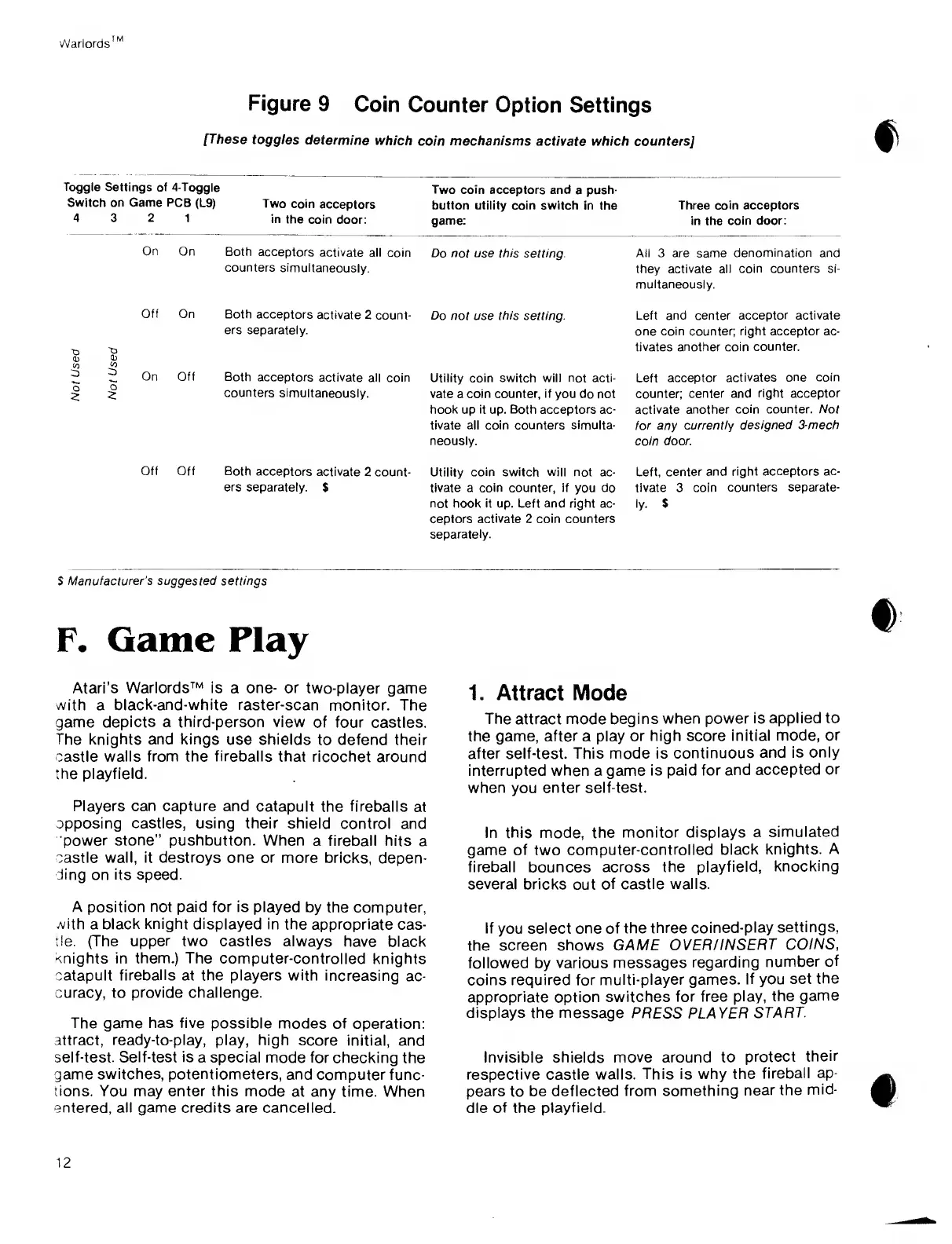
Figure
9
Coin
Counter Option Settings
[
These
toggles
determine
which
coin
mechanisms
activate which counters]
Toggle
Settings of
4-Toggle
Two coin
acceptors and
a
push-
Switch
on Game
PCB
(L9)
Two
coin
acceptors
button utility coin switch
in the
Three coin
acceptors
4
3
2
1
in
the coin
door:
game:
in the
coin door:
On
On
Both
acceptors
activate all
coin
Do not use this setting.
counters
simultaneously.
All 3 are same
denomination
and
they
activate all coin counters si-
multaneously.
T3
0)
CO
3
o
2
0
)
CO
2
O
2
Off
On
Both acceptors
activate
2
count- Do
not use
this
setting.
ers separately.
Left and center
acceptor activate
one coin counter; right
acceptor
ac-
tivates another coin
counter.
On Off
Both
acceptors
activate all
counters
simultaneously.
coin
Utility coin switch will not acti-
vate a
coin counter, if
you do not
hook
up
it
up.
Both acceptors
ac-
tivate all coin counters simulta-
neously.
Left
acceptor activates
one coin
counter;
center and
right acceptor
activate another coin
counter. Not
tor any
currently designed
3-mech
coin door.
Off Off
Both
acceptors activate
2 count-
ers
separately.
$
Utility
coin switch will
not ac-
tivate a coin counter, if
you
do
not hook it up. Left and right ac-
ceptors
activate
2 coin counters
separately.
Left,
center and right
acceptors ac-
tivate 3
coin counters
separate-
ly.
$
$
Manufacturer's
suggested
settings
F.
Game
Play
Atari’s
Warlords™
is a one- or two-player
game
with a
black-and-white raster-scan
monitor. The
game
depicts a third-person
view
of four
castles.
The knights and
kings
use shields
to defend their
castle
walls from the fireballs that
ricochet around
the playfield.
Players
can
capture
and
catapult
the fireballs
at
opposing
castles, using their
shield
control and
power
stone” pushbutton.
When
a fireball hits
a
castle wall, it destroys one or
more bricks,
depen-
ding on its speed.
A position
not
paid for is played
by the
computer,
with
a
black knight displayed in
the appropriate
cas-
tle. (The upper two
castles always
have black
Knights in them.) The
computer-controlled
knights
catapult
fireballs
at the players with
increasing ac-
curacy, to
provide challenge.
The game has five possible
modes of operation:
attract, ready-to-play, play,
high score
initial, and
self-test. Self-test is
a special mode for
checking the
game switches, potentiometers,
and
computer func-
tions.
You
may enter
this mode at any
time. When
entered, all game credits are cancelled.
1. Attract
Mode
The
attract
mode
begins when power
is
applied
to
the game, after a play
or
high
score
initial
mode, or
after self-test. This mode is
continuous
and is
only
interrupted when a
game is paid
for and
accepted
or
when
you
enter self-test.
In this mode, the
monitor
displays a
simulated
game of
two
computer-controlled
black
knights. A
fireball bounces across the
playfield,
knocking
several
bricks out of
castle walls.
If
you
select one of the
three
coined-play
settings,
the
screen shows GAME
OVER/INSERT
COINS
,
followed by
various messages
regarding
number
of
coins required for
multi-player games.
If you set
the
appropriate option switches
for free
play, the
game
displays the message
PRESS PLAYER
START.
Invisible shields move
around
to
protect
their
respective castle walls.
This is why
the
fireball
ap-
pears to be
deflected from
something
near
the
mid-
dle of
the
playfield.
12



 To Next Page