EasyManua.ls Logo

Atari WARLORDS - Page 26

Atari WARLORDS
53 pages
Print Icon
To Next Page IconTo Next Page
To Previous Page IconTo Previous Page
Loading...
Warlords
TM
F.
Fluorescent
Light and
Speaker
Replacement
A—
WARNING
^
1
If you
drop
a
fluorescent
tube
and it
breaks, it
will implode!
Shattered glass
can
fly 6
feet or
more from
the implosion.
Use
care
when replacing any fluorescent
tube.
Avoid
looking at the blacklight when it is
on.
It may damage
your
eyes.
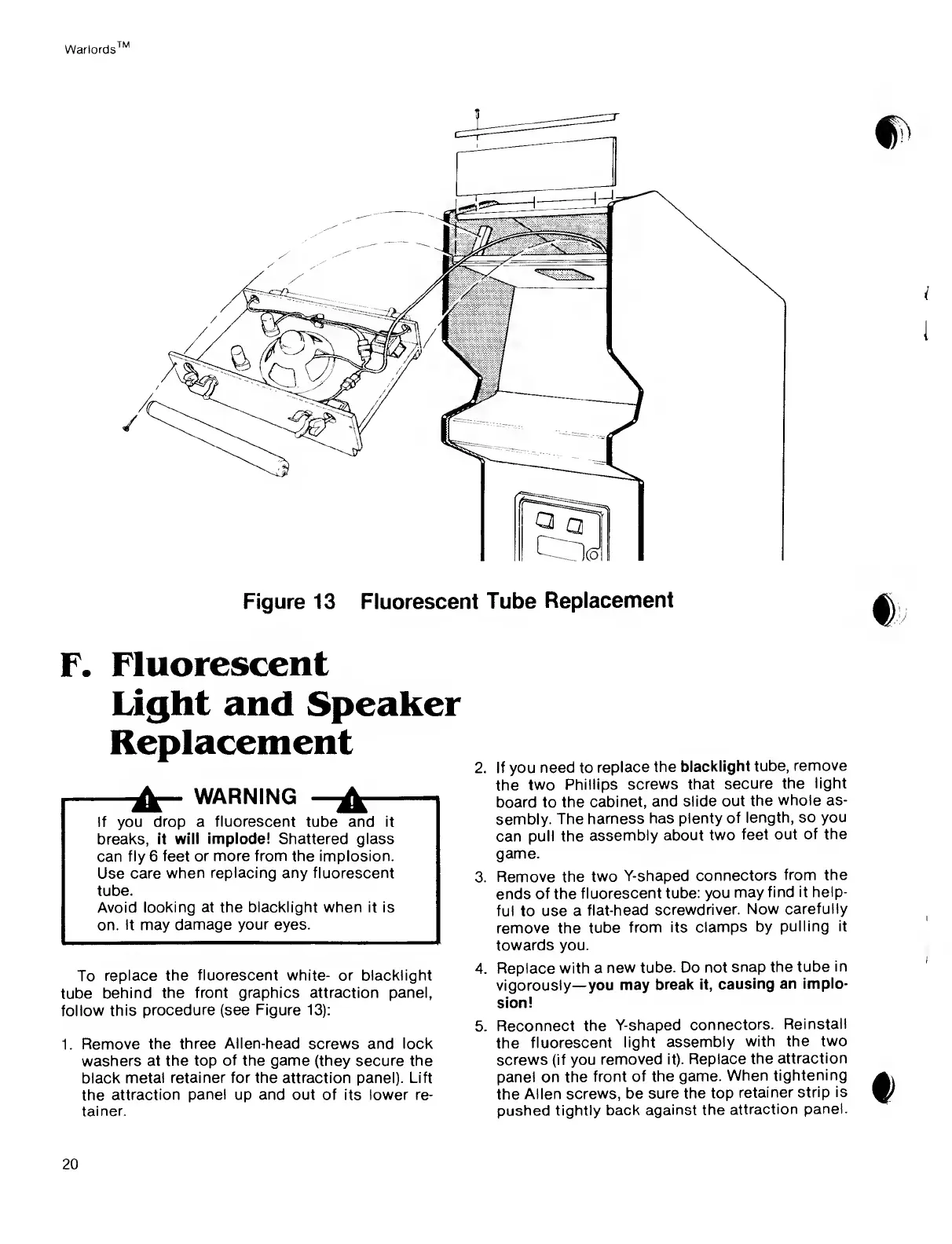
To replace
the
fluorescent
white- or blacklight
tube
behind
the front
graphics
attraction
panel,
follow this
procedure
(see Figure
13):
1.
Remove
the three Allen-head screws and lock
washers at
the top
of
the game (they secure the
black
metal retainer
for
the attraction
panel).
Lift
the
attraction
panel
up
and
out of its lower re-
tainer.
2. If you
need to
replace
the
blacklight
tube,
remove
the
two
Phillips
screws
that
secure
the light
board to
the
cabinet,
and
slide out
the
whole
as-
sembly.
The
harness
has
plenty of
length, so
you
can
pull the
assembly
about
two
feet
out of the
game.
3.
Remove the
two
Y-shaped
connectors
from the
ends
of the
fluorescent
tube: you
may
find it help-
ful
to
use a
flat-head
screwdriver.
Now carefully
remove
the tube
from
its clamps
by
pulling it
towards you.
4.
Replace
with
a
new tube. Do
not
snap the
tube in
vigorously
you
may
break it,
causing
an
implo-
sion!
5. Reconnect
the
Y-shaped
connectors.
Reinstall
the
fluorescent
light
assembly
with
the two
screws
(if
you
removed
it). Replace
the
attraction
panel on the
front
of the game.
When
tightening
the
Allen
screws, be
sure the top
retainer
strip is
pushed
tightly back
against the
attraction
panel.
20

Related product manuals