A10/A11/A10W/A11W Quick Start Guide
ATCOM TECHNOLOGY CO., LIMITED
9 Authenticate ID: normally is the same with User ID, can also be kept blank
if there is no special requirement from the SIP server.
9 Password: Password of SIP account.
9 Sip Server: SIP server address, support both IP address and domain name.
9 Sip Port: SIP server port, default is 5060.
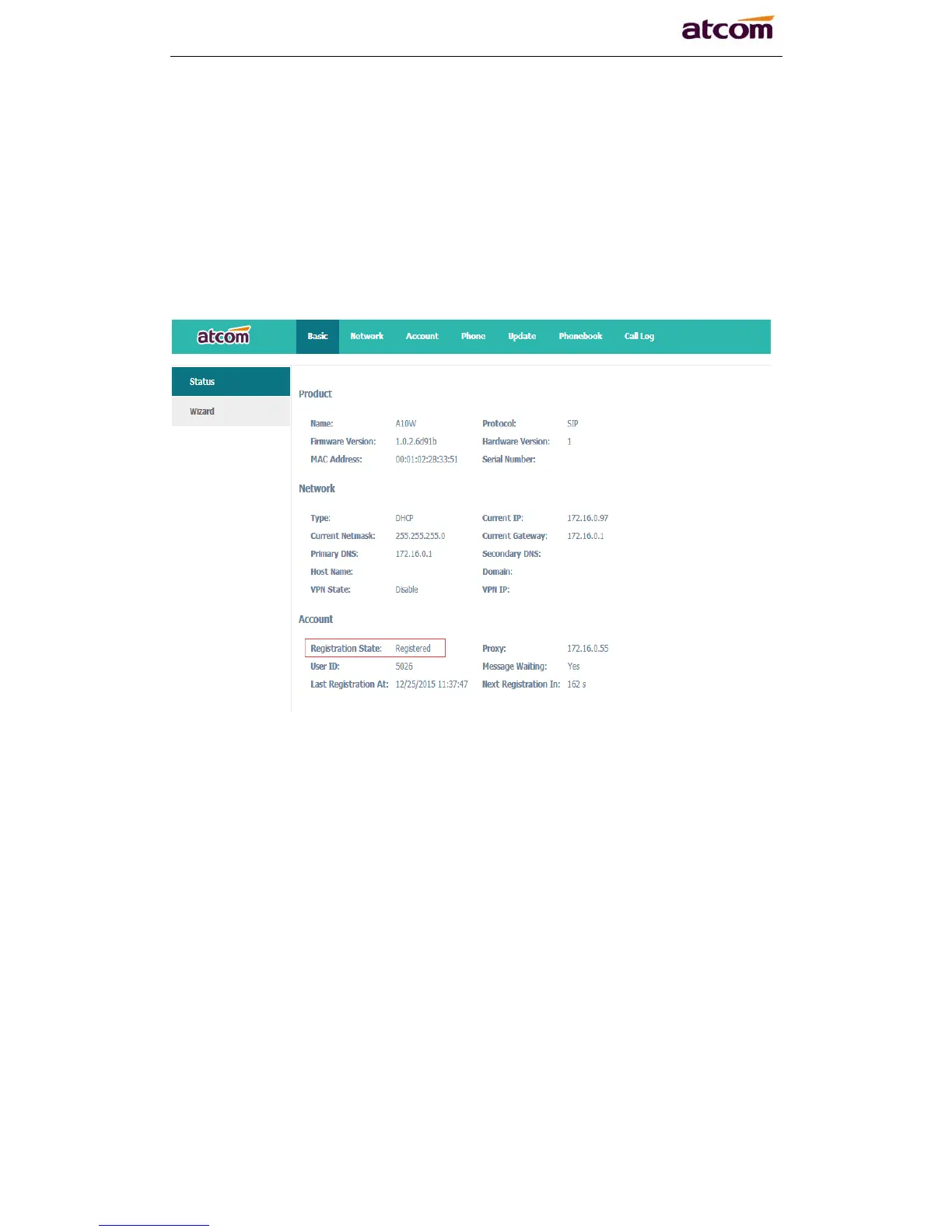
After configured and clicked ‘Submit’ to enable register this account, please
check the status of this account in System Status page. The Registration State
will be registered if this account registered successfully.
2.3 Wi-Fi (A10W/A11W only)
2.3.1 Configure the wifi on the phone
1 、 Press “Menu”-“Network”-“Connect Mode”,change for the wifi
connection mode,press “OK”.
2、 Press “Menu”-“Network”-“WIFI setting”-“WLAN”,choose the wifi
you want to connect,Press “Connect”,then input the correct wifi password.
3、 Return to the standby interface,and phone successful connected to the
wifi.



 To Next Page