EasyManua.ls Logo

ATEN KN1000A - User Manual

ATEN KN1000A
191 pages
Print Icon
To Next Page IconTo Next Page
Loading...
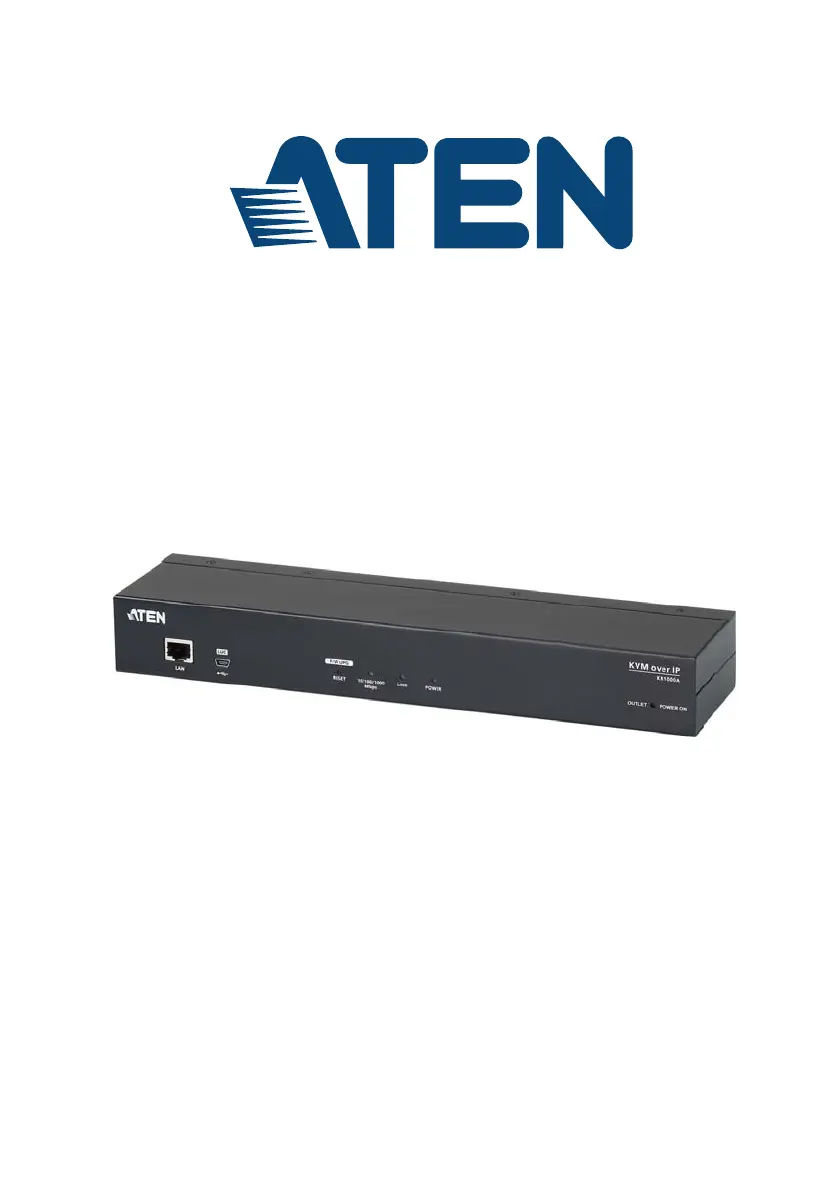
Single Port KVM over IP Switch with Single Port Power Switch
KN1000A
User Manual
www.aten.com

Table of Contents

Questions and Answers

  • A
    Amber BarnesSep 23, 2025
    What to do if mouse pointer display is confusing on ATEN Switch KN1000A?
    • M
      michaelbryantSep 23, 2025
      If you find the display of two mouse pointers (local and remote) to be confusing or annoying on the ATEN Switch KN1000A, you can use the Toggle Mouse Display function to shrink the non-functioning pointer.
  • K
    Katherine MccallAug 25, 2025
    Why is the Windows Client link missing in Firefox for ATEN Switch KN1000A?
    • B
      Brandon CrawfordAug 25, 2025
      The Windows Client link requires ActiveX, which Firefox does not support. Therefore, when logging in with Firefox, only the Java Applet is available for the ATEN Switch KN1000A.
  • D
    danaroseAug 25, 2025
    Why is mouse movement so slow on my ATEN Switch KN1000A?
    • R
      robert78Aug 26, 2025
      If mouse movement is extremely slow on the ATEN Switch KN1000A, it indicates too much data is being transferred. Lower the video quality via the Video Settings to reduce the amount of transmitted video data.
  • J
    jennifer71Aug 27, 2025
    How to fix erratic operation of ATEN Switch KN1000A?
    • M
      Matthew GarciaAug 27, 2025
      If you experience erratic operation with the ATEN KVM switch KN1000A, make sure the KN1000A is started before the KVM switch. If the KVM switch was started first, reset or restart it. You may also need to reset the KN1000A.
  • P
    Patrick CohenAug 27, 2025
    How to fix a frozen mouse pointer on Fedora with ATEN Switch KN1000A?
    • T
      Thomas FosterAug 27, 2025
      If the remote server is running Fedora and the mouse pointer isn't moving, and it's connected with a PS/2 cable, log into the ATEN KN1000A with a browser, open a viewer, and set Mouse DynaSync to Manual on the control panel.
  • J
    Jennifer AustinSep 16, 2025
    Why doesn't the Log Server program run on ATEN Switch KN1000A?
    • M
      Melissa MurphySep 16, 2025
      The Log Server requires the Microsoft Jet OLEDB 4.0 driver to access the database. Ensure this driver is installed. For Windows 98 or NT, retrieve the driver file: MDAC 2.7 RTM Refresh (2.70.9001.0) from the Microsoft download site. Alternatively, install Windows Office Suite.
  • M
    Mary NelsonSep 13, 2025
    How to resolve mouse pointer sync issues on Mac with ATEN Switch KN1000A?
    • K
      Kimberly JordanSep 13, 2025
      There are two USB I/O settings for the Mac: Mac 1, and Mac 2. If you experience pointer sync problems, try selecting the other mode on the ATEN KN1000A.
  • P
    pwilliamsSep 14, 2025
    What to do if ATEN Switch KN1000A hangs when using Snapshot in Safari?
    • A
      Amy ZavalaSep 15, 2025
      If the ATEN Switch KN1000A hangs when using the Snapshot feature with Safari, force close Safari, then reopen it. Avoid using the Snapshot feature in the future. Alternatively, upgrade to Mac OS 10.4.11 and Safari 3.0.4 to use the Snapshot feature.
  • H
    hailey09Sep 5, 2025
    How to resolve Java JRE performance issues with ATEN Switch KN1000A?
    • D
      David DavisSep 5, 2025
      If you have installed the latest Java JRE and are experiencing performance and stability problems with the ATEN Switch KN1000A, try using a Java version that is one or two updates earlier than the latest one.
  • A
    andreakingSep 3, 2025
    Why can't I access a mounted ISO file in Virtual Media on ATEN Switch KN1000A?
    • C
      Carol ChavezSep 3, 2025
      If you can mount an ISO file under Virtual Media but cannot access it, the ISO file is likely 4GB or greater. Virtual Media under the WindowsClient only supports ISO files less than 4GB.

Summary

Chapter 1: Introduction

System Requirements

Outlines the necessary hardware and software for remote user computers and servers.

Chapter 2: Hardware Setup

Installation Procedure

Step-by-step guide for installing the KN1000A and connecting devices.

Chapter 3: Browser Login

Chapter 4: Configuration

Advanced Settings

Details device information, network, security, and other advanced configurations.

Network Configuration

Settings for IP addressing, service ports, and network environment.

Authentication Methods

Sets up external authentication via RADIUS, LDAP, and CC Management servers.

Power Management

Settings for managing power outlets, Wake on LAN, and scheduling.

Console Management and OOBC

Methods for accessing the console via Out-of-Band Access or serial connection.

Date;Time and Preferences

Sets device time, timezone, language, and viewer preferences.

Chapter 5: The WinClient Viewer

Virtual Media Features

Explains the Virtual Media feature for file transfer and OS installation.

Chapter 6: The JavaClient Viewer

Control Panel Functions

Detailed description of functions available in the JavaClient Control Panel.

Video Settings

Adjusting video quality and display settings for the JavaClient.

Message Board

User communication feature for the JavaClient, similar to chat.

Chapter 7: Local Console

Chapter 8: The Log Server

Installation and Starting Up

Steps for installing and launching the Log Server utility.

Chapter 9: AP Operation

WinClient AP

Downloading and connecting with the Windows Client Application.

Logging In

Steps for logging into the KN1000A using the WinClient AP.

Java Client AP

Downloading and connecting with the Java Client Application.

Appendix

Safety Instructions

General safety guidelines for using the KN1000A and related equipment.

Troubleshooting

Specifications

ATEN KN1000A Specifications

General IconGeneral
BrandATEN
ModelKN1000A
CategorySwitch
LanguageEnglish

Related product manuals