Manual, F/T Sensor, Data Acquisition (DAQ) Systems
Document #9620-05-DAQ.indd-20
Pinnacle Park • 1031 Goodworth Drive • Apex, NC 27539 • Tel: 919.772.0115 • Fax: 919.772.8259 • www.ati-ia.com • Email: info@ati-ia.com
33
NOTICE: The connections from the SCB-68s to the user’s DAQ device should be made over
shielded twisted pair wiring for noise immunity and to ensure that the shield connections are
properly made. We recommend using differential mode for better noise performance. Use the
appropriate screw terminals and wires gages to pass the sensor signals correctly through.
4. Connect the 9105-C-PS-IFPSMC power supply to the back of the IFPSMC-X box as shown in
Figure 4.10 and plug the power supply into a wall outlet.
5. Connect the male connectors on the transducer cables to the appropriate connector on the front of the
IFPSMC box. Note: The serial number label on the Transducer must match the serial number label of the
IFPSMC Box connector it is plugged into. Refer to Figure 4.9.
6. Connect the (2) 68-pin, D-Type connectors on the DAQ shielded cables to the connectors on the back
of the IFPSMC-X box labeled “Connector 0 from User” and “Connector 1 from User”.Tighten the
jackscrews on the connectors to ensure a good electrical connection.
7. Connect the other ends of the DAQ shielded cables to a NI SCB-68 (ATI p/n 9105-SCB-68) I/O
connector block. Tighten the jackscrews on the connector to insure a good electrical connection.
8. Wire connections between the NI SCB-68 I/O connector blocks and other user devices can be made to
the available connection on the screw terminals. Refer to Section 4.5.6—Transducer Connections on a
Multi-Sensor IFPSMC Box for available connections.
9. Refer to Section 4.4—Install the F/T Demo Software to complete the installation.
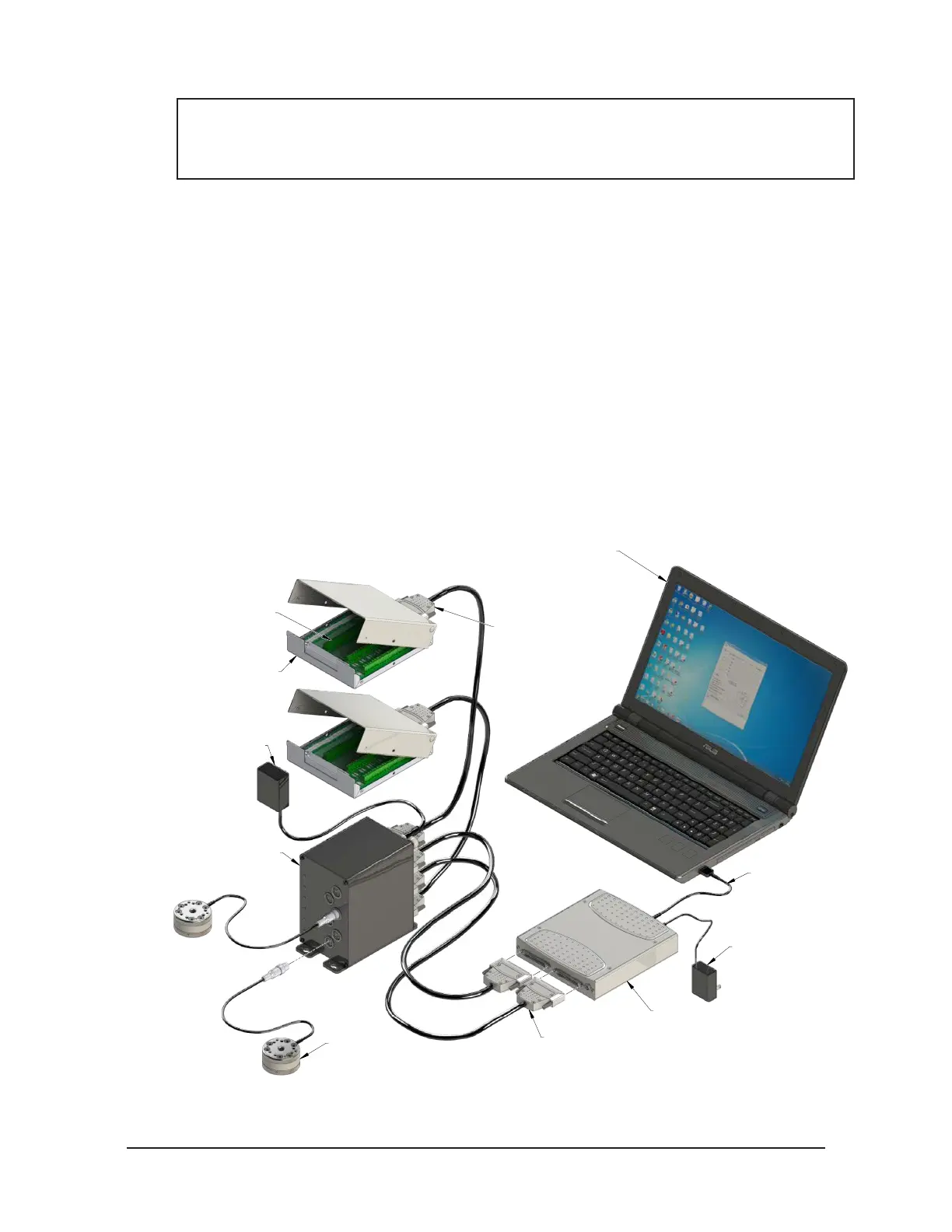
Figure 4.11—Multiple Transducer, IFPSMC Box, I/O Connector Block, and USB DAQ Device Installation
USB Cable
Laptop running DAQ Software
(9030-05-1001 Software)
TW Transducer
(9105-TW-MINI58 Shown)
Multi-sensor Interface Box
(9105-IFPSMC-6 Shown)
USB DAQ Device
(2) NI SCB-68 Shielded I/O
Connector Block with 68-pin
Connector (9105-SCB-68)
Connector Blocks
for Wired Connections
to Other User Devices
IFPSMC Power Supply
(9105-C-PS-IFPSMC)
(Included with IFPSMC Box)
(2) DAQ Shielded Cable
(9105-C-SH6868EPM-1)
(2) DAQ Shielded Cable
(9105-C-SH6868EPM-1)
Power Supply for
USB DAQ Device


 To Next Page