Default Possible reason Diagnosis and service
Water dripping out of the security
group when the water heater is not
heating
Security group damaged or
clogged.
Supply pressure too high
Replace the security group
Check that the supply pressure
after the water counter does not
exceed 5 bar (0,5 MPa), if it does
install a pressure reducer set to 3
bar (0,3 MPa) at the start of the
water network.
The electric backup heater does not
work.
Mechanical security thermostat
was triggered.
Thermostat defect
Backup heater defect.
Reset the security thermostat on
the heating element.
Replacer the thermostat
Replace the element
Condensate overflow. Condensates evacuation clogged Clean the evacuation
Vapor on the hot water tap Electric backup works permanently Shut off the electricity supply and
call the installer.
Overview Installation Operation Maintenance Warranty
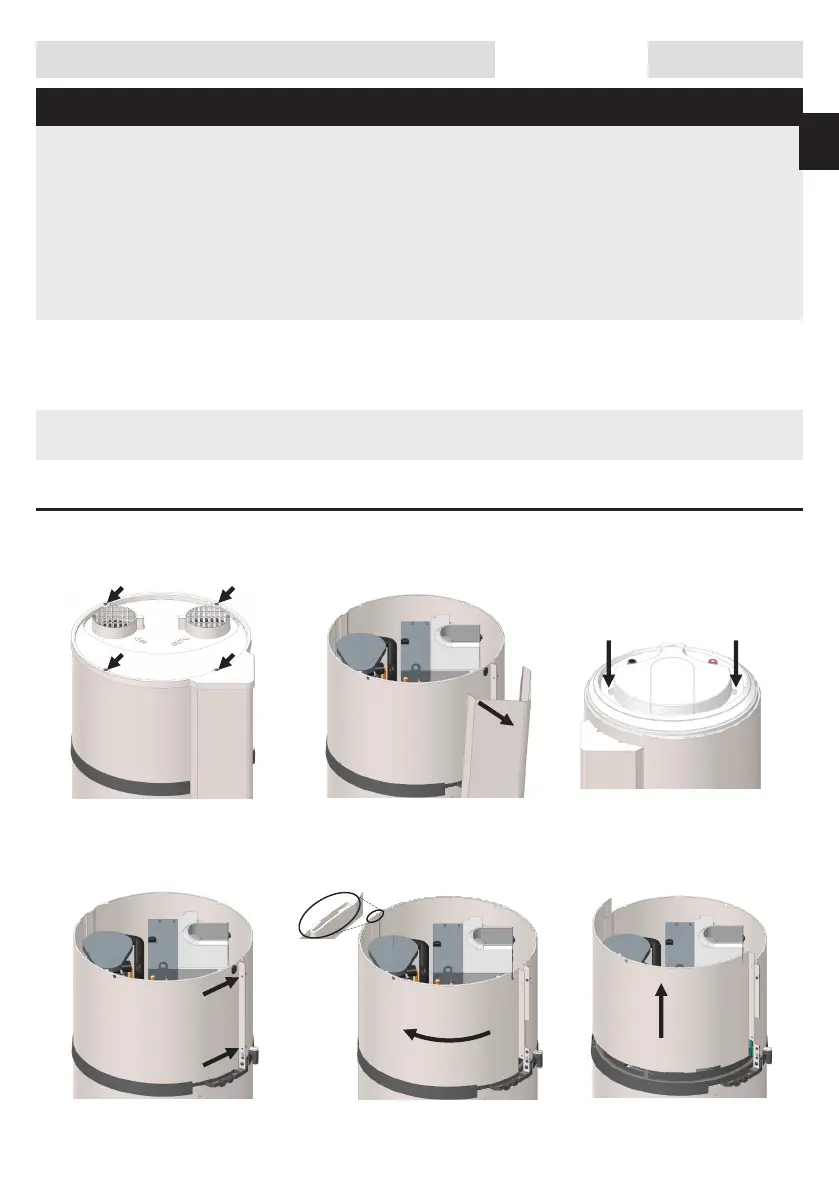
4. Opening of the water heater for maintenance.
Unscrew the 4 screw of the
cover.
Unscrew the 2 screw of the front
metallic cover.
Unscrew the 2 screw of the cap.
Release cover by lifting it.
Unclip the column by pulling it
out then get of the bottom plug
Unlock the cover by rotating it to
the left.
4.2. Access to the heat pump.
4.1. Access to the electrical components
49
UK



 To Next Page