
 Need help?
Do you have a question about the Atlas Copco Elektronikon Mk5 and is the answer not in the manual?
Explains standard safety symbols used in the manual for warnings and notes.
Outlines critical safety measures and precautions to be followed during equipment installation.
Details essential safety guidelines for operating the equipment safely and correctly.
Provides safety instructions and procedures for performing maintenance and repair tasks.
Describes the physical setup for connecting Modbus and Profibus to the controller network.
Details the Gateway module, its purpose, and the connections required for its operation.
Specifies the pin-layout of the 9-pin Sub-D connector for the Gateway module.
Illustrates the hierarchical structure of the module's display menu and navigation.
Describes the Mainscreen folder, its function, and behavior within the module's interface.
Explains the General Settings folder and its subfolders for configuring module parameters.
Explains the meaning and interpretation of various icons displayed on the Gateway module.
Describes the function and status indicated by the LEDs on the Gateway module.
Details the functions of the keyboard keys for navigating and interacting with the module.
Provides information on entering customer passwords and access codes for system security.
Lists the supported specifications and parameters for the Modbus protocol variant.
Details the Modbus message types and functions supported by the Elektronikon Mk5 controllers.
Explains the Modbus function code and data field conventions in responses and exceptions.
Lists and explains various exception codes returned by the Modbus protocol.
Provides practical examples of Modbus communication sequences.
Illustrates a Modbus request and answer for an illegal data address scenario.
Shows example Modbus requests and answers for outlet pressure and status.
Demonstrates Modbus communication to change the active pressure band setting.
Provides an example of Modbus commands to start the machine.
Outlines the basic specifications for the Profibus-DP V0 protocol implementation.
Explains the master-slave principle governing Profibus communication.
Describes the structure and length of buffers used in Profibus data transfer.
Lists and explains exception codes specific to the Profibus protocol.
Provides practical examples of Profibus communication sequences.
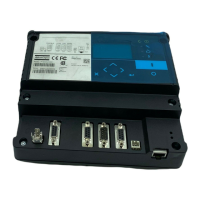
The Elektronikon Mk5 Gateway Module is a serial communication module designed to facilitate Modbus and/or Profibus connections to an Elektronikon MkIV and/or Elektronikon Mk5 compressor controller network. It acts as a Modbus/Profibus proxy, allowing access to all compressors within the network, with each compressor having its own Modbus address. Additionally, the module functions as a bridge to access data stored in the CAN node's Object Dictionary. For correct operation, this bridge module must be assigned a slave node ID. From the master's perspective, the module serves as an access point for information within the CANBUS network.
The primary function of the Gateway Module is to enable communication between a master device (e.g., a PC or PLC) and a network of Atlas Copco compressors equipped with Elektronikon MkIV or Mk5 controllers via Modbus or Profibus protocols. This is achieved by integrating the module into the existing CAN-based compressor network. The module translates communication between the Modbus/Profibus master and the CAN network, acting as an intermediary.
The module supports both Modbus and Profibus protocols. For Modbus, it operates in RTU mode with a binary coding system and RS485 physical layer. It supports various baud rates ranging from 9600 bps to 460800 bps, with options for even, odd, or no parity control, and 1 or 2 stop bits. Error checking is performed using CRC16. The supported Modbus functions include reading coil registers (Function 01), reading holding registers (Function 03), and presetting single registers (Function 06). It's important to note that for Elektronikon Mk5 controllers, direct parameter changes are not always possible; users should consult the address mapping document for adjustable parameters.
For Profibus, the module adheres to the standard Profibus-DP V0 protocol, utilizing RS485. It supports baud rates from 9.6k to 12M. Features like Autobaud are supported, while Freeze Mode, Sync Mode, Slave Node Address Change, and Diagnostics are not. The module does not have PTO or PNO certification, which is not mandatory for Profibus DP. The Profibus communication follows a master-slave concept, where the master initiates all communication and the slave generates replies. The buffer structure for Profibus can handle lengths of 8, 16, 32, and 64 bytes, split into a 1-byte header and 'n' data records (7 bytes each). Not all functions allow more than one data record transfer; read operations can handle multiple records, while write operations are limited to a single data record per cycle.
The module's software and configuration are managed through AC Service personnel using AC Speci5 for initial download and qualified Atlas Copco personnel using AC Modi5 for subsequent configuration. The display menu structure allows users to navigate through various settings, including General Settings, Communication parameters (Modbus Engine, Profibus Engine, EtherNet settings, CAN Engine), Password settings, Program Information, and Compressor parameters.
The module provides a user-friendly interface through its display and keyboard for configuration and monitoring.
The manual emphasizes safety precautions for installation, operation, and maintenance, highlighting the importance of authorized personnel and adherence to local regulations.
The module's design and documentation aim to ensure safe and efficient integration into compressor control systems, providing robust communication capabilities and clear operational guidelines.
 General
| Brand | Atlas Copco |
|---|---|
| Model | Elektronikon Mk5 |
| Category | Gateway |
| Language | English |

 To Next Page
