20
April 2008
e-motion™ Installation
MACHINE INSTALLATION
MACHINE INSTALLATION continued
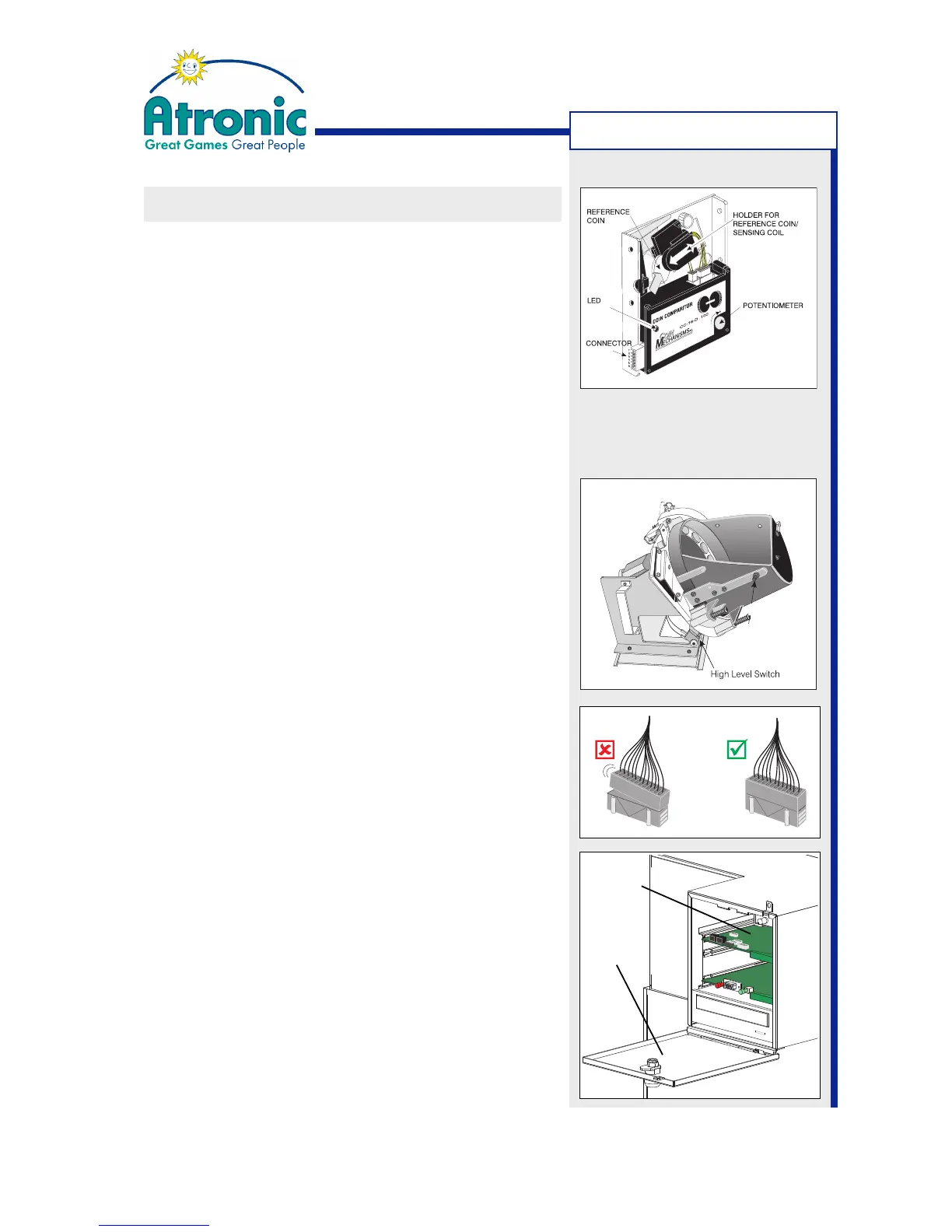
Prepare Coin Acceptor (CC-16 / MC-16)
• Slide holder for reference coin rightwards, remove
(plastic) transport chip and replace it with appro-
priate reference coin.
• Check reference coin for proper (parallel) seating.
-> See manuals Peripherals / Coin Acceptor for details.
Prepare Hopper
The hopper high level switch detects the filling level
of the hopper by the weight of the coins. If the switch
is activated, further accepted coins are separated to
the drop box. The switching threshold can be altered
with an adjustment srew.
• Fill the hopper with that amount of coins/tokens at
which you want the switch to be activated.
• Adjust switching threshold with the adjustment
screw that operates the high level switch.
-> See manuals Peripherals / Hopper for details.
Check cables and connectors
Check that all connectors are seated correctly, prior
to first power up. False connections can cause irre-
parable damage, not covered by warranty.
Check Commboard Settings
The commboard DIP switches and rotary switches
configure SAS address, APL address, progressive
mode and SAS (dual) channel allocation.
Use the DIP switch tables within manual "Software /
Basic Setup" for a particular software version (e.g.
C5.1.x) to check or alter the commboard settings.
Then connect to the online system components.
Commboard
Logicbox
Cover



 To Next Page