Need help?
Do you have a question about the Auber Instruments WS Series and is the answer not in the manual?
Essential safety precautions and warnings for operating the temperature controller and connected appliances.
Specifies the quantity of programmable smoking recipes the controller can store.
Defines the acceptable range of AC voltage for powering the controller.
Indicates the maximum electrical current the controller can safely handle.
Identifies the type of temperature sensor compatible with the controller.
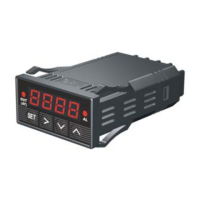
Details the front panel layout and the function of each display window and indicator.
Displays probe 1 temperature, alarms, or parameter settings.
Displays probe 2 temperature, elapsed time, or parameter values.
LED indicating the heater's power status: on, off, or intermittent.
LED indicating the operational status of the smoker generator output.
Used for viewing settings, entering parameter mode, and confirming actions.
Decrements values in setting mode or cancels alarms in normal operation.
Increments values in setting mode or changes display during normal operation.
Switches the right window display between timer and temperature values.
Instructions on how to install and position the temperature probes correctly.
Guidance on optimal placement of probe 1 and probe 2 for accurate measurements.
Describes using the provided power cord for the smoker generator connection.
Explains how to connect the controller to the smoker generator unit.
Details connecting the controller's output to the Smoker Tower using the provided power cord.
Instructions for connecting both controller and smoker generator to the wall outlet.
Explains programmed steps, including temperature settings and criteria for advancing.
Describes the two options, time (t) and temperature (F), for step completion criteria.
Step-by-step guide to entering temperature and ending criterion settings for each step.
Explains how to view the current program step using the '+' key.
Discusses system parameters for different applications and initial settings.
Guidance on optimal placement to avoid direct sun and water exposure.
Explains accuracy limitations at low temperatures due to dual heaters.
Discusses how damper position affects temperature stability and heat loss.
Advice on sensor placement to avoid proximity to the heater for uniform readings.
Details parameters affecting control performance and their adjustment.
Explains the proportional band (P) and its effect on controller output and gain.
Describes integral time (I) and its role in eliminating temperature offset.
Details derivative time (d) and its function in minimizing temperature overshoot.
Explains the auto-tune function for automatic PID parameter optimization.
Defines cycle rate (T) and its setting for controller action calculation.
Details parameters R1 and R2 for controlling smoker generator activation by step.
Parameters for calibrating the offset of the first and second sensor readings.
Function to limit the maximum output power delivered by the heater.
Setting to choose between Celsius or Fahrenheit for display unit.
Used to compensate for sensor errors by adjusting the input offset.
Limits maximum heater output power as a percentage, affecting response and stability.
Allows selection of display units between Celsius and Fahrenheit.
Sets the upper temperature limit for probe 1, triggering a buzzer and display flash.
Sets the lower temperature limit for probe 1, triggering a buzzer and display flash.
Sets the upper temperature limit for probe 2, triggering a buzzer and display flash.
Activates a buzzer to signal the completion of each programmed step.
Details the high limit alarm functionality for probe 1, including buzzer activation.
Explains the low limit alarm for probe 1, including its activation and suppression.
Describes the high limit alarm for probe 2 and its use with multiple meat pieces.
Details the step ending alarm function, providing audible notification for step completion.
Guidance on when to utilize the auto-tuning function for optimal performance.
Explains how auto-tuning optimizes PID parameters for specific cooking systems.
Prerequisite for auto-tuning: ensure the cooking equipment is set up in its exact intended configuration.
Procedure to activate auto-tuning by entering code 166 and setting parameter AT to 1.
Details the controller's ability to store up to 8 smoking recipes, each with 6 steps.
Step-by-step instructions on how to save the current program as a recipe.
Guidance on selecting a recipe name for saving the current program.
Procedure to initiate recipe recall by pressing and holding the SET key.
Describes the single-step mode where the controller maintains a constant set temperature.
Instructions on how to activate single-step mode by setting the 'PrG' parameter to 'off'.
Explains that save and recall functions remain operational in single-step mode.
Example of storing a programmed temperature profile into a recipe file.
Example of recalling a saved recipe into the controller's current program.
Example of saving a program to a recipe while in single-step mode.
Example of recalling a recipe's C-1 temperature into single-step mode.
Demonstrates how 'PrG' mode affects saved and current recipes/programs.
Explains the filter's purpose in rejecting power line interference for stable readings.
Details the one-year warranty for the controller and 90-day warranty for the sensor.
Describes the process for repair or replacement of defective units under warranty.
States the limitation of Auber Instruments' liability to repair or replacement cost.
Informs users about specific legal rights granted by the warranty, which may vary by location.
Instructions for packing items to prevent shipping damage and include necessary purchase information.
Explains how heater current draw directly impacts controller heat dissipation.
Details the heat generation issue related to the Solid State Relay (SSR) used in the controller.
Identifies when heat generated by the controller becomes a significant concern.
Provides methods to mitigate heat stress on the controller during operation.
Suggests using hot water to fill the pot to reduce the controller's heat dissipation issue.
Recommends limiting maximum output power via parameter to prevent controller overheating.
Suggests increasing the P value to help reduce heat, though with limited effect.
 General
| Model | WS Series |
|---|---|
| Category | Temperature Controller |
| Power Supply | 100-240VAC |
| Input Type | Thermocouple, RTD |
| Output | Relay, SSR |
| Control Mode | PID |
| Display | LED |
| Temperature Range | Depends on model |
| Resolution | 0.1°C |
| Communication | RS485 (optional) |


 To Next Page