Additionally, a function is implemented to define a specific wake-up source, allowing
the IMEO1 to always turn-on with the same input source selected, no matter which
input source was selected before power-down.
To enable hotel mode, follow below steps:
Enable hotel mode:
• Switch IMEO1 to standby mode (upper RED LED illuminated)
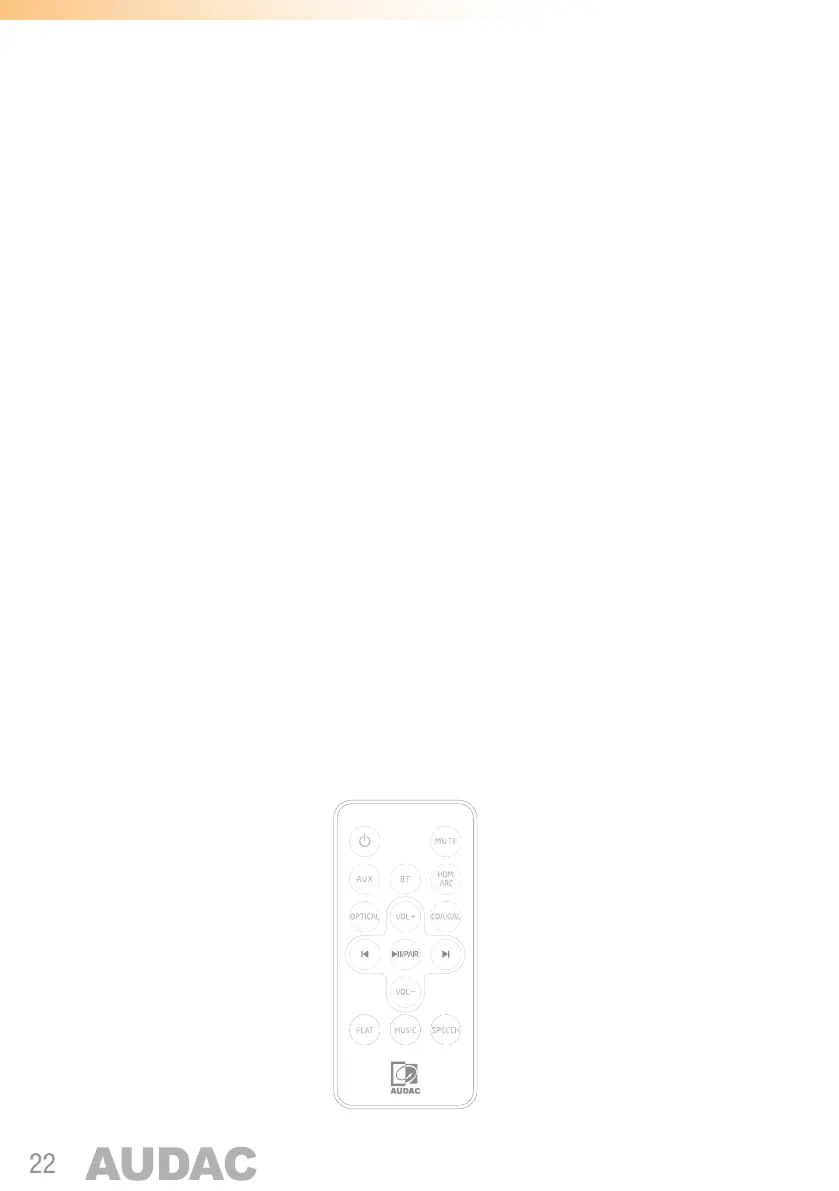
• Press code ‘6280’ on remote control to enable hotel mode. (see image as
below) (6280 = COAXIAL – BT – PAIR – VOL-)
• The Green LED will start to blink (others are continuously illuminated)
• Enter the first number of the 4-digit ID (see image as below)
• The Blue LED will start to blink (others are continuously illuminated)
• Enter the second number of the 4-digit ID (see image as below)
• Repeat for numbers 3 and 4
After the 4 digits of the Bluetooth ID are entered, the upper (standby) LED will start to
blink. Now the wake-up input source can be selected with the last digit:
• 1: AUX
• 3: HDMI ARC
• 0: No specific wake up source
The BT name will now be changed to e.g. ‘AUDAC IMEO1 – 1234’ (in case 1234 was
entered)
To exit the hotel mode function, press code ‘0826’ on remote control to enable hotel
mode.
1 2 3
4 5 6
7 8 9
0


 To Next Page