26 Dr iv er in f ormation d is play
¢ fig . 10 . The data from the single -trip mem -
ory (memory leve l 1) is being displayed if a
D
appears in the display . If a II is shown, then
the data from the total -trip memory is being
displayed (memory leve l 2). The fuel pump
nozzle
iii indicates the efficiency program*
¢ page 27 .
Single-tr ip m emory (Trip computer 1)
The single-trip memory stores the trip infor-
mat ion from the time the ignition is turned on
until it is turned off. If the trip is continued
within 2 hours from the t ime the ignition was
turned off, the new data will be included in
the calcu lation of the current trip info rma-
tion .
If the t rip is inte rrupted fo r more than 2
hours the memory is reset automati ca lly.
Total -trip memory (Trip computer 2)
Unlike the sing le-trip memory, the tota l-tr ip
memory is not reset automatically . This per-
mits you to evaluate your driving data for the
enti re pe riod be tween manual rese t s.
Efficiency program*
The efficiency program can help you to use
less fuel ¢ page 2 7.
Operation
App lies to vehicles: with trip computer
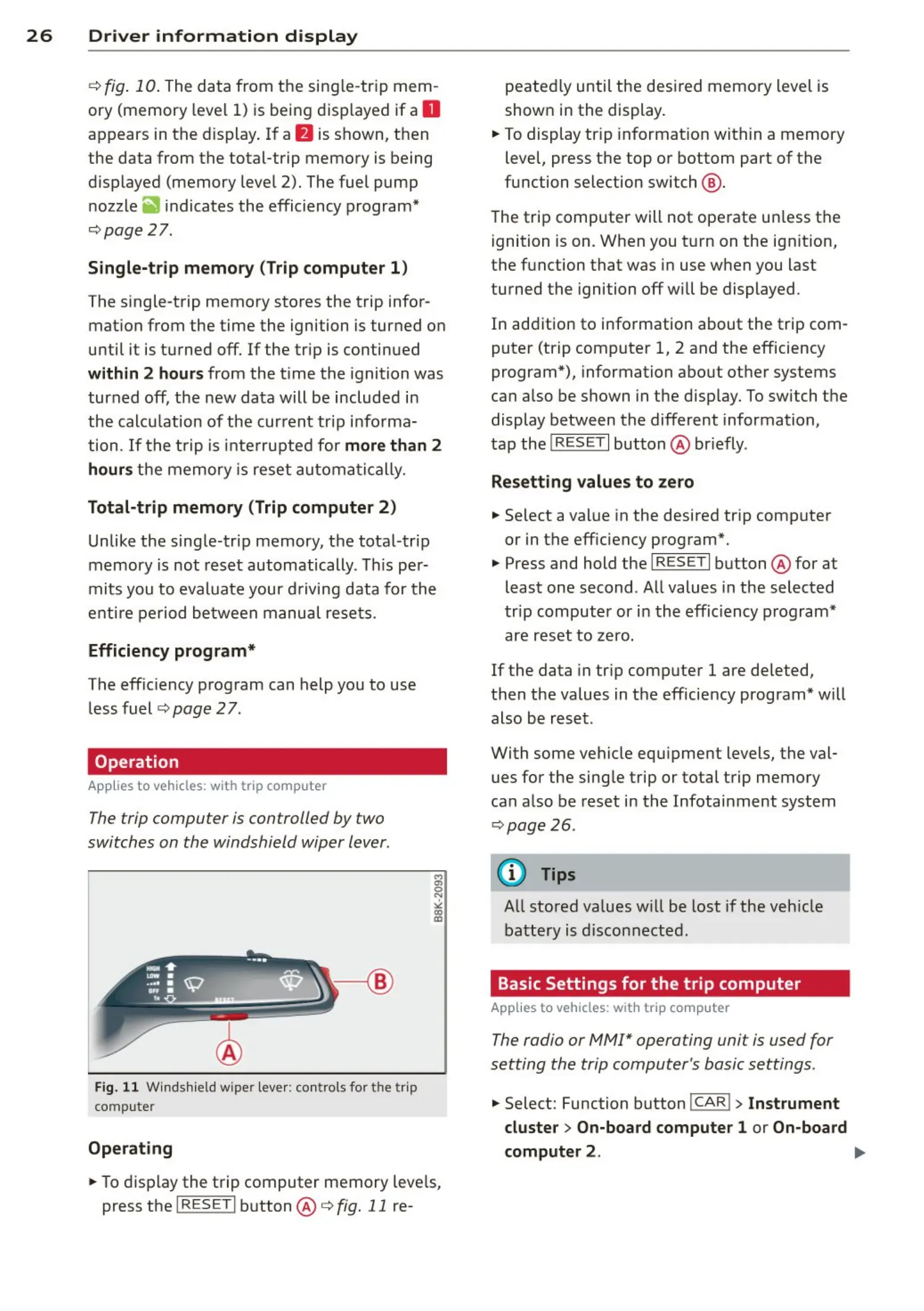
The trip computer is controlled by two
switches on the windshield wiper lever.
Fig. 1 1 W indshiel d wipe r lever: controls for th e t rip
computer
Operating
M
"'
0
N
"'
co
a:,
.. To d isp lay the trip computer memory leve ls,
press the I RESET I button @ ¢ fig. 11 re-
peated ly until the desi red memory level is
show n in the display.
.. To display tr ip informat ion within a memory
level, press the top or bottom part of the
function selection switch @ .
The trip computer will not operate un less the
ignition is on . When you t urn on the ignit ion,
the function that was in use when you last
turned the ignition off will be displayed .
In addition to information about the trip com-
puter (trip comp uter 1, 2 and the efficiency
program*), information abo ut other systems
can a lso be shown in the disp lay. To switch the
display between the different information,
tap the
! RESE T I button @ br iefly.
Resett ing values to zero
.. Select a value in the desired tr ip computer
or in the eff iciency program*.
.. Press and hold the I RES ET I button @ for at
least one second . All values in the selected
trip computer or in the efficiency program*
are reset to zero.
If the data in tr ip computer 1 are deleted,
then the values in the eff iciency program* will
also be reset .
With some vehicle eq uipment levels, the val-
ues for the sing le trip or total trip memory
can a lso be reset in the Infotai nment system
¢ page 26 .
@ Tips
All stored va lues will be lost if the veh icle
battery is disconnected.
Basic Settings for the trip computer
Applies to vehicles: w ith trip computer
The radio or MM!* operating unit is used for
setting the trip computer 's basic settings .
.. Select: Function button ICAR! > Instrument
cluster > On-board computer 1 or On-board
computer 2 . .,,.



 To Next Page