....
N
0
CJ
'<I:
....
I.Cl
U"I
M
I.Cl
......
.. Select the @ symbol with the control knob .
You can choose between three different views in
this mode.
.. To cross park, pa rallel park or position the vehi-
cle in front of a trailer*, press the control but -
ton ® on the contro l pane l repeatedly unti l the
symbol for the des ired mode is selected .
Cross parking
Applies to vehicles: with peripheral cameras
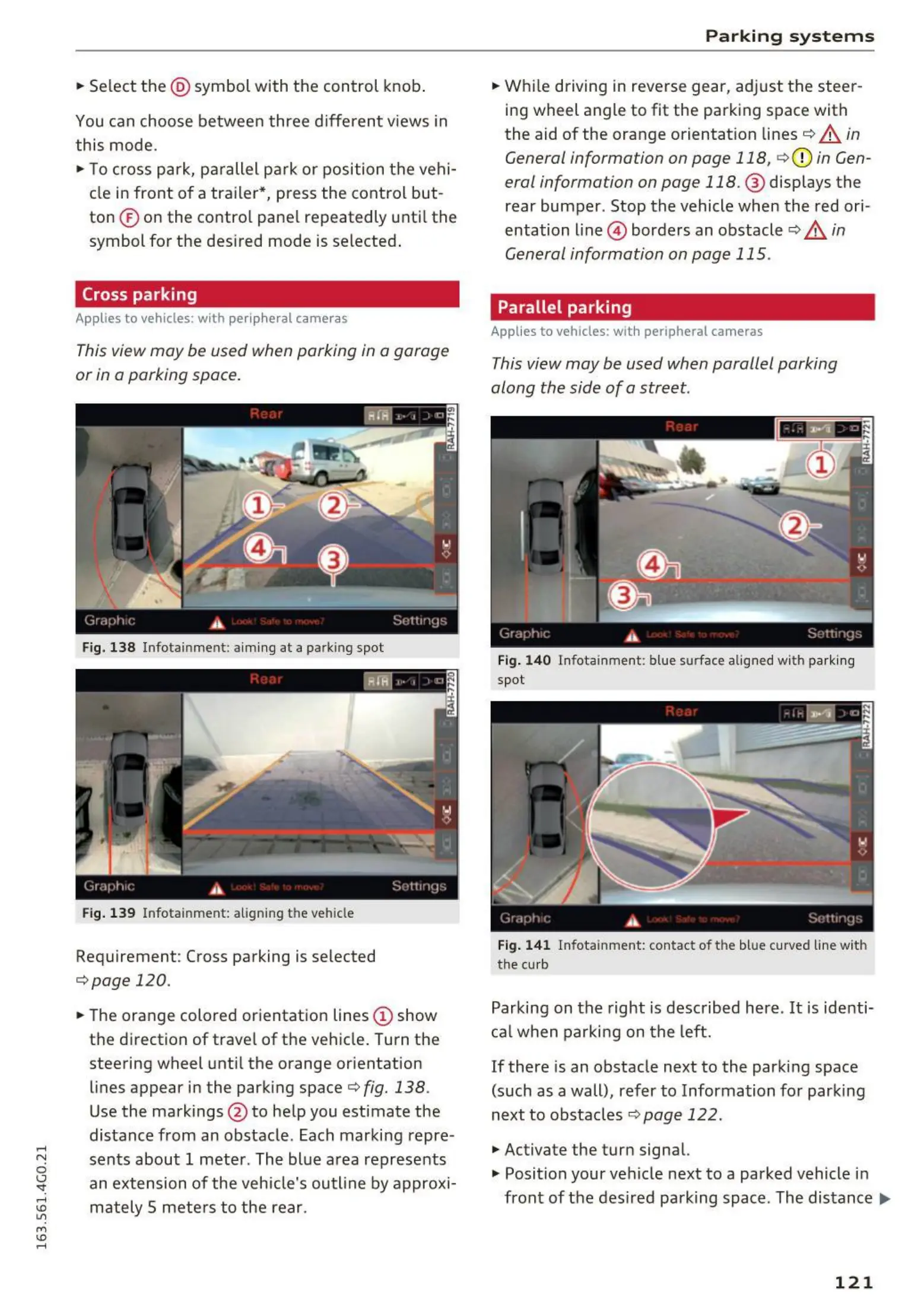
This view may be used when parking in a garage
or in a parking space.
Fig. 138 Infotainment: aim ing at a parking spot
Fig. 139 Infotainment: aligning the veh icle
Requirement: Cross parking is se lected
,=;,page 120.
.. The orange colored orientation lines (D show
the d irection of trave l of the veh icle. Turn the
steering wheel unt il the orange orientation
lines appear in the parking space¢
fig. 138.
Use the markings @ to help you estimate the
distance from an obstacle. Each marking repre-
sents about 1 meter. The blue area represents
an extension of the vehicle's outline by approx i-
mately 5 mete rs to the rear.
Parking syst ems
.. Wh ile driving in reverse gear, adj ust the steer-
ing wheel angle to fit the parking space with
the aid of the orange orientation lines¢
A in
General information on page 118,
c;,(D in Gen-
eral information on page
118. @ displays the
rear bumper . Stop the vehicle when the red ori-
entation line @) borders an obstacle ¢
A in
General information on page 115 .
Parallel parking
Applies to vehicles: with peripheral cameras
This view may be used when parallel parking
along the side of a street.
Fig. 14 0 Infotainment: blue surface alig ned with parki ng
spot
Fig. 14 1 Infotainment: contact of the blue curved line with
the cu rb
Parking on the right is described here. It is identi-
cal when parking on the left.
If there is an obstacle next to the parking space
(such as a wall), refer to Information for parking
next to obstacles¢
page 122.
.,. Activate the turn signal.
.,. Position your ve hicle next to a parked vehicle in
front of the des ired parking space. The distance..,.
121















 To Next Page