co
co
....
N
"
N
....
0
00
<.,;)
'SI"
- When locking the vehicle from outside, the
vehicle must be unoccupied since the win-
dows can no longer be opened in an emer-
gency .
(D Tips
- The windows will automatica lly lower ap-
prox imately 0 .4 inches (10 mm) when you
open the doors.
- When the window in the dr iver's or front
passenger 's doo r is comp letely open, it will
raise approximate ly 1 inch (25 mm) when
t he door is opened. The window will lower
again when you close t he door .
- You can still open and close t he windows for
appro ximately 10 mi nutes after tur ning the
igni t ion off . The power windows do not
switch off until t he driver's doo r o r front
passenger 's doo r has been op ened.
Convenience opening
All of the windows and the sunroof* can be
opened at once.
The settings in t he Infotainment system spec ify
which windows will open .
Convenience opening feature
• Press and hold the ~ button on the remote
contro l key unt il all of the windows reach the
desired position and the su nroof* is ti lted open .
Setting convenience opening in the
Infotainment system
• Se lect : the ICARI function button > (Car)* Sys-
tems control button > Vehicle settings > Cen-
tra l locking
> Long-pre ss to open windows .
To enable conven ience opening of the windows
and the roof*, the
Front windows , Rear windows
and Roof functions must be switched On.
.&_ WARNING
For security reason s, the windows a nd th e
sunroof* ca n only be opened with t he remote
cont rol key at a maxim um distanc e of app rox-
imate ly 6 fee t (2 m) from t he vehicle .
Open ing and closing
Correcting power window malfunctions
You can reactivate the one-touch up/down func-
tion if it malfunctions .
• Pull the power window switch up until the win-
dow is completely raised .
"' Release the switch and pull it up aga in fo r at
least one second .
Sunroof
Description
Applies to: vehicles with sliding/tilt ing sunroof
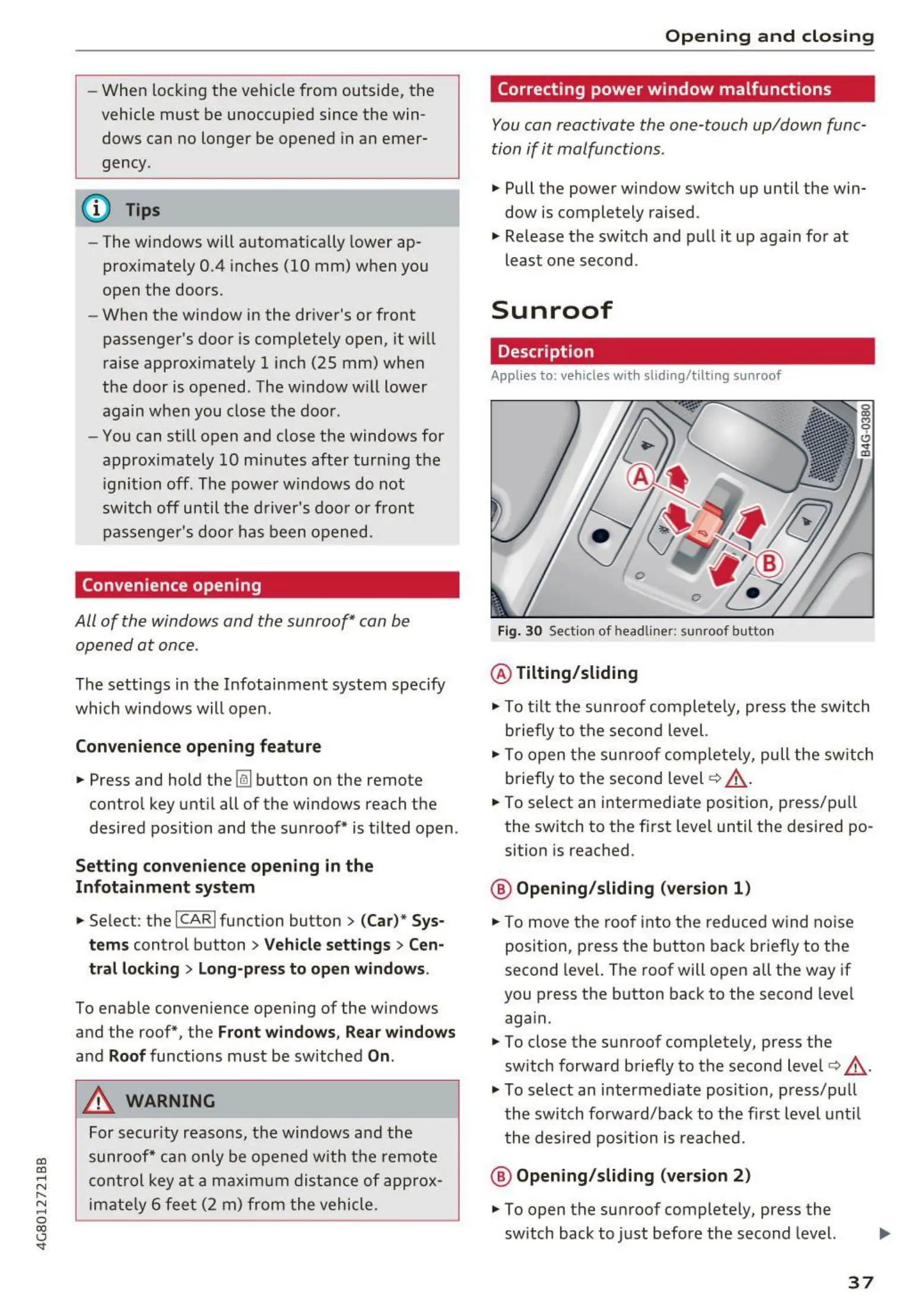
Fig. 30 Sect ion of head liner: sunroof butto n
@ Tilting/sliding
"' To tilt the su nroof com plete ly, press the switch
briefly to t he second level.
• To open t he su nroof com plete ly, pull t he sw itc h
briefly to the sec ond level
c:> _&.
• To select an intermedi ate position, p ress/p ull
the switch to the f irst level until the desired po-
sition is reached .
@ Opening/sliding (version 1)
• To move t he roof into t he reduced wind no ise
posi t ion, press t he but t on back briefly to t he
second level. The roof will open all the way if
you press the button back to the second level
aga in.
"' To close the sunroof completely, press the
switch forward briefly to the second level
c:> &.
"' To select an intermediate posi t ion, press/p ull
t he switch fo rwa rd/back to the first level unt il
t he de sired pos ition is reache d .
@ Opening/sliding (version 2)
"' To open the su nroof complete ly, press the
switch back to ju st before the second level.
37



 To Next Page