The j warning light in the instrument cluster comes on when the
tire is significantly underinflated.
In addition, the tire symbo l ) appears in the display together with
the message
Please check tire pressure => page 42, fig . 25.
Af ter a few seconds, the message disappears again :::>
page 42,
fig. 26. If you would like to show the message again, press the
!CHECK] button.
[ i ] Tips
• In the case of an intentional loss of air pressure, for example,
when re-adjusting tire pressure, this has to be stored again after-
wards => page 44.
• Current information about tire pressures and temperatures can
be scanned in MMI =>
page 43.
• Tire pressure must only be adjusted when the temperature of the
tires is about the same as ambient air temperature .
• The ye llow symbol disappears, when the tire pressure is
corrected and the new pressure is stored in the system=>
page 44.
• After changing a wheel you have to adjust the tire pressures on
all whee ls. In addition, you must then initialize the new tire pres-
sures in the tire pressure monitoring system => page 45.
• If your vehicle is equipped with a spare tire* with a wheel sensor,
the tire will be monitored and the display symbols =>
page 42, fig . 25
or=>
page 42, fig. 26 will appear if the pressure is too low. •
Controls and equip-
ment
Driver information display
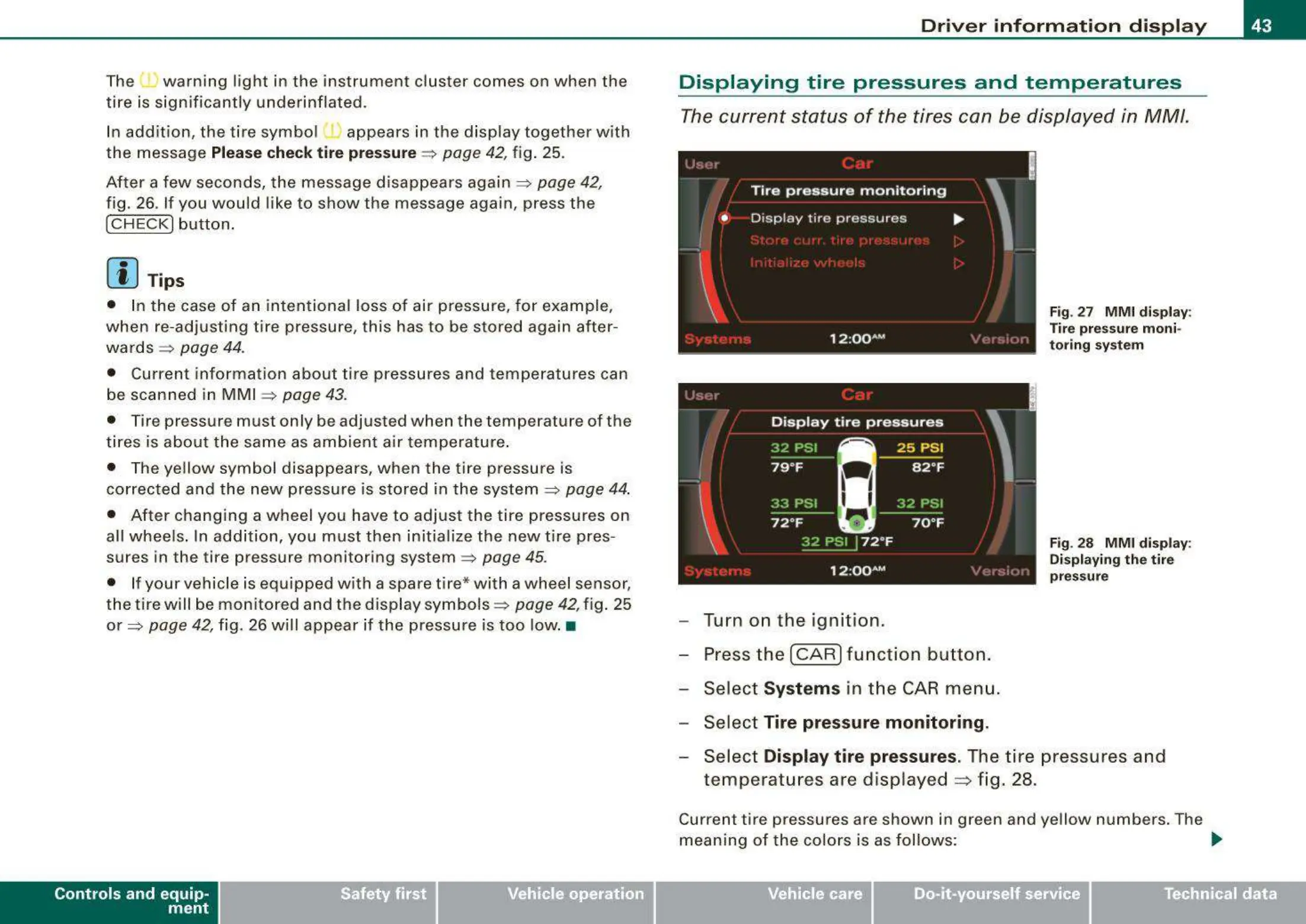
Displaying tire pressures and temperatures
The current status of the tires can be displayed in MM/.
'
!
Tire pressure monitoring
•
Disp lay tire pressures
...
I
\
Fig. 27 MMI display :
Tire pres sure moni-
toring system
12 :QQ AM
Turn on the ignition.
Press the
I CAR I function button.
Select
Systems in the CAR menu .
Select
Tire pressure monitoring .
,. •I
Fig. 28 MMI display:
Displaying the tire
pressure
Select Display tire pressures. The tire pressures and
temperatures are displayed
~
fig. 28.
Current tire pressures are shown in green and yellow numbers. The
meaning of the colors is as follows:
~
Vehicle care
I I
irechnical data



 To Next Page