@ - Folding the leg support up/down
@ - Leg support steeper/flatter
©-Leg support forward/back
@ -Adj usting the display
Operating the reclining rear seat
Applies to vehicles: with reclining rear seat
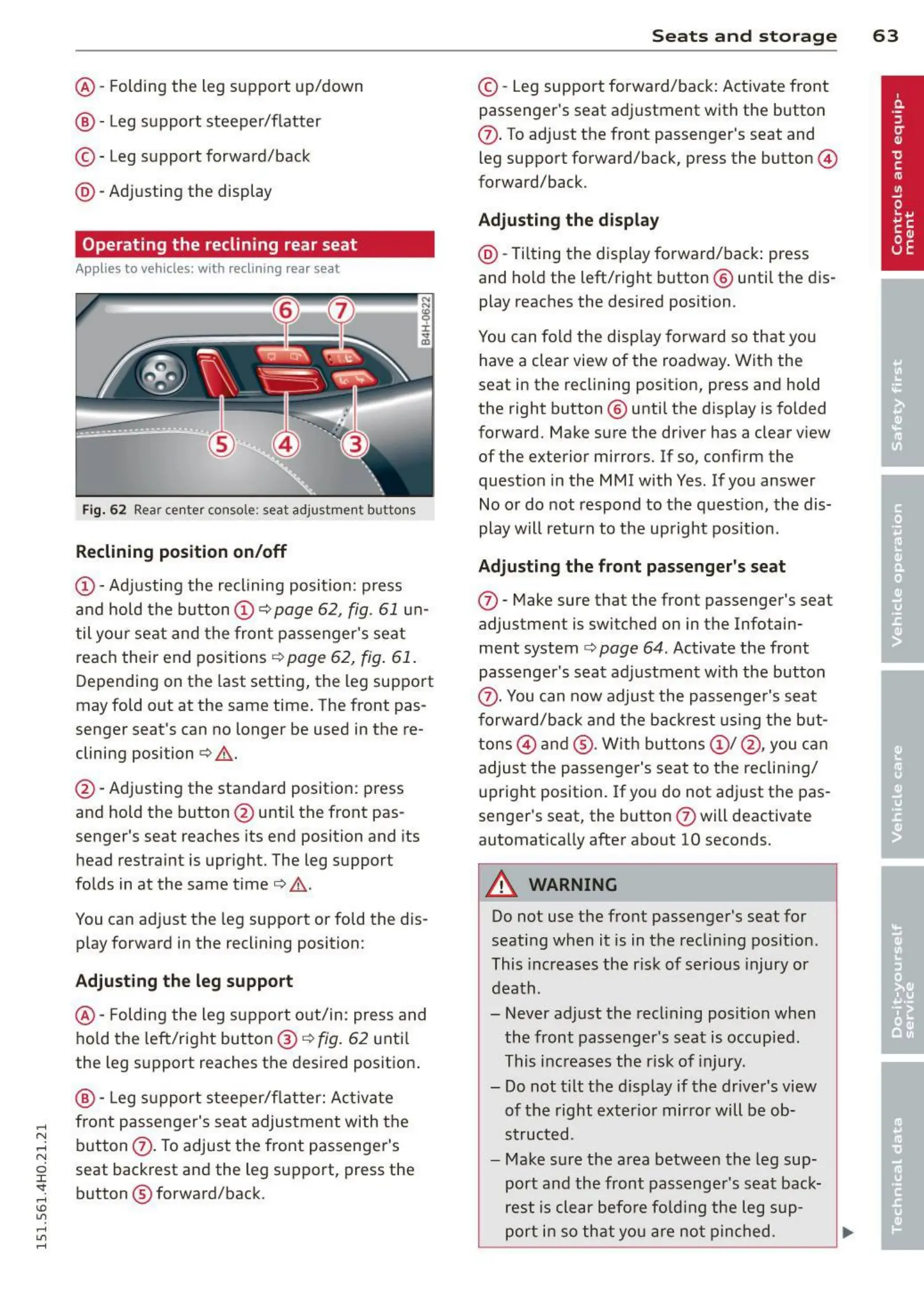
Fig. 6 2 Rear center console: seat adjustment buttons
Reclining position on/o ff
@ - Adjusting the reclining position: press
and hold the button @ c>
page 62, fig. 61 un-
til your seat and t he fron t passenger's seat
reach their end positions c>
page 62, fig. 61.
Depending on the last setting, the leg support
may fold out at the same time. The front pas-
senger seat's can no longer be used in the re-
clining position c>
& .
@ - Adjusting the standard position: press
and hold the button @ until the front pas-
senger's seat reaches its end position and its
head restraint is upright. The leg support
folds in at the same time c>
& .
You can adjust the leg support or fold the dis-
play forward in the reclining position:
Adjusti ng th e leg support
@ - Folding the leg support out/in: press and
hold the left/right button @ c>
fig. 62 unti l
the leg support reaches the desired position .
@ - Leg support steeper/flatter: Activate
front passenger's seat adjustment with the
button
(f). To adjust the front passenger's
seat backrest and the leg support, press the
button ® forward/back.
S ea t s a n d s t o rage 6 3
© -Leg support forward/back: Activate front
passenger's seat adjustment with the button
(f). To adjust the front passenger's seat and
leg support forward/back, press the button @
forward/back.
Adjusting th e display
@ -Tilting the display forward/back : press
and hold the left/right button @ until the dis-
play reaches the desired position .
You can fold the display forward so that you
have a clear view of the roadway. With the
seat in the reclining position, press and hold
the right button @ unti l the display is folded
forward. Make sure the driver has a clear view
of the exterior mirrors. If so, confirm the
quest ion in the MMI with Yes. If you answer
No or do not respond to the question, the dis-
play will return to the upright position .
Adju sting the front passenger's seat
(f) - Make sure that the front passenger's seat
adjustment is switched on in the Infotain-
ment system
c> page 64. Activate the front
passenger's seat adjustment with the button
(f). You can now adjust the passenger's seat
forward/back and the backrest using the but-
tons @) and @ . W ith buttons @ / @ , you can
adjust the passenger's seat to the reclin ing/
upright position. If you do not adjust the pas-
senger's seat, the button
(f) will deactivate
automatica lly after about 10 seconds.
_.& WARNING
Do not use the front passenger's seat for
seating when it is in the reclin ing position.
This increases the risk of serious injury or
death .
- Never adjust the reclining posit ion when
the front passenger's seat is occupied.
This increases the risk of injury.
- Do not t ilt the display if the driver's view
of the right exter ior mirror will be ob-
structed.
- Make sure the area between the leg sup-
port and the front passenger's seat back-
rest is clear befo re fo lding the leg sup-
port in so that yo u are not pinched .



 To Next Page