EasyManua.ls Logo

Audient ASP 008 - Functions and Controls Overview; Input Signal Controls; Input Selection and Padding; Input Impedance and Indicators

Audient ASP 008
12 pages
To Next Page IconTo Next Page
To Previous Page IconTo Previous Page
Loading...
9
©audient 05/2008
Operation Manual
Functions & Controls
I/P Z
0.2
5
1.2
k
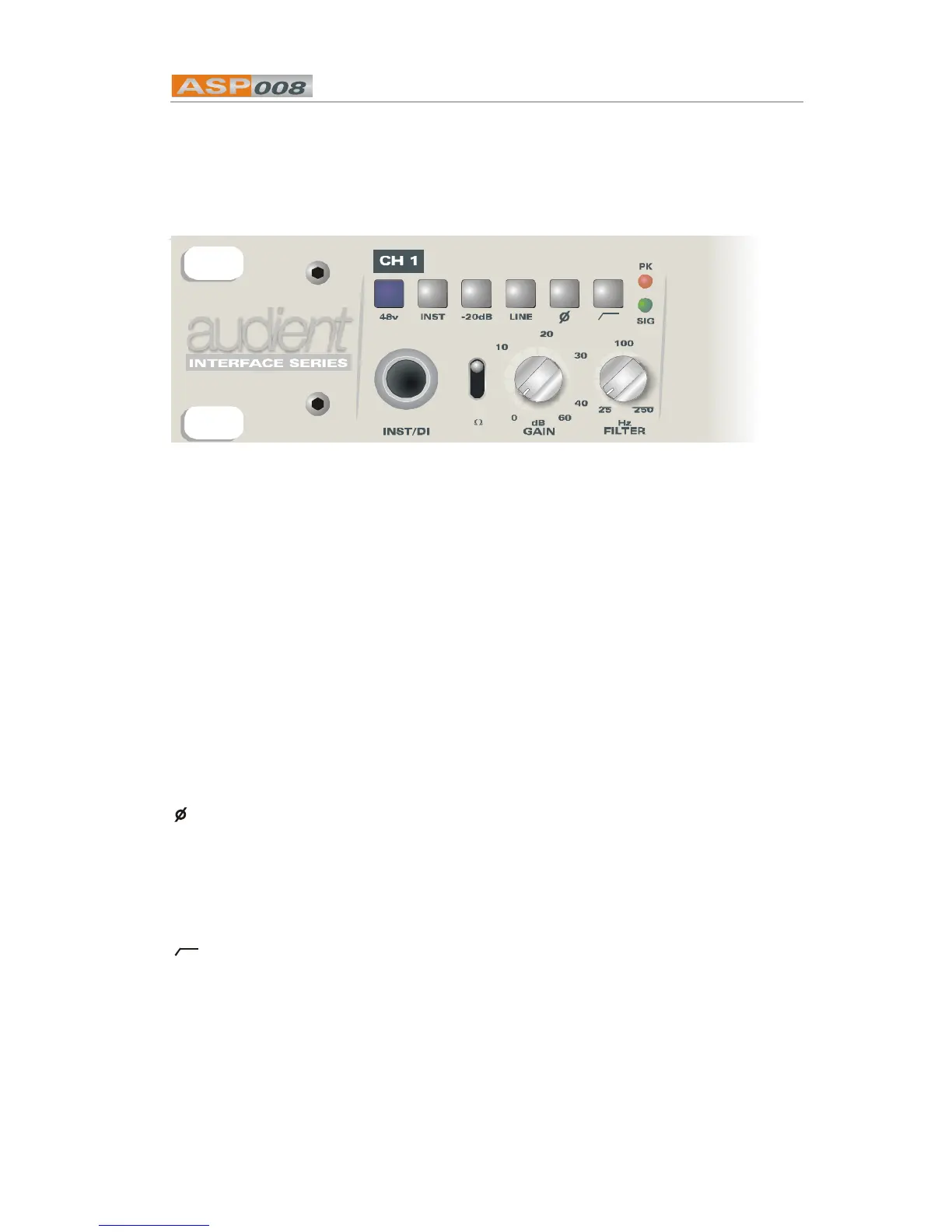
48V applies phantom
power to the
microphone input of
this channel. It is not
good practice to
switch phantom on
while monitoring a
channel, however a
proprietary ‘soft start’
feature is incorporated
to minimise the
potentially damaging
transients if phantom
is switched ‘live’.
INST (channels 1 and 2
only). This is a high
impedance 1/4” jack
input that allows the
direct connection of a
guitar without the need
for an external DI box.
-20dB (channels 1 and 2
only). Inserts a 20dB
pad on the microphone
input to enable very
high output sources to
be connected without
risk of overload.
With the PAD inserted
the available gain is
between -20dB and
40dB.
LINE connects the
electronically balanced
D-Sub input to the
channel. Gain range is
-20dB to +40dB. Note
that this input
selection overrides the
INST input.
I/PZ adjusts the
impedance of the
microphone input
Three settings are
provided 200,1200
and 5000 ohms.
GAIN 0 to 60dB of gain is
available (-20dB to
40dB with PAD or
LINE selected).
inverts the phase of the
input signal. This can
be particularly useful
when using multiple
microphone
techniques.
Switches in the 12dB
per octave high-pass
filter adjustable using
the rotary control from
25Hz to 250Hz.
SIG illuminates to show
that a signal at a level
above -25dBu is
present on this input.
PK lights when a signal
level above +16dBu is
detected.
Functions and Controls

Related product manuals