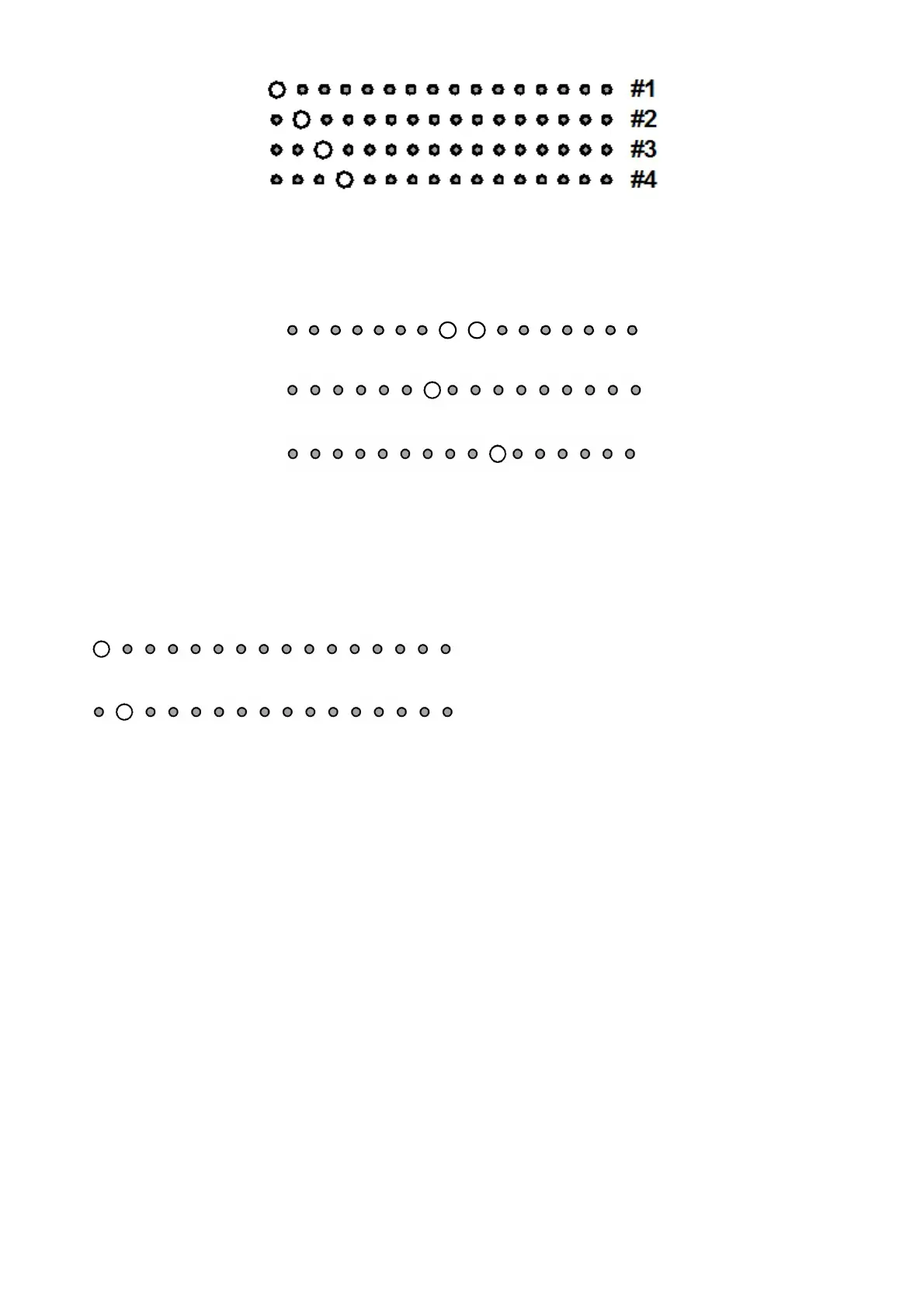
23
fig. 5
BALANCE setting (input LED nr. 3)
In this mode only the LED of input 3 will be brighter. This function permits to balance the two channels. In this
mode the input LED number 3 will be ON and the volume LEDs will show the balance currently set. To
change the balance, simply press “VOL+” or “VOL-“. Here below you can see three examples.
balanced volume
one step to the left unbalanced volume
two steps to the right unbalanced volume
DIRECT mode set-up (input LED nr. 4)
In this mode only the LED of input 4 will be brighter. Only input 3 can be used in DIRECT mode and once
activated, the volume bar will have the LEDs alternatively ON. Once entered the set-up and selected the
input LED nr. 4, DIRECT mode can be activated or deactivated moving the first two LEDs of the volume bar
using the VOL+ and VOL- keys on the remote control. It will be shown as follows:
DIRECT mode not active (default):
DIRECT mode active (working as a power amp):
IMPORTANT= When the amplifier is in DIRECT mode, the volume is at the maximum.
BE CAREFUL!




 To Next Page