English High End Series
Connecng Your Subwoofer
Please switch o all equipment in your HiFi system before you connect your subwoofer. Depending on
how you want to use your subwoofer, for example in a stereo or surround sound system, there are a
number of dierent possibilies when it comes to connecng your subwoofer to your system.
Operang Your Subwoofer in a Stereo Conguraon
You can integrate your subwoofer into your stereo music system in a variety of ways. If you have a com-
binaon consisng of a preamplier and a power amplier with a free „pre-out“ on the preamplier,
you can use this to connect your subwoofer. This also applies to integrated ampliers or receivers that
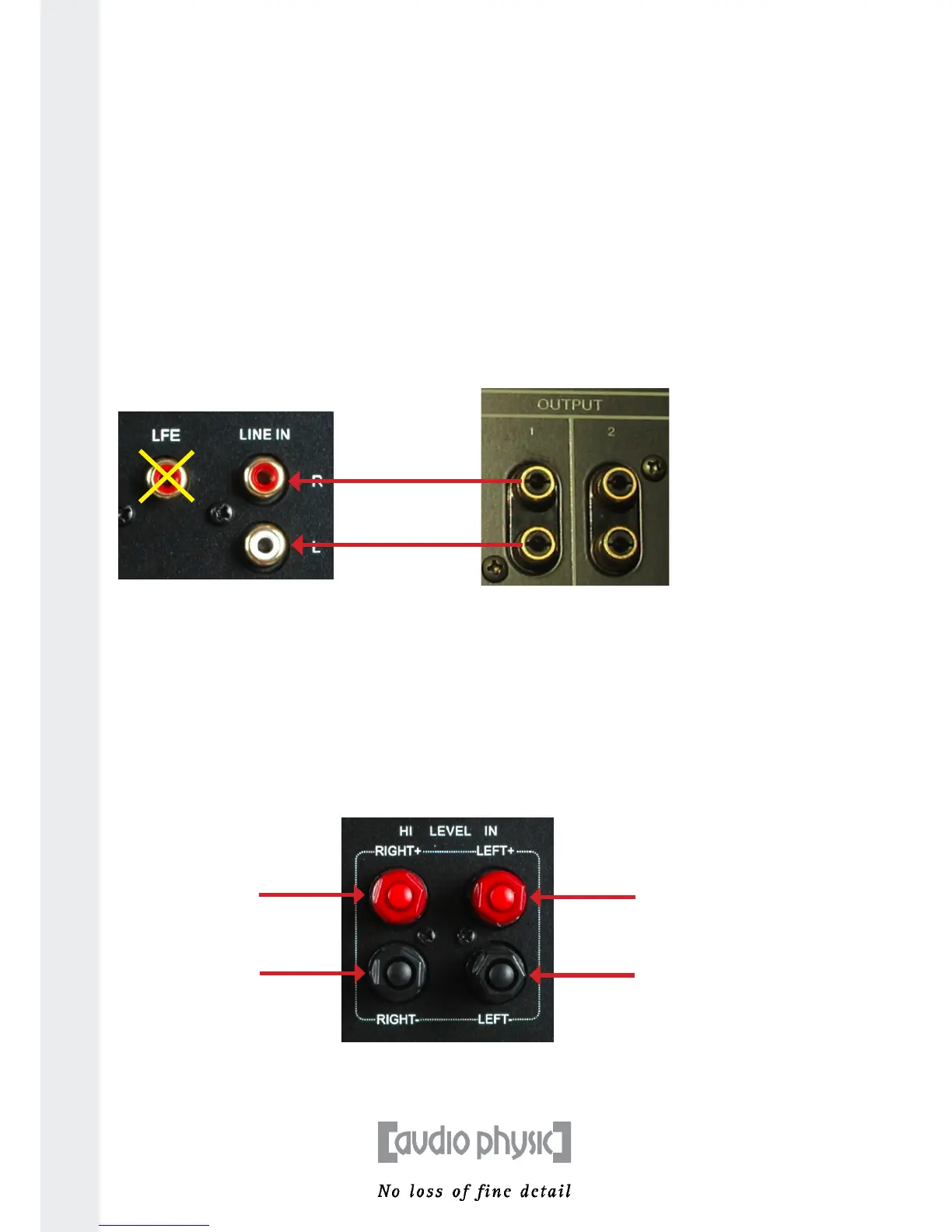
have an unused pre-out connector. Use an RCA cable of a suitable length to connect the “pre-out” jacks
to the LUNA’s “low level input”. “Record-out jacks” are not suitable for this purpose.
AUDIO PHYSIC recommends that you use the “high level input” to connect your subwoofer.
1) Connecng your subwoofer with an RCA cable:
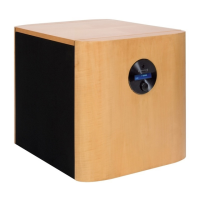
2) Connecng your subwoofer with a loudspeaker cable:
You can also control your LUNA by using a second loudspeaker output on your amplier. To do so, you
need to connect the loudspeaker outputs, normally marked as “B”, of your integrated or power amplier
with the loudspeaker terminals on your subwoofer. Depending on the setup of your system, you can also
connect your subwoofer with cables from the loudspeakers in order to save cable. Loudspeakers mostly
accept cables with spades and banana plugs, meaning that this connecon method can be used without
any problems. Connect the cable from the le loudspeaker with the le “high level input“ of your LUNA
and connect the right channel with the right input accordingly.
If you hear a clear humming noise once you have acvated your subwoofer aer connecng it using this
method, it is very likely that this is due to a dierence in the ground potenals. You can nd out how to
simply recfy this problem on the following page.
10
RCA (low frequency)
connecon: Connect
the free pre-out outputs
of your amplier to the
LUNA’s “low level input”.
Record-out outputs on
your amplier are not
suitable for this purpose!
Connect the right and
le channels with your
subwoofer.
Connecon with a
loudspeaker cable:
Use the high level
input to connect your
subwoofer to the right
and le loudspeaker
outputs of your
amplier or
loudspeakers.
right channel
le channel
LUNA connecon terminal
amplier with pre-out


 To Next Page