English High End Series
Seng Up Your Subwoofer
1. Acvang Your Subwoofer
Use the supplied power cable to connect your subwoofer to a
mains socket. Turn on the power switch on the back of your
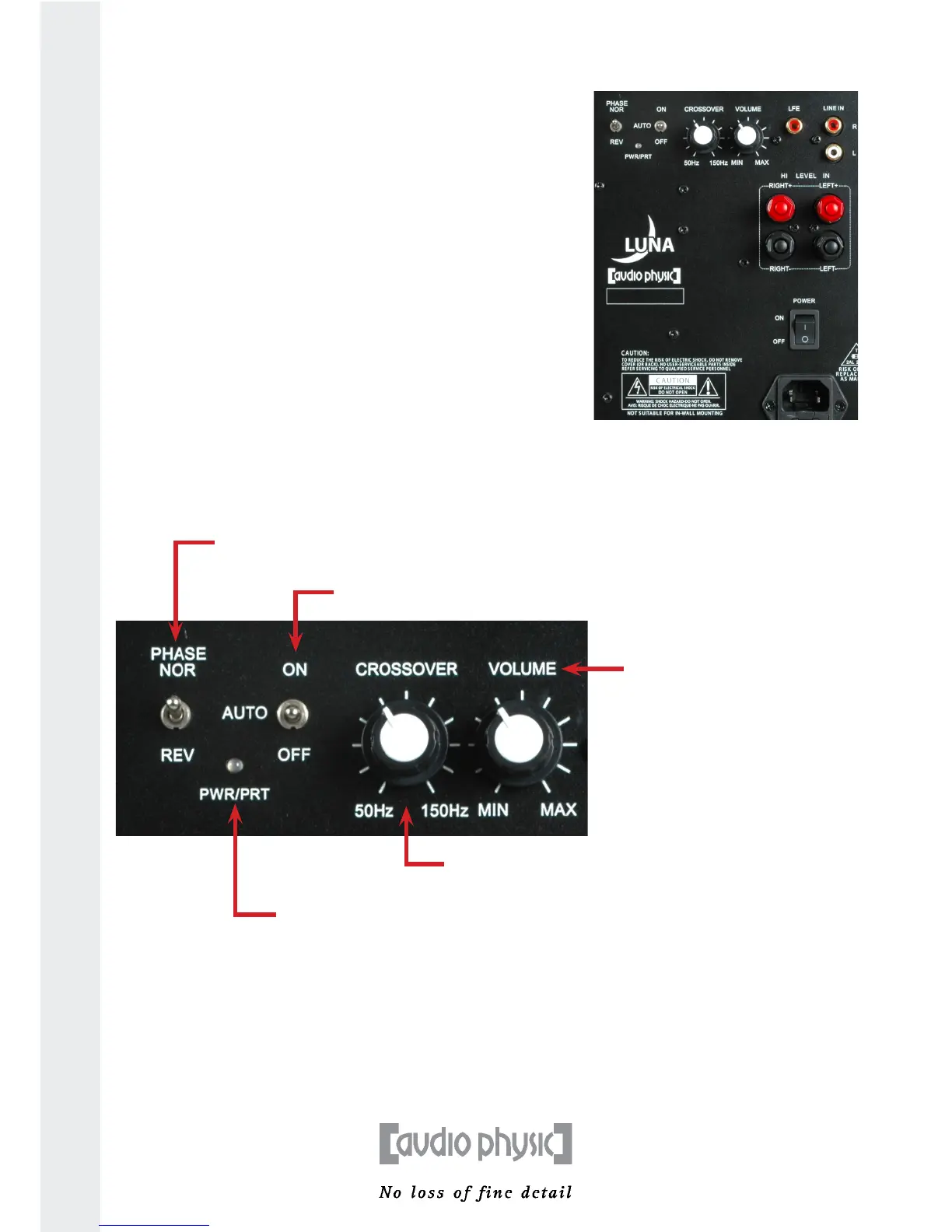
subwoofer (marked with an arrow in the image on the right).
The indicator light next to the operang switch will then light up.
Move the operang switch to the “ON” posion. You should use
music that you know well for the next setup steps. Pieces of music
involving a singing voice accompanied by only a few natural
instruments are parcularly suitable.
2. Using the Controls to Adjust Your Subwoofer
You can nd the controls that you can use to opmally integrate your subwoofer into your HiFi or
surround sound system on the connecon terminal on the back of the LUNA.
3. Operang Your Subwoofer in a Surround sound System Using LFE
If you choose to use the LFE output of your receiver or surround sound processor to control your LUNA,
please set up the crossover frequency on your receiver (using the setup menu).
12
Volume: The LUNA has its
own volume control that
can be used to adjust the
volume of the subwoofer
in the system.
Phase switch: You can use this switch to choose
between the 0° and 180° sengs in order to
adapt the LUNA to suit your front loudspeakers.
Indicator light: This light shines green when the
subwoofer is in operaon and red when it is in
standby.
Crossover frequency: You can use this control knob
to select the maximum frequency that the subwoofer
should deliver between a 50 and 150 Hertz.
Operang switch: You can use this switch to acvate the LUNA and to disconnect it from the power supply
if you do not plan to use it for a long me. When the switch is set to the middle posion marked “AUTO”,
the subwoofer will enter into standby mode aer around 20 minutes when there is no signal


 To Next Page