EasyManua.ls Logo

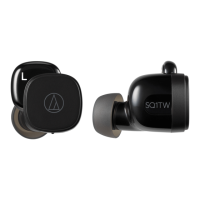
Audio Technica ATH-SQ1TW - User Manual

Audio Technica ATH-SQ1TW
36 pages
Print Icon
To Next Page IconTo Next Page
Loading...
ATH-SQ1TW
Wireless Headphones
User Manual
English

Other manuals for Audio Technica ATH-SQ1TW

Question and Answer IconNeed help?

Do you have a question about the Audio Technica ATH-SQ1TW and is the answer not in the manual?

Summary

Safety Precautions

Cautions for the Headphones

Safety warnings specific to using the headphones, covering potential hazards and precautions.

Cautions for Charging Case

Safety warnings specific to the charging case, covering potential hazards and precautions.

Cautions for Rechargeable Battery

Precautions related to the built-in rechargeable battery (lithium-ion) to prevent leakage or explosion.

FCC Notice

Details on FCC compliance, warnings, and recommendations for operating the device in the USA.

ISED Statement

Information regarding compliance with Industry Canada's license-exempt radio standards.

Notes on Use

About Water-Resistant (Drip-Proof) Performance

For a More Comfortable Bluetooth Communication Experience

Part Names and Functions

Headphones

Identification and description of the various parts and indicators on the headphones.

Charging Case

Identification and description of the parts and indicators on the charging case.

Accessories

Lists and describes the included accessories, such as charging cables and eartips.

Charging the Battery

Charging the Headphones and Charging Case

Step-by-step instructions on how to charge both the headphones and the charging case using the USB cable.

Charging Headphones Without the USB Charging Cable

Instructions on how to charge the headphones using the power stored in the charging case.

Power Supply ON;OFF

Turning on the Product

Procedure for powering on the headphones, typically by removing them from the charging case.

Turning off the Product

Procedure for powering off the headphones, typically by placing them back into the charging case.

Connecting via Bluetooth

Pairing a Bluetooth Device

Step-by-step guide on how to pair the headphones with a Bluetooth-enabled device for the first time.

Pairing with Fast Pair

Instructions for quick and easy Bluetooth pairing with Android devices using the Fast Pair feature.

About Pairing

Information about the pairing process, multipairing, and conditions requiring re-pairing.

Wearing the Product

Touch Sensors

Unlocking

Using the Product

Listening to Music

Instructions on how to play, pause, and control music playback using the headphones.

Talking on the Phone

Guide on how to answer, make, and end calls, and adjust call volume using the headphones.

R (Right) Side Headphone Touch Sensor Operations

Specific touch controls for the right headphone during calls and playback.

L (Left) Side Headphone Touch Sensor Operations

Specific touch controls for the left headphone for volume adjustment and calls.

Hear-Through Mode

How to enable and use the hear-through mode to listen to ambient sounds while wearing the headphones.

Low Latency Mode

How to activate low latency mode for improved audio synchronization during gaming or video playback.

Auto Power Off Function

Information about the automatic power-off feature to conserve battery life.

Indicator Lamp Display

Pairing

Explains the indicator lamp patterns during the Bluetooth pairing process.

Connecting

Describes indicator lamp behavior when connecting to a device and during music playback.

Battery Level

Shows how indicator lamps display the current battery status.

Voice Guidance

Cleaning

Eartips

Eartip Size

Guidance on selecting the correct eartip size for a secure fit and optimal sound quality.

Replacing the Eartips

Step-by-step instructions on how to remove and attach eartips to the headphones.

Resetting

Troubleshooting Common Issues

Power and Pairing Problems

Solutions for issues related to power supply and Bluetooth pairing.

Audio Playback Problems

Covers issues like no sound, faint sound, one-sided audio, and distortion.

Troubleshooting Connectivity and Charging

Call Audio and Charging Issues

Solutions for problems with call audio quality and charging the case/headphones.

Specifications

Headphones Specifications

Technical details about the headphones, including driver, sensitivity, and frequency response.

Microphone Specifications

Technical details about the built-in microphone, including type, pattern, and sensitivity.

Communication Specifications

Technical details related to Bluetooth connectivity, range, and codecs.

Other Specifications

Trademarks

Summary

Safety Precautions

Cautions for the Headphones

Safety warnings specific to using the headphones, covering potential hazards and precautions.

Cautions for Charging Case

Safety warnings specific to the charging case, covering potential hazards and precautions.

Cautions for Rechargeable Battery

Precautions related to the built-in rechargeable battery (lithium-ion) to prevent leakage or explosion.

FCC Notice

Details on FCC compliance, warnings, and recommendations for operating the device in the USA.

ISED Statement

Information regarding compliance with Industry Canada's license-exempt radio standards.

Notes on Use

About Water-Resistant (Drip-Proof) Performance

For a More Comfortable Bluetooth Communication Experience

Part Names and Functions

Headphones

Identification and description of the various parts and indicators on the headphones.

Charging Case

Identification and description of the parts and indicators on the charging case.

Accessories

Lists and describes the included accessories, such as charging cables and eartips.

Charging the Battery

Charging the Headphones and Charging Case

Step-by-step instructions on how to charge both the headphones and the charging case using the USB cable.

Charging Headphones Without the USB Charging Cable

Instructions on how to charge the headphones using the power stored in the charging case.

Power Supply ON;OFF

Turning on the Product

Procedure for powering on the headphones, typically by removing them from the charging case.

Turning off the Product

Procedure for powering off the headphones, typically by placing them back into the charging case.

Connecting via Bluetooth

Pairing a Bluetooth Device

Step-by-step guide on how to pair the headphones with a Bluetooth-enabled device for the first time.

Pairing with Fast Pair

Instructions for quick and easy Bluetooth pairing with Android devices using the Fast Pair feature.

About Pairing

Information about the pairing process, multipairing, and conditions requiring re-pairing.

Wearing the Product

Touch Sensors

Unlocking

Using the Product

Listening to Music

Instructions on how to play, pause, and control music playback using the headphones.

Talking on the Phone

Guide on how to answer, make, and end calls, and adjust call volume using the headphones.

R (Right) Side Headphone Touch Sensor Operations

Specific touch controls for the right headphone during calls and playback.

L (Left) Side Headphone Touch Sensor Operations

Specific touch controls for the left headphone for volume adjustment and calls.

Hear-Through Mode

How to enable and use the hear-through mode to listen to ambient sounds while wearing the headphones.

Low Latency Mode

How to activate low latency mode for improved audio synchronization during gaming or video playback.

Auto Power Off Function

Information about the automatic power-off feature to conserve battery life.

Indicator Lamp Display

Pairing

Explains the indicator lamp patterns during the Bluetooth pairing process.

Connecting

Describes indicator lamp behavior when connecting to a device and during music playback.

Battery Level

Shows how indicator lamps display the current battery status.

Voice Guidance

Cleaning

Eartips

Eartip Size

Guidance on selecting the correct eartip size for a secure fit and optimal sound quality.

Replacing the Eartips

Step-by-step instructions on how to remove and attach eartips to the headphones.

Resetting

Troubleshooting Common Issues

Power and Pairing Problems

Solutions for issues related to power supply and Bluetooth pairing.

Audio Playback Problems

Covers issues like no sound, faint sound, one-sided audio, and distortion.

Troubleshooting Connectivity and Charging

Call Audio and Charging Issues

Solutions for problems with call audio quality and charging the case/headphones.

Specifications

Headphones Specifications

Technical details about the headphones, including driver, sensitivity, and frequency response.

Microphone Specifications

Technical details about the built-in microphone, including type, pattern, and sensitivity.

Communication Specifications

Technical details related to Bluetooth connectivity, range, and codecs.

Other Specifications

Trademarks

Audio Technica ATH-SQ1TW Specifications

General IconGeneral
Color nameLicorice
Control typeTouch
Headset typeBinaural
Product typeHeadset
Product colorBlack
Wearing styleIn-ear
Control unit typeOn-ear control unit
Recommended usageCalls/Music
Protection featuresSplash proof
International Protection (IP) codeIPX4
BluetoothYes
Bluetooth version5.0
Connectivity technologyTrue Wireless Stereo (TWS)
Impedance16 Ω
Driver typeDynamic
Driver unit5.8 mm
Ear couplingIntraaural
Headphone frequency20 - 20000 Hz
Headphone sensitivity100 dB
Intraaural headphones typeEarbuds
Microphone typeBuilt-in
Microphone frequency100 - 10000 Hz
Microphone sensitivity-38 dB
Microphone direction typeOmnidirectional
Battery typeBuilt-in battery
Fast charging time15 min
Battery recharge time1.5 h
Input voltage (earpieces)3.7 V
Continuous audio playback time6.5 h
Battery recharge time (charging case)2 h
Continuous audio playback time (with charging case)19.5 h
Quantity1
Cables includedUSB Type-C to USB Type-A
Charging case typeWired
Accessories included in set4 sizes silicone eartips
Charging case connector typeUSB Type-C
Operating temperature (T-T)5 - 40 °C
Weight and Dimensions IconWeight and Dimensions
Charging case weight34.2 g
Left earpiece weight5.2 g

Videos

How to Pair Your Phone with Audio Technica ATH-SQ1TW Earbuds

Related product manuals