EasyManua.ls Logo

AudioEngine B2 Premium - User Manual

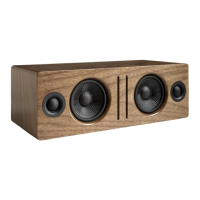
AudioEngine B2 Premium
15 pages
Print Icon
To Next Page IconTo Next Page
Loading...
~'
audioengine
Audioengine
B2
Premium Bluetooth® Speaker
Quickstart Guide
Question and Answer IconNeed help?

Do you have a question about the AudioEngine B2 Premium and is the answer not in the manual?

Summary

Whats in the box

Features

Safety Instructions

Quick Setup

Rear Panel Overview

Troubleshooting Tips

Power Indicator Not Lighting Up

Solutions for when the speaker's power light does not illuminate.

Poor Sound Quality or Audio Cutting Out

Solutions for intermittent audio or degraded sound performance.

Device Not Pairing

Steps to resolve issues when the speaker fails to pair with a device.

Cannot Connect Despite Solid Pair Light

Troubleshooting for connection problems when the pair light is solid.

Contact Support

Specifications

Warranty Information

How to Obtain Audioengine Warranty Service

Product Returns and Refunds

FCC Part 15 Notice

FCC Radiation Exposure Statement

Audioengine B2 Bluetooth Speaker

Features

Key features of the Audioengine B2 Bluetooth speaker.

Overview

The Audioengine B2 is a premium Bluetooth speaker designed to deliver high-quality wireless audio from various devices such as computers, phones, or tablets. It aims to provide an award-winning listening experience with attention to detail and operational simplicity.

Function Description:

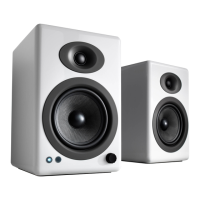
The Audioengine B2 serves as a wireless speaker that streams music from any Bluetooth-enabled device. It features a built-in power supply and includes custom aramid fiber woofers and silk dome tweeters, housed in a hand-built and hand-finished wood cabinet. The speaker is designed for easy setup and quick connection, allowing users to enjoy their music wirelessly with extended Bluetooth range and aptX® support for enhanced audio quality. It also includes an auxiliary audio input for wired connections.

Usage Features:

  • Easy Setup and Pairing: The B2 is designed for quick and straightforward setup. To begin, connect the power cable to the B2's rear panel and plug it into an AC outlet. Turn on the B2 using the power switch on the rear panel; it will automatically enter Pair mode, indicated by a flashing Pair button.
  • Bluetooth Connectivity: On your device (phone, computer, tablet), enable Bluetooth and navigate to Bluetooth preferences. Select "Audioengine B2" to pair and connect. Once connected, the Pair indicator light on the B2's rear panel will become solid.
  • Volume Control: Music playback and volume adjustments can be managed both on your connected device and using the volume control knob located on the B2's rear panel.
  • Multi-Device Pairing: The B2 can remember up to six devices. To pair and connect with additional devices, press and hold the Pair button on the B2's rear panel until the indicator light flashes, then repeat the pairing steps (Steps 3-5). While it remembers multiple devices, the B2 connects to one device at a time.
  • Auxiliary Audio Input: For devices without Bluetooth or for a wired connection, the B2 includes an auxiliary audio input on the rear panel.
  • Detachable Magnetic Grill: The speaker features a detachable magnetic grill, allowing users to customize its appearance or access the drivers if needed.

Troubleshooting Tips:

  • No Power Indicator Light: If the B2 is connected to AC power but the power indicator doesn't light up, ensure it's plugged into a functioning AC outlet and that the power switch on the rear panel is in the "on" position.
  • Device Not Pairing: If your device won't pair, verify that Bluetooth is turned on on your device and that the B2's Pair button is blinking (indicating Pair mode). Keep your device as close to the B2 as possible during pairing.
  • Pair Light Solid, Cannot Connect: If the B2's Pair light is solid but your device can't connect, ensure no other devices are currently connected. Disconnect other devices, turn off their Bluetooth, or press and hold the B2's Pair button until it flashes, then try connecting. Unpairing and re-pairing your device, or cycling the B2's power (turning it off and back on), can also resolve this.
  • No Audio Output (Device Connected): If the B2's Pair light is solid and your device is connected but there's no sound, check the volume level on your device. Try unpairing and re-pairing, or cycle the B2's power.
  • Low Volume Output: If the volume output seems low, check the volume levels on both your device, your music app, and the volume control on the B2's rear panel.
  • Poor Sound Quality/Audio Cutting Out: To address poor sound quality or audio dropouts, move your device closer to the B2 or move the B2 to a different location. Unpair and re-pair your device, or disconnect and reconnect power to the B2. Ensure your device's software and operating system are updated to the latest versions.

Maintenance Features:

  • Cleaning: It is recommended to clean the Audioengine B2 cabinets and speakers using only a soft, dry cloth. Avoid using any solvents or cleaners, as these could damage the finish or components.
  • Break-In Period: While the B2 sounds great out of the box, it is advised to allow for a break-in period of 40 to 50 hours before engaging in any critical listening. This allows the components to settle and achieve optimal sound performance over time.
  • Safety Instructions: Adhere to all safety instructions provided in the manual, including reading instructions before use, keeping them for future reference, heeding warnings, and following all instructions. Avoid using the apparatus near water or moisture, blocking ventilation openings, or installing it near heat sources. Protect the power cord from being walked on or pinched. Use only manufacturer-specified attachments or accessories. Unplug the apparatus during lightning storms or when unused for long periods to prevent damage. Refer all servicing to qualified personnel if the apparatus is damaged in any way, such as a damaged power supply cord or plug, liquid spills, objects falling into it, exposure to rain or moisture, abnormal operation, or if it has been dropped.

AudioEngine B2 Premium Specifications

General IconGeneral
Amplifier classA/B
Impedance10 Ω
Frequency range65 - 22000 Hz
RMS rated power30 W
Signal-to-Noise Ratio (SNR)95 dB
Peak Music Power Output (PMPO)60 W
Total Harmonic Distortion (THD)0.05 %
TweeterYes
Speaker type-
Number of drivers1
Speaker placementTabletop/bookshelf
Audio output channels1.0 channels
Tweeter diameter (imperial)0.75 \
Subwoofer driver diameter (imperial)2.75 \
Product colorWood
Recommended usageUniversal
Bluetooth range30 m
Connectivity technologyWired
Package depth190.5 mm
Package width406.4 mm
Package height266.7 mm
Package weight4600 g
Storage temperature (T-T)-20 - 46 °C
Operating temperature (T-T)0 - 40 °C
Operating relative humidity (H-H)5 - 95 %
Cables includedAC, Audio (3.5mm)
Weight and Dimensions IconWeight and Dimensions
Depth139.7 mm
Width311.15 mm
Height107.95 mm
Weight- g

Related product manuals