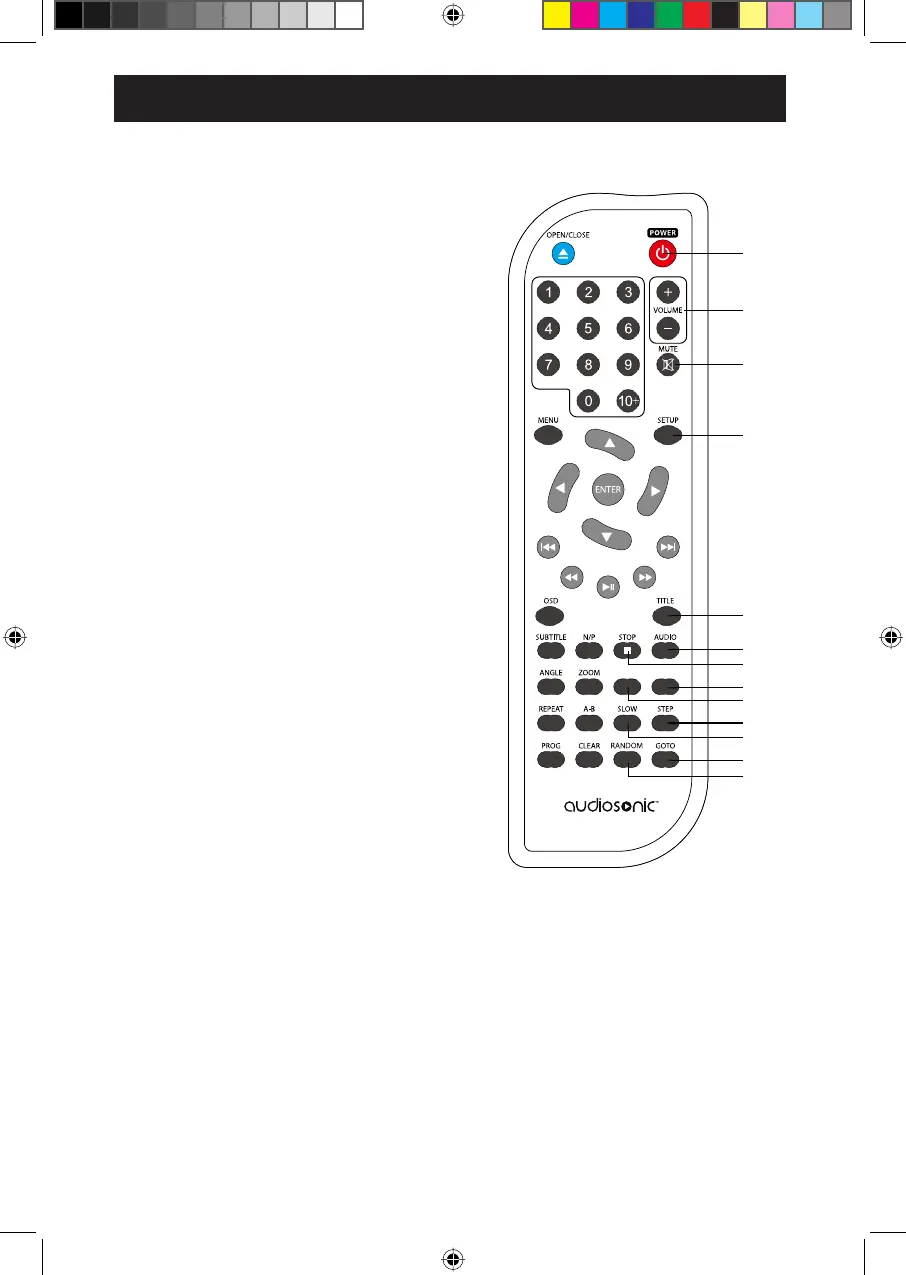
17. POWER Button
Turn the power on or restore the DVD
player to standby mode.
18. VOL +/– Buttons
To increase and decrease volume.
19. MUTE Button
To mute or restore the sound output.
20. SETUP Button
To access or exit the SETUP menu.
21. TITLE Button
Press to go to title menu.
22. AUDIO Button
To change the audio mode.
23. ( Ŷ6723%XWWRQ
7RVWRSWKHSOD\EDFN
24. PBC Button
To open the VCD main menu.
25. WIDE Button
Press to change aspect ratio.
26. STEP Button
27. SLOW Button
3UHVVUHSHDWHGO\WRHQWHUVORZSOD\EDFN
28. GOTO Button
7RVNLSGLUHFWO\WRDVSHFLILFWLPHWLWOH
FKDSWHUWUDFNLQWKHGLVF
29. RANDOM Button
Press to turn on or turn off random k.
23
22
21
20
19
18
17
24
25
26
27
28
29
WIDE
at
different speeds.
SOD\EDFN
PBC
REMOTE CONTROL
7
Press to play forward frame by frame.


 To Next Page